Claude Code MCP is the use of Anthropic’s Model Context Protocol with Claude Code, so the coding assistant can connect to approved tools, repositories, files, databases, and documentation sources.
c-ai.chat is an independent guide, not Anthropic. For the broader developer context, start with our Claude API docs guide. This page focuses on MCP in Claude Code, not the general Claude chat interface at claude.ai.
- The short answer
- How Claude Code MCP works
- What it means for developers and teams
- FAQ
- The honest take
- Sources
The short answer
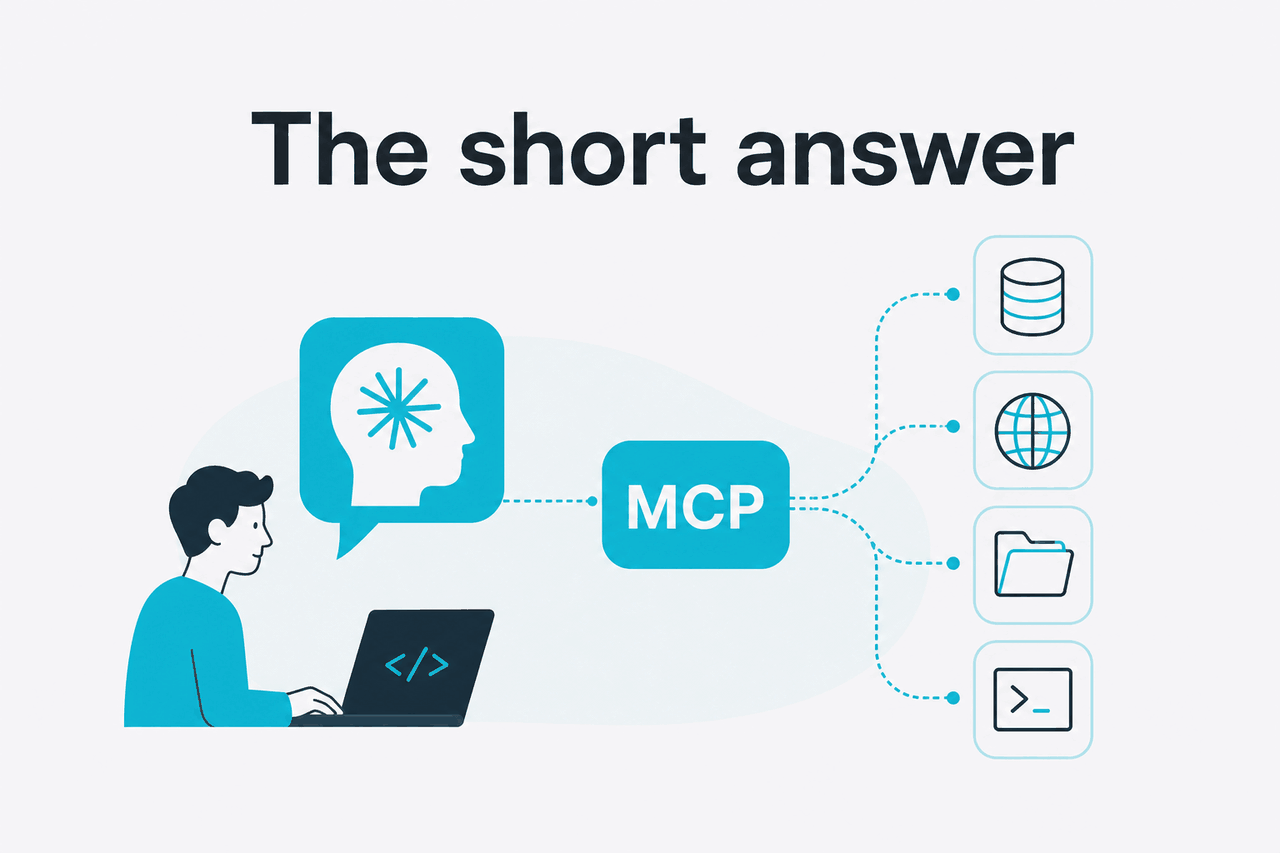
Claude Code MCP is the bridge between Claude Code and external context. Instead of pasting files, API responses, issue threads, or database notes into a prompt, you connect an MCP server and let Claude Code request approved context through a defined protocol.
- MCP stands for Model Context Protocol.
- Claude Code can use MCP servers as tool and context providers.
- You approve what gets connected and which actions run.
- Best fit: coding workflows where useful context is spread across repos, docs, tickets, and tools.
In practical terms, MCP helps Claude Code answer questions such as “which service owns this endpoint?”, “what changed in this branch?”, “what does this internal doc say?”, or “which database table matches this field?” without making you gather every source by hand.
MCP is not the model. It is a protocol and integration pattern. Claude Code still uses Claude as the model; MCP changes what external information and tools Claude Code can reach when you allow it.
How Claude Code MCP works

Anthropic describes the Model Context Protocol as a way for AI applications to connect to tools and data sources through a consistent interface. In a Claude Code workflow, Claude Code is the application. MCP servers expose capabilities such as reading files, searching documentation, querying systems, or calling approved tools.
The protocol matters because coding work depends on context. A normal prompt can include only what you paste, attach, or keep in the working directory. An MCP-enabled workflow can make reusable context available during the task, subject to the permissions and configuration you set.
Think of the setup as three parts: Claude Code, one or more MCP servers, and the resources those servers can reach. A file-system server might expose a permitted folder. A documentation server might expose an internal knowledge base. A database server might expose a read-only query path.
How Claude Code uses MCP in a coding workflow
Claude Code helps with developer tasks such as understanding a repository, editing files, running approved commands, explaining changes, and helping with tests. MCP expands that workflow when the task needs context outside the open files.
For example, a migration task may require the repository, a design note, a ticket, and a schema reference. MCP can provide a controlled route to those sources. This is different from uploading a file once. An MCP server can remain available across tasks, depending on how you configure it.
Worked example
Using MCP to explain a failing test
The gain is not automatic accuracy. The gain is that Claude Code can work with the same project material a developer would check manually.
Common MCP server types
MCP servers can be local or remote, depending on the implementation and Claude Code support. Local servers are common for file-system and development-machine workflows. Remote servers help when the tool or data source lives behind a hosted service. Check Anthropic’s Claude Code documentation before changing a production environment.
| MCP server type | What it can help with | Main caution |
|---|---|---|
| File-system server | Let Claude Code inspect permitted folders, project files, notes, or generated artifacts. | Do not expose home directories, secrets, private keys, or unrelated client work. |
| Repository or issue server | Connect code questions to branches, pull requests, tickets, and review context. | Check whether write actions are enabled and who can trigger them. |
| Documentation server | Give Claude Code access to API references, architecture notes, style guides, or runbooks. | Outdated docs can mislead the model. Ask for citations, file paths, or source names. |
| Database or analytics server | Support schema lookup, read-only diagnostics, or query generation. | Prefer read-only access, scoped credentials, and non-production data where possible. |
| Custom internal server | Expose company-specific tools through a standard interface. | Requires engineering ownership, logging, review, and maintenance. |
A safe setup pattern
The safest way to start is to connect one low-risk source, test the workflow, and inspect what Claude Code can see. Do not begin with broad access to every repository, document, or production system.
Choose one narrow task
Pick a repeatable use case, such as reading project docs while editing a local repository.
Select the smallest useful server
Use an MCP server that exposes only the folder, documentation source, or tool needed for that task.
Set permissions before testing
Prefer read-only access first. Avoid credentials that can write to production systems.
Test with non-sensitive data
Ask Claude Code what context it can access and verify that the answer matches your configuration.
Review logs and outputs
Check what the server returned, what actions were requested, and whether the setup should be narrowed.
If you are comparing this to the normal Claude web product, the distinction is scope. The web interface is useful for general analysis, writing, and file-based work. Claude Code with MCP is closer to an agentic development environment. For a broader map of product capabilities, see our guide to Claude features.
What it means for developers and teams
For developers, Claude Code MCP can reduce the “paste this file, now paste that error, now paste the schema” loop. It is most useful in mature codebases where the answer often lives across several systems, not in one source file.
For teams, MCP raises governance questions. A personal setup may be fine for a local folder and a small side project. A company setup needs access control, auditability, approved servers, credential handling, and a clear policy for sensitive data.
Use Claude Code MCP when context is reusable and scoped
MCP is a good fit when Claude Code needs the same approved source again and again, such as internal docs, API references, schema notes, or repository metadata. It is a poor fit when you only need one short file, one prompt, or a task that should not touch sensitive systems.
Pick when
- Your coding tasks depend on docs, tickets, schemas, or tools outside the repository.
- You can scope access tightly and review what the server exposes.
- You want repeatable context instead of manual copy-paste for every task.
- Your team can maintain approved MCP servers and permissions.
Skip when
- You cannot separate sensitive data from the context source.
- The task only needs one file or a short prompt.
- You do not know what an MCP server can read or execute.
- Your organisation has not approved external AI tooling for the relevant codebase.
Where MCP helps most
MCP is strongest when the context changes often or sits behind tools a model cannot infer from training data. A public language feature usually does not need MCP. A private service boundary, an internal API convention, a company migration plan, or a custom deployment rule often does.
It can also help during onboarding. A new engineer can ask Claude Code to explain part of a repository while it checks approved internal docs through MCP. The engineer still has to verify the answer. The value is faster orientation, not removal of review.
Where MCP can go wrong
The obvious risk is over-permissioning. If a server can read broad folders or call powerful tools, Claude Code may receive more context than intended. The less obvious risk is stale or conflicting context. If an MCP server returns an old runbook, Claude Code may produce a confident but wrong recommendation.
MCP is not a substitute for secure engineering practice. Keep secrets out of exposed paths. Use environment isolation. Review commands. Keep write-capable tools behind explicit approval. Check Anthropic’s trust resources and your own internal policy before connecting confidential systems.
FAQ
These are the related questions people usually have after searching for Claude Code MCP.
Is MCP only for Claude Code?
No. MCP is a protocol, not a Claude Code-only feature. Other tools can implement MCP clients or servers. Claude Code is a common place to encounter MCP because coding tasks often need external context.
Does Claude Code MCP let Claude access my whole computer?
Not unless you configure access that broadly, which you should avoid. An MCP server exposes the resources it is configured to expose. Start with a narrow folder, read-only access, and test data before connecting anything sensitive.
Do I need MCP to use Claude Code?
No. Claude Code can help with many repository tasks without MCP. You need MCP when the task depends on external context or tools that are not already available in the working directory or prompt.
Is MCP the same as a plugin?
Not exactly. A plugin is usually a product-specific extension. MCP is a protocol for connecting AI applications to external capabilities through servers. A well-designed MCP server can be reused across compatible clients instead of being tied to one interface.
Can MCP run commands or change files?
It depends on the server and the permissions you grant. Some servers are read-only. Others may expose actions that write files, open pull requests, query services, or trigger tools. Treat write-capable servers as higher risk and require explicit human review.
How is Claude Code MCP different from Projects or file uploads?
Projects and uploads are useful when you want to provide a bounded set of files or instructions. MCP is better when context should be fetched from a live or reusable source during the workflow. If your question is mainly about general Claude usage, our Claude FAQ is a better starting point.
What should teams document before allowing MCP?
Teams should document approved servers, allowed data types, credential rules, logging expectations, and who owns each integration. They should also define which repositories or systems are off-limits. A small internal registry of approved MCP servers is safer than letting every developer connect arbitrary tools.
The honest take
Claude Code MCP is useful when your coding work depends on context that lives outside the files currently in front of you. It is not required for every Claude Code user, and it is not a shortcut around security review. The best setups are narrow and well documented: one server, one purpose, limited access, clear approval.
If you are an individual developer, start with a low-risk local workflow and learn how Claude Code requests context. If you are a team, decide who can add MCP servers, what data they can expose, and how those decisions get reviewed. For model context, see our Claude models guide. For cost planning, see Claude pricing.
Independent guide. Not affiliated with Anthropic. For the official Claude product, visit claude.ai.
Last updated: 2026-05-12