Free
$0/month
For users starting with Claude.
- No card required for basic access
- Usage limits apply
- Good place to test the account flow

For Claude AI login, use the official Claude app at claude.ai or the official login route at claude.com/login; this independent c-ai.chat guide explains sign-in, signup, workspace access, troubleshooting, and security without asking for your credentials.

The safe route is simple: open an official Claude address, choose the same identity method you used at signup, complete verification, and check the final domain before entering sensitive information.
Type claude.ai in your browser, or use Anthropic’s login route at claude.com/login. If you started from search, inspect the final domain before entering credentials.
Choose the method attached to the account: email, Google, Microsoft, or your work identity provider. Switching methods often causes “account not found” errors.
Enter the email code, password step, social-login prompt, or identity-provider challenge shown by the official page. Do not share one-time codes with anyone.
After the redirect, the address bar should show the official Claude app at claude.ai.
If the sign-in screen asks you to create an account, you may be using a different email or provider than the one attached to your Claude account. Try the original method before creating a second account.
After sign-in, available tools depend on plan, workspace settings, and region. Our Claude features guide separates product features from access issues.
| Sign-in method | Use it when | Common mistake |
|---|---|---|
| You created Claude with an email address and the email flow shown by Claude. | Using Google or Microsoft with the same email and expecting it to match automatically. | |
| You originally selected “Continue with Google.” | Typing the Gmail address into the email field instead of using Google sign-in. | |
| Microsoft | You use a Microsoft personal or work identity for Claude. | Being blocked by employer security policy and assuming Claude itself is down. |
| SSO | Your organization manages Claude access through a workspace. | Trying to reset a personal password when access is controlled by the company identity provider. |
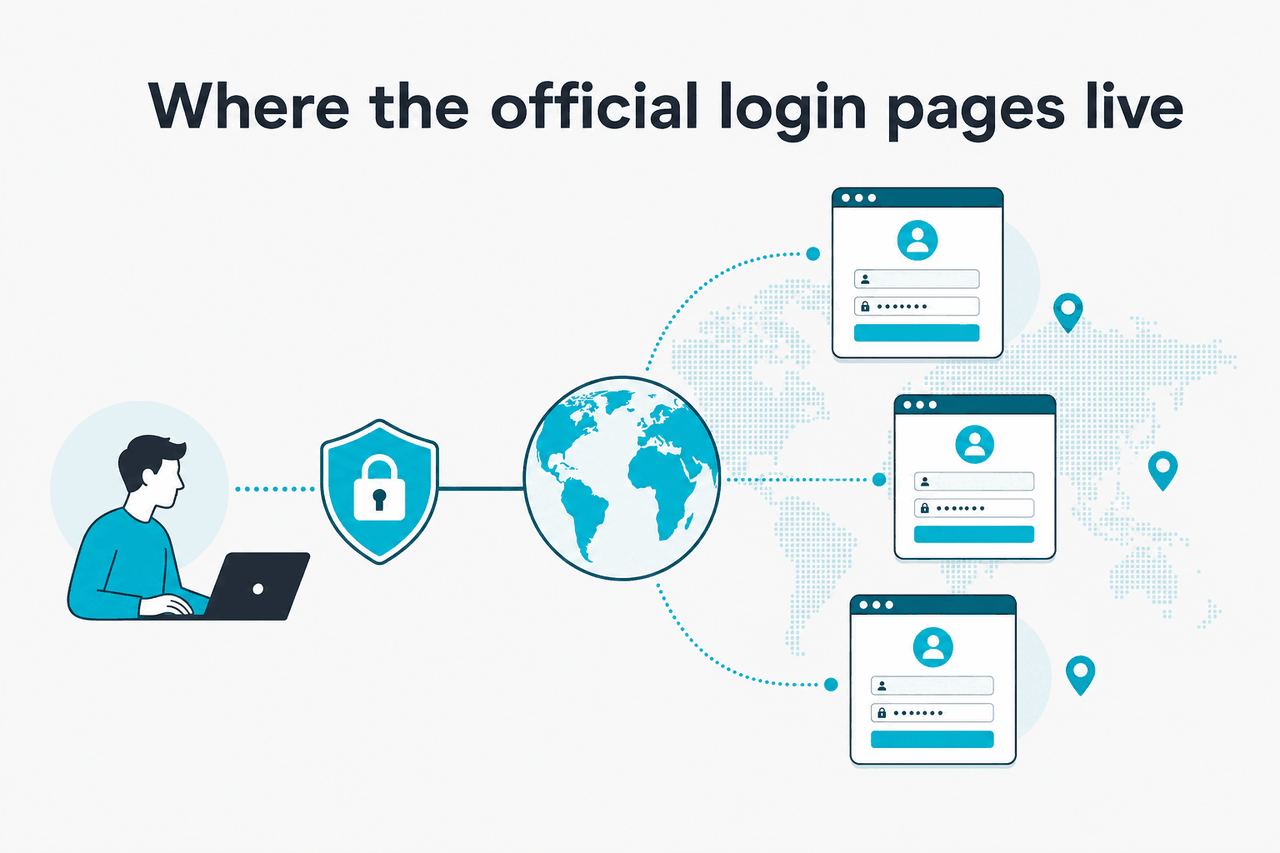
Claude and Anthropic use several official destinations. Match the page to your task before entering an email address, password, or one-time code.
| Task | Official destination | What to expect |
|---|---|---|
| Chat with Claude | claude.ai | The consumer Claude app and normal account sign-in. |
| View plans | claude.com/pricing | Official plan and subscription information. |
| Use developer docs | platform.claude.com | Model, API, and platform documentation. |
| Check service health | status.claude.com | Official incident and uptime information. |
| Get account help | support.claude.com | Anthropic support articles and help routes. |
Anthropic makes Claude. c-ai.chat does not process Claude passwords, recover Claude accounts, or verify billing. If a page claims to be c-ai.chat and asks for Claude credentials, treat it as suspicious.
Account creation starts from the official Claude screens. Choose signup, enter an email or social login, complete verification, and accept the terms shown by Anthropic.
$0/month
Free Claude access requires no card for basic signup
Use claude.ai for the app, or claude.com/login for the login route. Avoid copied links from unknown messages.
Use a personal email for personal use. Use a work identity if your organization manages Claude. Do not mix a personal account with a company workspace unless your admin asks you to.
Complete the code, social-login prompt, or identity check shown by the official flow. If the message does not arrive, request a fresh code from the same page.
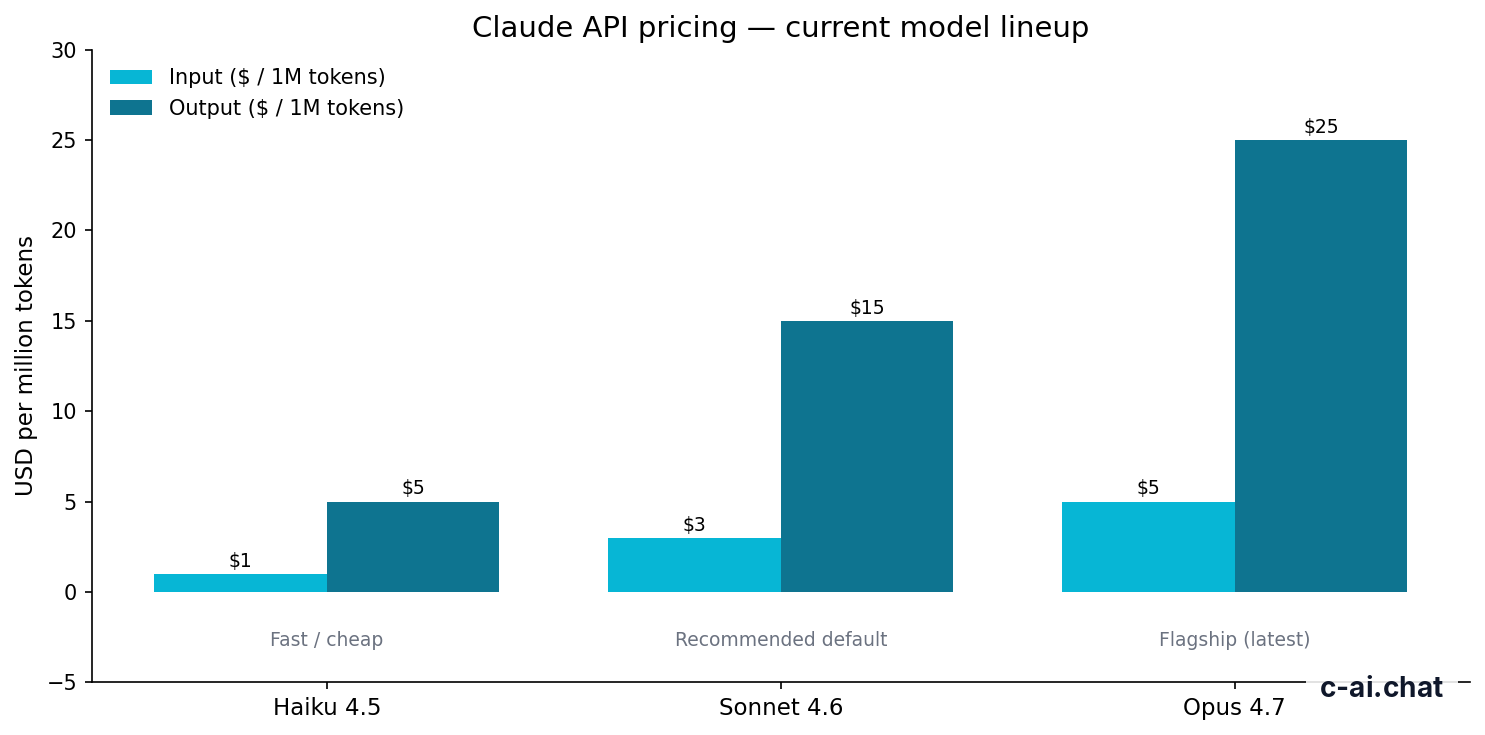
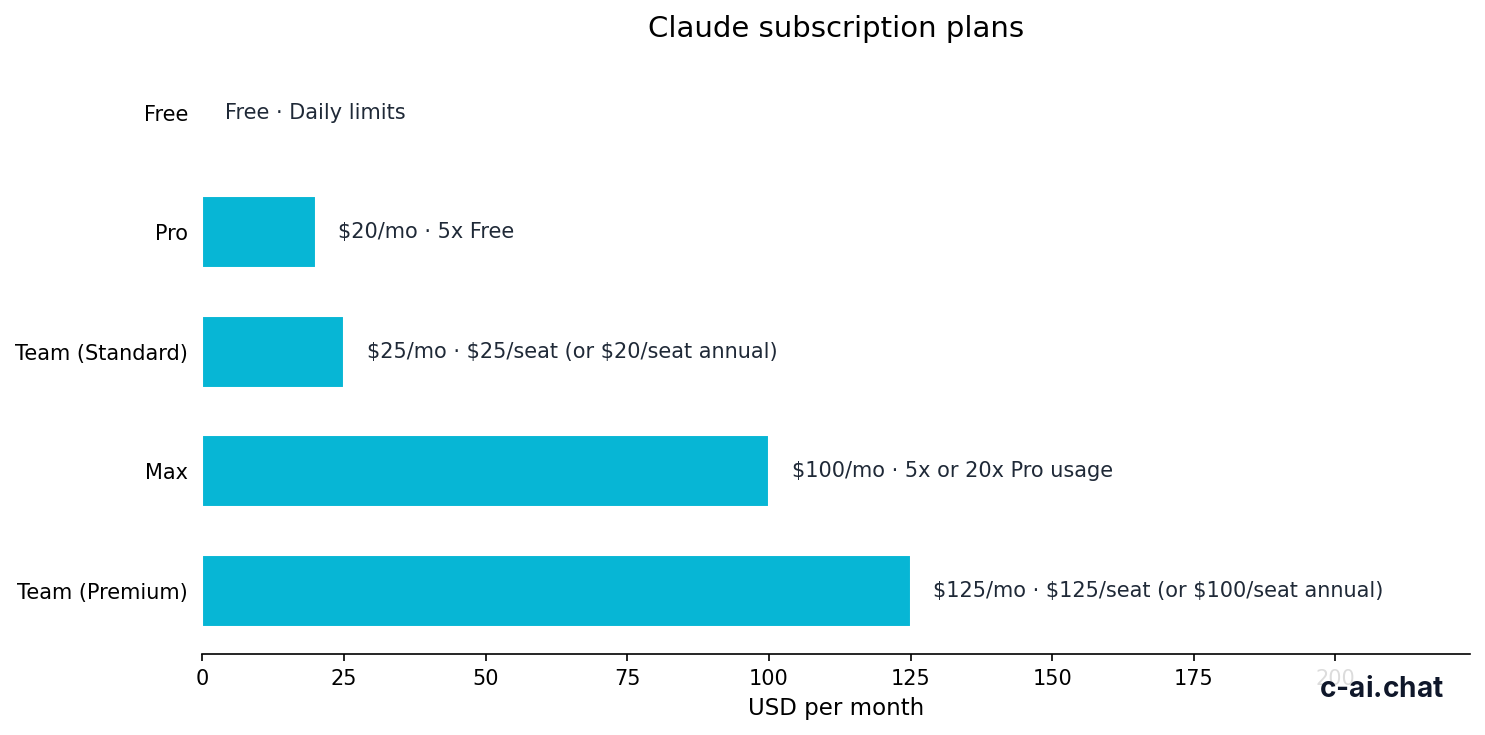
Free is $0/month and requires no card for basic access. Paid plans require billing details and should be managed only through Claude’s official checkout and account pages.
$0/month
For users starting with Claude.
$20/month
For individuals who use Claude regularly.
From $100/month
For heavy individual use.
Plan details and availability can change, so use Claude’s official pricing page for checkout and our Claude AI pricing guide for independent explanation.
If Claude says the service is not available for your account or location, follow the official message. A VPN, proxy, or mismatched billing region can make verification harder and may trigger extra checks.

If your organization manages Claude, sign-in may route through its identity provider after you enter your work email. The options you see depend on workspace configuration and plan rules.
$25/seat/month
For teams that need seat-based Claude access.
$125/seat/month
For organizations choosing the higher Team tier.
$20/seat base + API rates
For organizations whose access is handled through enterprise terms.
With SSO, a failed login can be a correct security decision rather than a Claude outage. Common causes include no assigned seat, removal from an identity-provider group, an unverified domain, device-compliance rules, or a policy that blocks personal accounts. Ask your workspace admin before creating a separate account with the same work email.
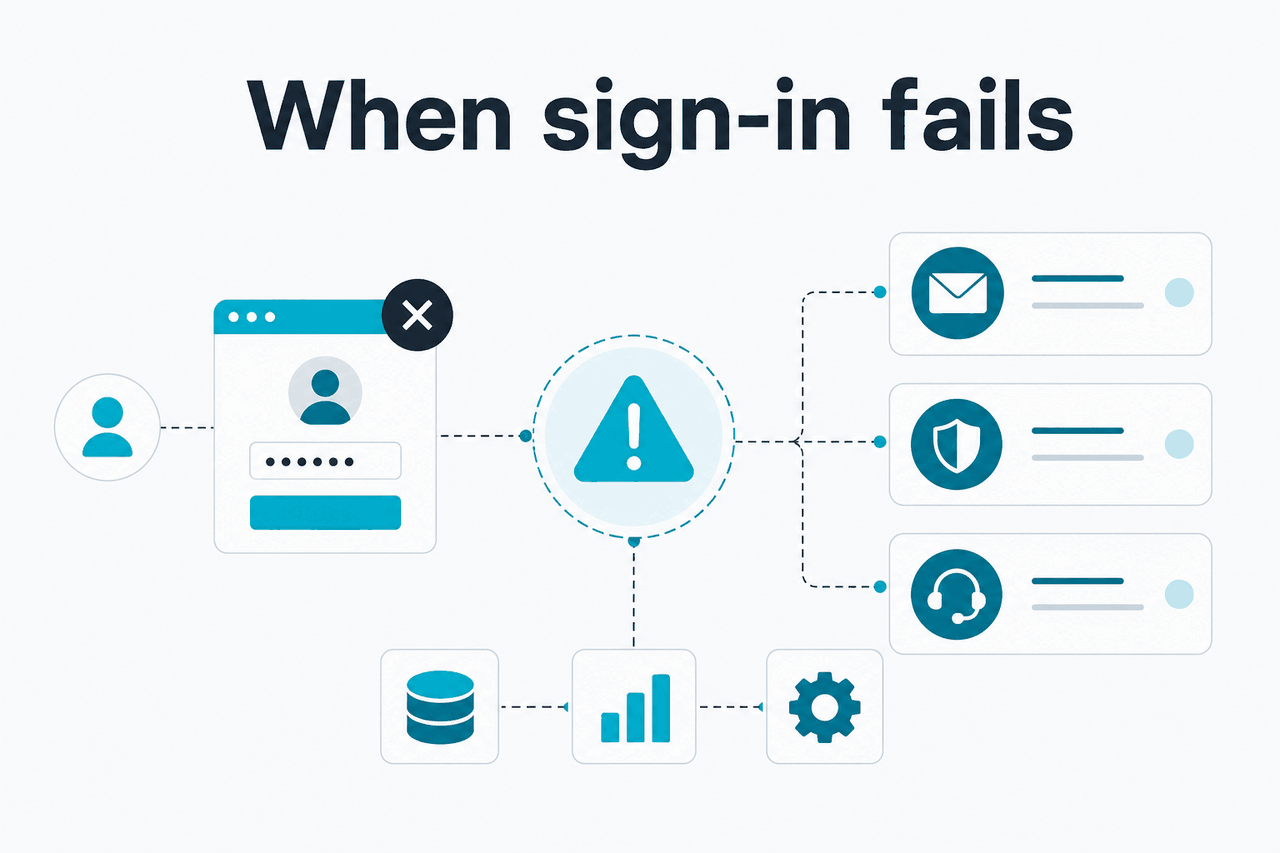
Most Claude sign-in failures come from a small set of causes: wrong domain, wrong identity method, blocked browser storage, workspace policy, service incidents, or confusing a usage limit with an account problem.
Worked example
You created Claude with Google, then typed the same email manually
The email address can look identical while the login method is different.
Use claude.ai or claude.com/login. If the domain is wrong, stop before entering a code or password.
If you normally use Google, Microsoft, or SSO, choose that button instead of typing the email address into another field.
Use a private window or a separate browser profile with extensions disabled. This isolates cookie, cache, and script-blocking problems.
If the issue remains, contact your workspace admin or Anthropic support with the email used, sign-in method, browser, and a non-sensitive screenshot. Never send passwords or one-time codes.
If Claude loads but refuses a specific action, separate the problem from login. A message cap, missing paid feature, unavailable model, file limit, or admin policy can all look like an access failure even when the account is working.
Claude accounts often sit next to work documents, code, and private research. Treat login access as sensitive.
For teams, login security is also an admin process. Keep membership synced, remove unused seats, review audit logs where available, and document who can approve integrations. For individuals, the biggest gains are simple: use the official domain, protect the email account behind Claude, and remove access from devices you do not control.
Claude login is straightforward when you use the official app and the same identity method every time. Most problems come from lookalike domains, mixed sign-in methods, browser state, workspace SSO, plan limits, or service incidents. If a page asks for payment before Free signup or the domain looks wrong, stop and start again from claude.ai.
The main official login page is claude.ai. Anthropic also uses claude.com/login as an official login route. Always check the address bar before entering credentials.
No. c-ai.chat is an independent guide to Claude AI. We are not Anthropic, we do not operate claude.ai, and we cannot access, recover, or verify Claude accounts.
No card is required for Free access at $0/month. Paid upgrades require billing details and should be handled only through official Claude account and checkout pages.
Yes, if that is the method attached to your account. If you originally used Google or Microsoft, keep using that button instead of typing the same email address into a different login field.
claude.ai is the Claude chat app. platform.claude.com is for developer platform work such as API usage and documentation. Some users need both, but they are different destinations.
The most common reason is a sign-in method mismatch. For example, an account created with Google may not behave like an email account even if the visible email address is the same.
Use the reset or recovery flow shown on the official Claude login page. If you use Google, Microsoft, or SSO, password recovery usually happens through that provider or your workplace identity system.
Check status.claude.com. If the status page shows no incident and the issue affects only your account, contact Anthropic support.
Independent guide. Not affiliated with Anthropic. For the official Claude product, visit claude.ai.

Claude phone verification is a mandatory, one-time step for new accounts: when you sign up, Anthropic asks for a phone number and a code to confirm you are a real person before you can start using Claude. There is no…

Claude email verification problems usually come down to using the wrong sign-in page, a delayed or filtered verification email, or a security block on the account; this independent guide explains the fastest fixes, where the official login pages live, and…

A Claude verification code is usually the one-time code sent during sign-in or account security checks on Claude’s official login pages; if you are trying to access Claude, start at our independent Claude guide, then use the official claude.ai sign-in…
If you want to delete your Claude account, sign in at claude.ai, open your account settings, and use the account deletion option; if you cannot access your account, use the official support path instead. This guide is from c-ai.chat, an…
Claude account settings are managed inside the official Claude interface after you sign in at claude.ai; this guide from c-ai.chat explains where to log in, which pages are official, what to check when access fails, and how to secure your…

If you searched for a “Claude 2FA setup,” here is the honest starting point: Anthropic does not publicly document a consumer two-factor authentication toggle, authenticator-app pairing, or recovery-code flow inside Claude. This independent guide from c-ai.chat — which is not…

Claude platforms means the official ways to use Claude across web, desktop, and mobile: the browser app at claude.ai, desktop apps, and mobile apps for iPhone and Android. This is an independent guide from c-ai.chat, not Anthropic, and below we…
The claude android app is the official Claude mobile app for Android from Anthropic, and the safest way to get started is to install it from Google Play, then sign in with the same account you use on claude.ai; if…
Before you try to “reset your Claude password,” check one thing: many Claude accounts do not have a password to reset. If you signed up with an email magic-link, Google, Apple, or your organisation’s single sign-on, you authenticate through that…
The Claude iOS app is Anthropic’s official iPhone app for using Claude on mobile, and this independent guide from c-ai.chat shows where to get it, how sign-in works, what to do when login fails, and which official Claude URLs are…

Claude has an official desktop app for Windows, available for x64 and ARM64 devices from Anthropic’s official download page. This guide explains how to download it safely, sign in, keep it updated, and troubleshoot installation issues — and how the…

If you searched for claude sign in, the official path is simple: go to claude.ai, choose Sign in or Sign up, and use your email, Google, Apple, or organisation login; this guide from c-ai.chat explains the right URLs, common login…

Claude for Mac is the official Claude desktop app for macOS, and the safest way to get it is from claude.ai; this independent guide from c-ai.chat shows how to install it, sign in, fix common Mac-specific issues, and decide whether…

Yes — there is an official Claude desktop app for Linux, currently in beta. Anthropic distributes it for Ubuntu and Debian (both x64 and arm64), installable via an apt repository or a .deb package. This independent guide from c-ai.chat covers…

The claude ai official website for the consumer app is claude.ai; this page explains how to spot the real login, where Anthropic’s official sign-in pages live, and what to do if access fails, while c-ai.chat remains an independent guide and…

The safest Claude Chrome extension answer is to use claude.ai directly in Chrome and treat any extension as unofficial unless Anthropic links to it from an official property; c-ai.chat is an independent Claude AI guide, not Anthropic. Official web app:…

For a Claude AI download, use claude.ai or an official app store; c-ai.chat is an independent Claude AI guide, not Anthropic, and this page explains the safe sign-in routes, login fixes, and account security checks. The fastest way to sign…

The Claude desktop app lets you use Claude on your computer with the same account you use at claude.ai; start from official Claude or Anthropic domains, then use this independent Claude AI guide to avoid fake downloads, login traps, and…