Anthropic Claude pricing spans a free plan, paid Claude subscriptions from $20/month for individuals, team plans from $25 per seat/month, enterprise contracts, and API pricing from $1 to $25 per million tokens depending on the model; this independent guide from c-ai.chat explains what each option includes, who should pay, and when a cheaper or higher tier makes more sense.

If you want the broader pricing hub first, see our Claude pricing guide. If you are choosing between chat subscriptions and developer billing, this page separates the web app plans from Claude API pricing so you can match the cost to your actual use.
- The bottom line
- What’s actually included
- Is it worth it for you?
- Cheaper / better alternatives
- The honest take
- FAQ
The bottom line
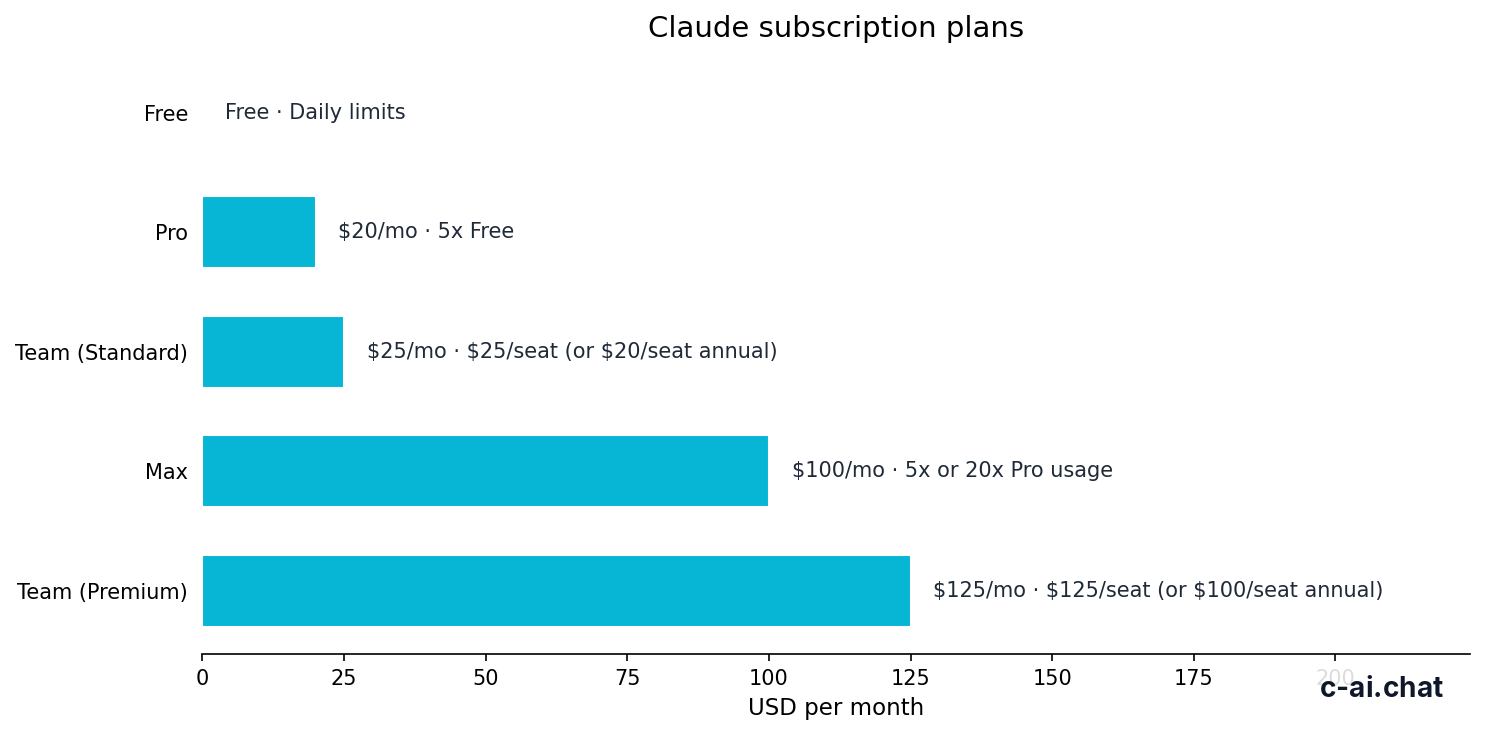
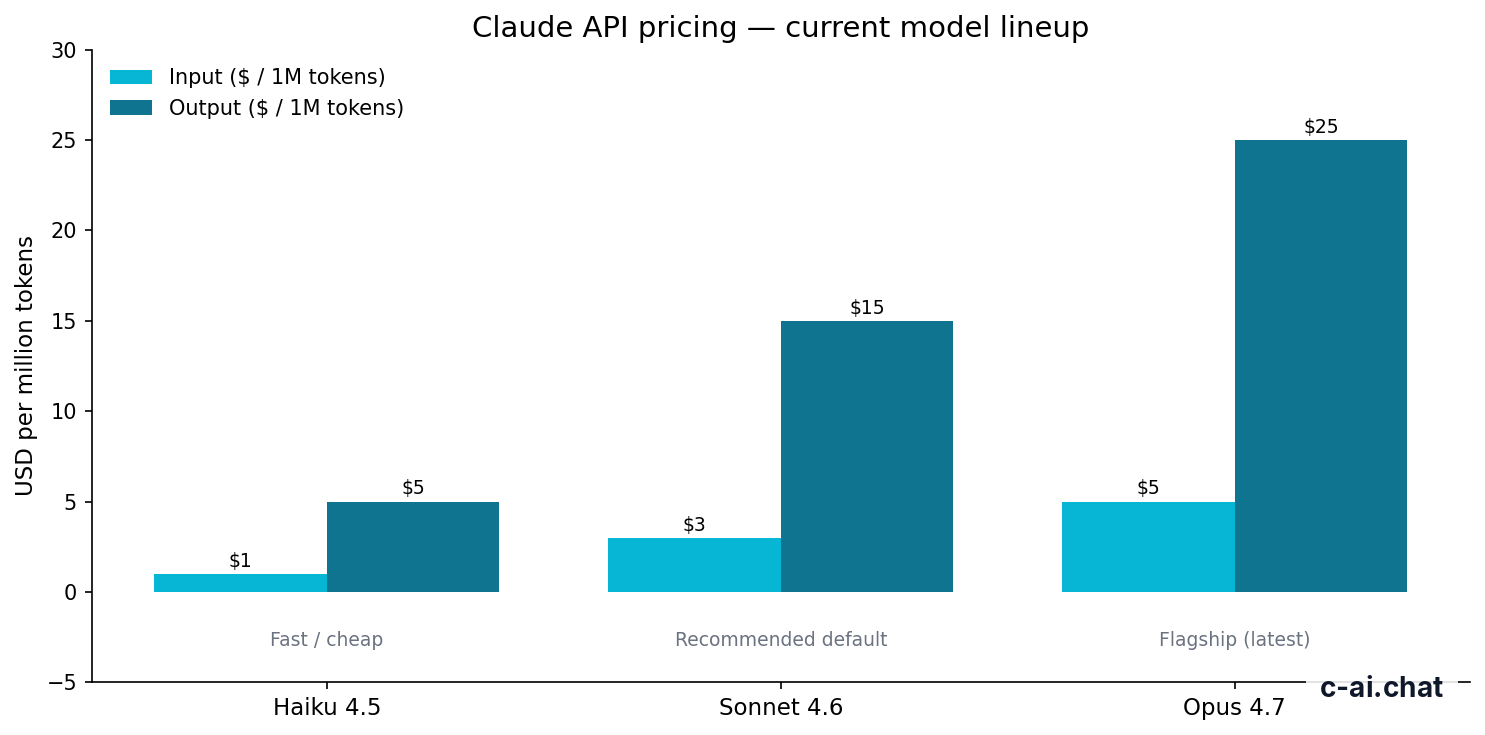
Anthropic Claude pricing breaks into two buckets: subscriptions for using Claude in the app, and usage-based billing for the API. The free plan costs $0/month. Claude Pro costs $20/month, or $17/month on annual billing. Max starts at $100/month. Team Standard starts at $25 per seat/month, Team Premium at $125 per seat/month, and Enterprise is custom with a $20 per seat base plus usage at API rates. On the API side, Claude Haiku 4.5 starts at $1 per million input tokens and $5 per million output tokens, Sonnet 4.6 costs $3/$15, and Opus 4.7 costs $5/$25.
- Price · Free, $20 Pro, from $100 Max, API from $1/M input
- Included · App access, paid usage tiers, or token-based API billing
- Upgrade when · Free limits block regular work or you need team controls
- Skip when · You only need occasional prompts or a lighter model is enough
The practical default for most people is simple. If you use Claude casually, stay on Free. If Claude is part of your daily work, Pro is usually the first paid tier to consider. If you are running automations, products, or internal tools, ignore the app plans and look at API pricing instead. If you manage multiple users, go straight to Team or Enterprise rather than stacking individual Pro accounts.
| Category | Plan or model | Price | Best fit |
|---|---|---|---|
| App | Free | $0/month | Occasional personal use |
| App | Pro | $20/month or $17/month annual | Individuals using Claude regularly |
| App | Max | From $100/month | Heavy individual users |
| Team | Standard | $25/seat/month or $20/seat/month annual | Small teams needing admin controls |
| Team | Premium | $125/seat/month or $100/seat/month annual | Higher-capacity team access |
| Enterprise | Custom | $20/seat base + usage at API rates | Larger organisations with compliance needs |
| API | Haiku 4.5 | $1/M input, $5/M output | Fast, low-cost workloads |
| API | Sonnet 4.6 | $3/M input, $15/M output | General-purpose default |
| API | Opus 4.7 | $5/M input, $25/M output | Highest capability tasks |
What’s actually included
The tricky part of anthropic claude pricing is that the cheapest option is not always the cheapest in practice. App subscriptions give you access to Claude through the official interface on web, iOS, Android, and desktop. API billing charges only for tokens used, which is better for software, scripted workflows, and variable volume. The right choice depends on whether you are paying for a person’s usage or a system’s usage.
Free
$0/month
For occasional users
- Access on web, iOS, Android, and desktop
- Daily usage limits
- No card required
Pro
$20/month
For individuals using Claude for work
- $17/month on annual billing
- Claude Code and Claude Cowork
- Unlimited Projects and Research access
- Additional models
- Office integrations for Excel, PowerPoint, and Word beta
Max
From $100/month
For power users
- 5x or 20x Pro usage
- Higher output limits
- Early feature access
- Priority traffic
For teams, the main value is not just more usage. It is shared administration. Team Standard costs $25 per seat/month, or $20 per seat/month on annual billing. Team Premium costs $125 per seat/month, or $100 per seat/month annual. Enterprise pricing is custom, with a $20 per seat base plus usage billed at API rates, and it adds controls such as SCIM, audit logs, role-based access, spend controls, regional data residency, and HIPAA-ready options.
| Plan | Price | Main inclusions | Main limit or tradeoff |
|---|---|---|---|
| Free | $0/month | Claude app access across devices | Daily usage limits |
| Pro | $20/month or $17/month annual | Claude Code, Claude Cowork, unlimited Projects, Research, more models, Office integrations beta | Still an individual plan |
| Max | From $100/month | 5x or 20x Pro usage, higher output limits, early features, priority traffic | Expensive unless usage is very heavy |
| Team Standard | $25/seat/month or $20/seat/month annual | SSO, admin controls, shared workspace | Per-seat cost adds up for larger groups |
| Team Premium | $125/seat/month or $100/seat/month annual | Higher-capacity team tier, priority traffic, expanded admin controls | Only makes sense for high-demand teams |
| Enterprise | $20/seat base + usage at API rates | SCIM, audit logs, HIPAA-ready options, role-based access, residency, spend controls | Requires contract discussion |
For developers and product teams, API pricing is separate from these subscriptions. The current published rates are straightforward:
| Model | Input | Output | Notes |
|---|---|---|---|
| Claude Haiku 4.5 | $1 per million tokens | $5 per million tokens | Fastest and cheapest |
| Claude Sonnet 4.6 | $3 per million tokens | $15 per million tokens | Recommended default for many workloads |
| Claude Opus 4.7 | $5 per million tokens | $25 per million tokens | Flagship model |
Long context can change your cost assumptions. Claude Opus 4.7, Opus 4.6, and Sonnet 4.6 support up to 1,000,000 tokens of context at standard rates. That matters if you work with very large documents or repositories. But standard rates does not mean low bills. Large prompts plus large outputs can still become expensive quickly, especially on Opus.
90% off
cached input tokens with prompt caching
Anthropic also publishes two important cost controls for API users. Prompt caching cuts the price of cached input tokens by 90%. Batch API cuts both input and output costs by 50%. If you are comparing models only on sticker price, you may miss the bigger savings that come from changing your workflow. That is why our broader Claude features guide is often more useful than a pricing chart alone.
Worked example
Simple API cost for a Sonnet 4.6 task
A moderate Sonnet workflow can stay inexpensive, but repeated large outputs are what usually push bills up.
If you are new to the ecosystem, the easiest rule is this: pay for Pro if a human is using Claude every day; pay for the API if software is calling Claude; pay for Team or Enterprise if governance matters more than individual seat convenience. Our Claude FAQ covers related setup questions, including account types and access paths.
Is it worth it for you?

Whether anthropic claude pricing is worth it depends less on the headline price and more on how often you hit limits, how much output you need, and whether collaboration or compliance is part of the job. The best-value tier for one person is often not the best-value tier for a team.
Pick when
- You use Claude several times a week for writing, analysis, coding, or research
- You need Claude Code, Claude Cowork, or unlimited Projects on Pro
- You want admin controls, SSO, or shared workspace features on Team
- You are building software and need pay-as-you-go API access
Skip when
- You only ask occasional questions and Free limits do not get in the way
- You are paying for Pro but using Claude less than a few times a month
- You need a team workspace but are trying to manage with separate personal accounts
- You choose Opus by default when Haiku or Sonnet would do the job for less
Three user types fit Claude pricing especially well. First, solo professionals who use Claude every workday usually get clear value from Pro. The subscription is simple, and the added tools justify the jump from Free once daily limits become a bottleneck. Second, small teams that need account controls and shared workspaces should look at Team Standard before they look at multiple Pro subscriptions. Third, developers with uneven or automated demand often get better economics from API billing than from trying to force app plans into a production workflow.
The weaker fit is also clear. If you are a casual user, Pro is easy to overbuy. If your team needs compliance, auditability, or identity management, individual plans are the wrong tool even if they look cheaper at first. And if your application sends a lot of low-stakes requests, Opus pricing can be hard to justify when Haiku 4.5 is much cheaper.
Cheaper / better alternatives
Sometimes the right answer is not to upgrade. The cheaper alternative may be the plan below your current one, or a cheaper model in the API. The better alternative may be the next plan up if your current setup creates friction, bottlenecks, or weak governance.
| If you are considering | Cheaper alternative | Better but pricier alternative | What changes |
|---|---|---|---|
| Pro at $20/month | Free at $0/month | Max from $100/month | Free saves money but keeps daily limits; Max raises usage and output limits |
| Team Standard at $25/seat/month | Pro at $20/month | Team Premium at $125/seat/month | Pro is cheaper per person but lacks team controls; Premium adds higher capacity and priority traffic |
| Sonnet 4.6 API at $3/$15 | Haiku 4.5 at $1/$5 | Opus 4.7 at $5/$25 | Haiku cuts cost for simpler tasks; Opus raises quality ceiling for harder tasks |
If you are near the bottom of a tier and barely using it, move down. If you are regularly constrained by usage or collaboration limits, moving up is usually cheaper than wasting staff time. This is especially true for Team plans. A business trying to avoid seat costs can create more operational mess than it saves.
On the API side, the best alternative is often model selection rather than plan selection. Many support bots, extraction jobs, summaries, and classification tasks do not need Opus. If Sonnet gives the same business result, the lower cost is immediate. If Haiku gives an acceptable result, it is cheaper again. You can then reserve Opus 4.7 for the narrow slice of work where the extra capability pays for itself.
-
Start from the task, not the model name
List your common jobs: chat, coding, summaries, extraction, document Q&A, or agent workflows.
-
Estimate real usage
Count people for app plans, or estimate
input tokensandoutput tokensfor API usage. -
Test the cheaper option first
Try Free before Pro, Team Standard before Premium, and Haiku or Sonnet before Opus unless the task is clearly demanding.
-
Use cost controls
Apply prompt caching and Batch API where they fit, since these can reduce the bill more than changing plans.
The honest take
Anthropic Claude pricing is reasonably clear once you separate app subscriptions from API billing. Free is enough for light use. Pro at $20/month is the practical paid tier for many individuals. Max is for people who push Claude hard enough to justify a much higher monthly bill. Team and Enterprise are not just bigger plans; they are governance plans. On the API side, Haiku is the budget option, Sonnet is the balanced default, and Opus is the premium model when quality matters more than cost.
The main mistake is paying for the wrong type of access. Do not buy seat-based plans for software workloads. Do not buy Enterprise just for more usage. Do not default to the most expensive model if a cheaper one already clears the bar. If you choose based on actual usage, Claude’s pricing structure is predictable enough to work with.
FAQ
How much does Claude cost per month?
Claude has a Free plan at $0/month, a Pro plan at $20/month or $17/month on annual billing, and Max starting at $100/month. Team Standard starts at $25 per seat/month, Team Premium at $125 per seat/month, and Enterprise is custom.
What is the cheapest Claude API model?
Claude Haiku 4.5 is the cheapest published option at $1 per million input tokens and $5 per million output tokens.
Is Claude Pro worth $20/month?
Usually yes for people who use Claude regularly for work and hit Free plan limits. Usually no for occasional users who only need light chat access.
What is included in Claude Pro?
Claude Pro includes Claude Code, Claude Cowork, unlimited Projects, Research access, additional models, and Office integrations for Excel, PowerPoint, and Word beta.
What is the difference between Pro and Team?
Pro is an individual subscription. Team adds shared workspace features, SSO, and admin controls. Team Standard starts at $25 per seat/month, or $20 per seat/month annual.
How does Claude Enterprise pricing work?
Enterprise uses custom contracts with a $20 per seat base plus usage billed at API rates. It is designed for organisations that need controls such as SCIM, audit logs, role-based access, spend controls, regional data residency, and HIPAA-ready options.
Can Claude API costs be reduced?
Yes. Prompt caching gives 90% off cached input tokens, and Batch API gives 50% off both input and output pricing.
Where can I verify official Claude pricing?
Use Anthropic’s official pages on claude.com/pricing and platform.claude.com. You can also check service availability on status.claude.com.
Independent guide. Not affiliated with Anthropic. For the official Claude product, visit claude.ai.
Last updated: 2026-05-10
This article is part of the Claude pricing & plans hub on c-ai.chat.