Claude billing covers both Claude subscription plans on claude.com/pricing and API token charges on platform.claude.com; this guide explains the common billing questions, what each paid tier includes, and when to switch plans, from the perspective of c-ai.chat, an independent guide to Claude by Anthropic.

- The bottom line
- What’s actually included
- Is it worth it for you?
- Cheaper / better alternatives
- The honest take
The bottom line
If your Claude billing question is “what do I pay and why,” the short answer is this: Claude has free and paid subscriptions for the app, plus separate API billing priced per million tokens, so the right fix depends on whether you are paying for Pro, Max, Team, Enterprise, or API usage.
- Price · Free, Pro $20/month, Max from $100/month, Team from $25/seat/month, Enterprise custom, API from $1/M input tokens
- Included · App access, model access by plan, and API billed separately by token usage
- Upgrade when · You hit free or Pro limits, need team controls, or need higher output and priority traffic
- Skip when · You only use Claude occasionally or only need low-cost API calls with Haiku 4.5
The first thing to check is whether your issue is app billing or API billing. Claude app plans are the subscriptions most people see on the pricing page. API billing is separate and depends on the model you use, how many input and output tokens you send, and whether you use cost controls such as prompt caching or the Batch API. If you need a broader overview first, see our Claude pricing guide.
That split explains many support questions. A user may pay $20/month for Pro and still see API charges, because Pro does not bundle API credits. Another user may be on the free app plan but still incur platform costs after adding a payment method to the developer console. Billing confusion usually starts there.
What’s actually included
Here is what each Claude billing option actually includes. This is where most mistaken expectations happen, especially around API access, team features, and usage limits.
Free
$0/month
For occasional individual use
- Web, iOS, Android, and desktop access
- Daily usage limits
- No card required to start
Pro
$20/month
For individuals who use Claude regularly
- Claude Code
- Claude Cowork
- Unlimited Projects
- Research access
- Additional models
- Office integrations for Excel, PowerPoint, and Word beta
Max
From $100/month
For power users who hit Pro limits
- 5x or 20x Pro usage
- Higher output limits
- Early feature access
- Priority traffic
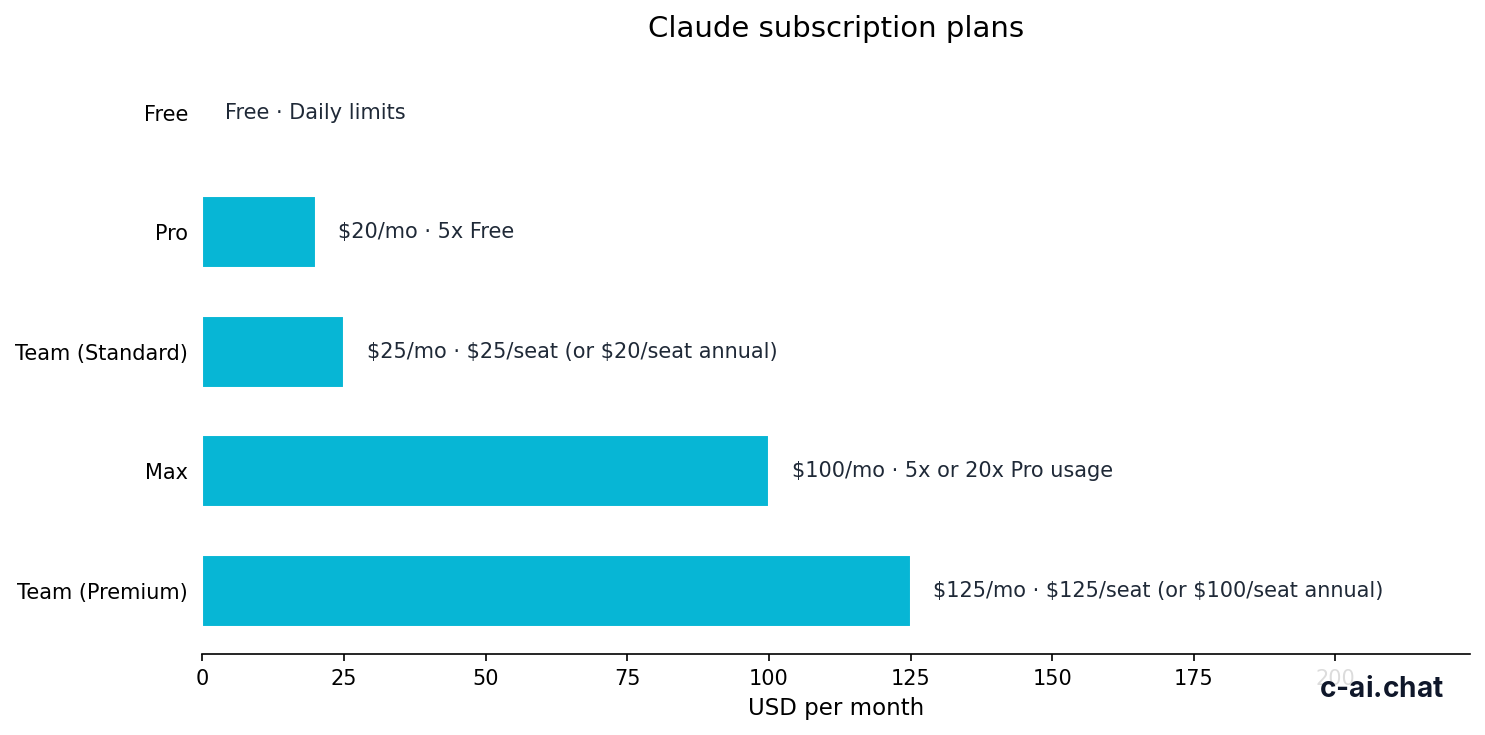
For teams and companies, Claude billing shifts from a personal subscription to seat-based plans or custom contracts. Team Standard starts at $25 per seat per month, or $20 per seat per month when billed annually. Team Premium starts at $125 per seat per month, or $100 per seat per month annually. Enterprise starts with a $20 per seat base plus usage at API rates.
| Plan | Price | Best for | Key billing detail |
|---|---|---|---|
| Free | $0/month | Light personal use | Daily usage limits apply |
| Pro | $20/month or $17/month annual | Individuals | Does not include API credits |
| Max | From $100/month | Heavy individual use | Higher usage and priority traffic |
| Team Standard | $25/seat/month or $20/seat/month annual | Small teams | SSO, admin controls, shared workspace |
| Team Premium | $125/seat/month or $100/seat/month annual | Higher-capacity teams | Priority traffic and expanded admin controls |
| Enterprise | $20/seat base + usage at API rates | Larger organisations | Custom contract and advanced governance |
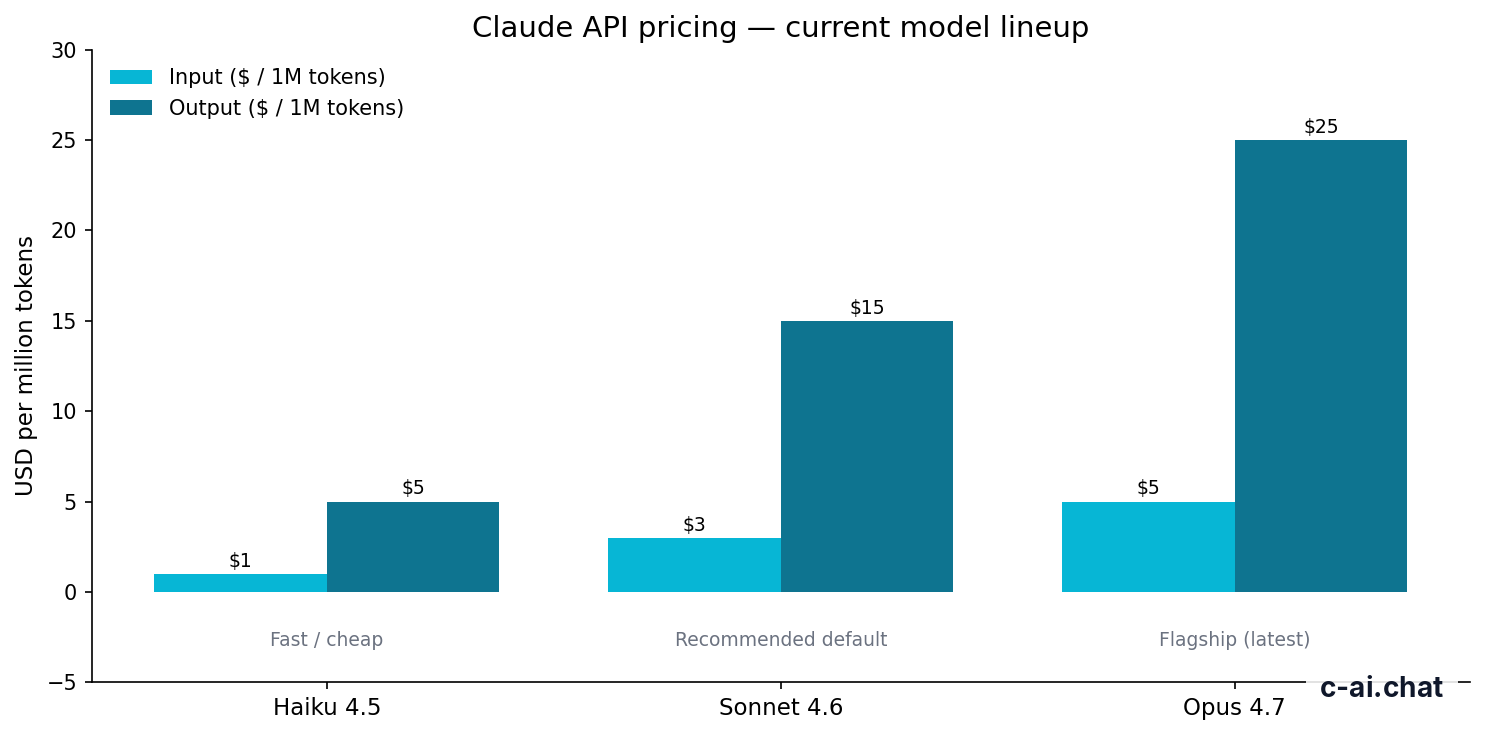
API billing is separate from all of the above. Current headline API rates are $5 per million input tokens and $25 per million output tokens for Claude Opus 4.7, $3 and $15 for Claude Sonnet 4.6, and $1 and $5 for Claude Haiku 4.5. If you are comparing model costs rather than subscriptions, our Claude API guide and Claude features overview will be more useful than the app plan page alone.
90% off
cached input tokens with prompt caching
Two important API cost reducers are easy to miss. Prompt caching cuts cached input token cost by 90%. The Batch API cuts both input and output costs by 50%. Those discounts matter more than model choice in some workloads, especially repeated prompts, background jobs, or large-scale document processing.
Long context is another point that causes billing surprises. Opus 4.7, Opus 4.6, and Sonnet 4.6 support up to 1,000,000 tokens of context at standard rates. That does not mean every request is expensive. It means cost scales with actual token usage, not with the maximum window alone.
Is it worth it for you?

Claude billing is worth it when the paid tier solves a real limit you hit often. It is not worth it just because a higher plan exists. The right choice depends on how often you use Claude, whether you need collaboration features, and whether your real need is the API rather than the consumer app.
Pick when
- You use Claude daily for writing, analysis, coding, or document work and the free tier feels restrictive
- You want Pro for Claude Code, Claude Cowork, Research access, unlimited Projects, or Office integrations
- You need Max because Pro limits interrupt your workflow and you value higher output limits or priority traffic
- You run a small team and need SSO, admin controls, and a shared workspace on Team Standard
- You need governed rollout, role-based access, audit features, or regional controls through Enterprise
Skip when
- You only use Claude a few times per week and free access covers your needs
- You expect Pro or Max to include API credits; they do not
- Your main goal is low-cost automation, where Haiku 4.5 API usage may be cheaper than any app upgrade
- You do not need collaboration, identity, or compliance features, so Team or Enterprise would be overkill
- You are troubleshooting one billing anomaly that likely needs account support, not a plan change
For most individuals, Pro is the practical paid default. It fits researchers, writers, consultants, students, and solo developers who use Claude often enough to care about daily limits and workspace features. It also fits people who want the app experience, not API infrastructure.
Max fits a narrower group: power users who already know Pro is not enough. That includes heavy coding sessions, long document workflows, or users who care about priority traffic and early features. If you are unsure whether you need Max, you probably do not need it yet.
Team Standard fits small businesses, agencies, startup teams, and internal departments that need shared workspace controls more than advanced compliance. Enterprise fits regulated or larger organisations that need SCIM, audit logs, spend controls, HIPAA-ready options, and stronger role management. If your billing problem is really about access control, not price, this is usually the branch to examine.
Cheaper / better alternatives
Sometimes the right answer is not “pay more.” If Claude billing feels high, compare the plan you have with the next level down and the next level up before changing anything. Many users can save money by moving down to free or by shifting some work to the API with a cheaper model.
| If you are considering… | Cheaper alternative | Higher alternative | Best choice when |
|---|---|---|---|
| Pro at $20/month | Free at $0/month | Max from $100/month | Choose Free for occasional use, Pro for regular solo work, Max only if Pro limits are a real problem |
| Max from $100/month | Pro at $20/month | Team Standard at $25/seat/month | Choose Pro for individual use, Max for very heavy individual use, Team if collaboration and admin controls matter |
| Team Standard at $25/seat/month | Pro at $20/month | Team Premium at $125/seat/month | Choose Pro for solo users, Standard for small teams, Premium for higher-capacity shared use and expanded admin controls |
| Sonnet 4.6 API | Haiku 4.5 API at $1/$5 per M tokens | Opus 4.7 API at $5/$25 per M tokens | Choose Haiku for speed and cost, Sonnet for balance, Opus for highest-end tasks |
If your current issue is a surprise API invoice, the cheapest alternative is usually not a subscription downgrade. It is one of these: switch from Sonnet 4.6 to Haiku 4.5 for high-volume jobs, cache repeated prompt prefixes, or use the Batch API for deferred workloads. Those changes can cut spend faster than changing app plans.
Worked example
When cheaper API usage beats an app upgrade
If your workload is backend automation rather than interactive chat, lower-cost API routing is often the better fix.
If your issue is account reliability rather than price, check Claude status before assuming billing caused the problem. Outages, payment method verification delays, and region-specific incidents can look like access loss. For account-specific billing disputes, the right path is usually Anthropic support, not repeated plan changes.
For broader product context, you can also compare how app features and plan boundaries relate in our Claude FAQ. That is useful when the problem is not “what was I charged” but “what should this plan let me do.”
The honest take
Claude billing is fairly straightforward once you separate subscriptions from API usage. Free is enough for light use. Pro is the sensible paid choice for most individuals. Max is for people who already know they hit Pro ceilings. Team and Enterprise are about shared access, governance, and controls, not just more messages. The biggest source of confusion is expecting app subscriptions to cover developer API costs. They do not.
If you are troubleshooting charges, start by identifying the billing system, then check the exact plan or model rate, then look for cost controls such as prompt caching or the Batch API. If the charge still does not make sense, use official support. If you just want the official product, go straight to Claude. If you want a broader independent view first, keep this guide and our pricing references nearby.
Independent guide. Not affiliated with Anthropic. For the official Claude product, visit claude.ai.
Last updated: 2026-05-10
This article is part of the Claude pricing & plans hub on c-ai.chat.