Claude for students usually means starting with Claude Free at $0/month, then moving to Pro at $20/month only if you regularly hit limits or need advanced study workflows; this guide from c-ai.chat is independent, and below we cover what you get, who should upgrade, alternatives, and the honest trade-offs.

- The bottom line
- What’s actually included
- Is it worth it for you?
- Cheaper / better alternatives
- The honest take
The bottom line
For most students, the right answer is simple: start on Claude Free at $0/month, and only pay for Claude Pro at $20/month if your coursework, writing load, or research habits regularly push you into usage limits.
- $0/month to start on Free
- Pro $20/month adds more usage and study tools
- Upgrade if you hit limits often or need Projects and Research
- Skip paid plans if you only need light homework help
That matters because many students do not need a paid AI subscription every month. If you use Claude a few times a week for brainstorming, explaining concepts, outlining essays, or checking drafts, the free plan is often enough. If you rely on Claude daily for long readings, project-based study, coding classes, or repeated revision passes, Pro becomes easier to justify.
If you also want a broader view of consumer and team plans, see our Claude pricing guide. If your work is more technical than academic, our Claude features overview and Claude API guide cover the developer side.
What’s actually included
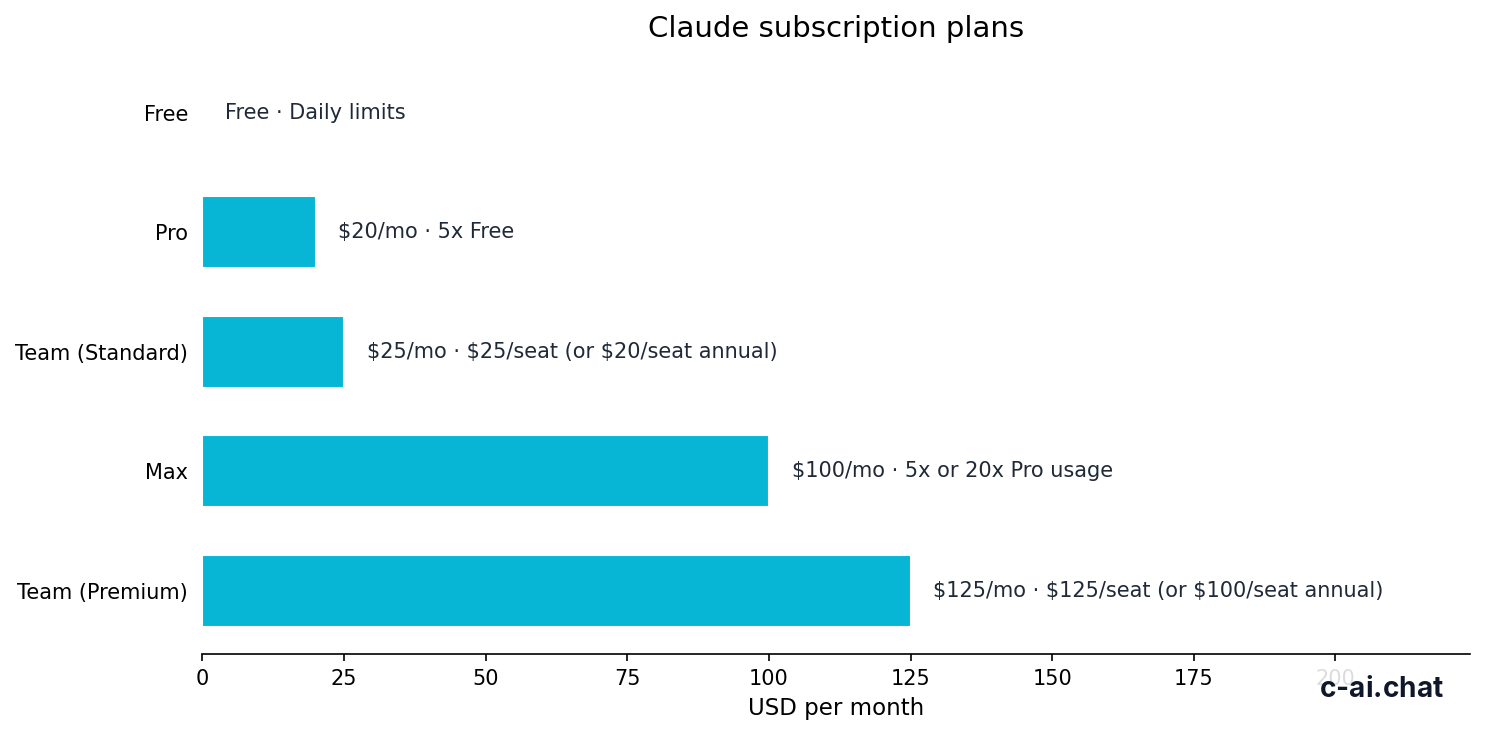
Students usually compare only Free and Pro, but it helps to see the full ladder. Free is the low-risk starting point. Pro is the individual paid tier. Max is for unusually heavy use. Team and Enterprise are not student plans in the normal sense, though they can matter for labs, clubs, or university departments.
Free
$0/month
For most students starting out
- Web, iOS, Android, and desktop access
- Daily usage limits
- No card required
Pro
$20/month
For individuals who use Claude every day
- Claude Code and Claude Cowork
- Unlimited Projects and Research access
- Additional models and Office integrations beta
Max
From $100/month
For power users with very heavy usage
- 5x or 20x Pro usage
- Higher output limits
- Early feature access and priority traffic
Here is the cleaner view for students deciding what they actually get for the money.
| Plan | Price | What a student gets | Main limit |
|---|---|---|---|
| Free | $0/month | Access on web, mobile, and desktop with daily usage limits | Less capacity for long, repeated study sessions |
| Pro | $20/month or $17/month annual | More usage, Claude Code, Claude Cowork, unlimited Projects, Research access, additional models, Office integrations beta | Still an individual plan, not a shared team workspace |
| Max | From $100/month | 5x or 20x Pro usage, higher output limits, early feature access, priority traffic | Too expensive for most students |
| Team Standard | $25/seat/month or $20/seat/month annual | SSO, admin controls, shared workspace | Built for teams, not solo student use |
| Team Premium | $125/seat/month or $100/seat/month annual | Higher-capacity team tier, priority traffic, expanded admin controls | Overkill for almost all students |
| Enterprise | $20/seat base + usage at API rates | SCIM, audit logs, HIPAA-ready options, role-based access, spend controls, regional data residency | Custom procurement and admin setup |
The practical question is not whether Pro has more features. It does. The real question is whether those features improve your school workflow enough to justify a recurring bill.
For students, the most useful Pro additions are usually:
- More usage headroom for long study sessions before exams.
- Unlimited Projects for keeping classes, notes, drafts, and source material organised by subject.
- Research access if your workflow depends on structured information gathering.
- Office integrations beta if you work heavily in Word, PowerPoint, or Excel.
- Claude Code if you are in computer science, data, or technical coursework.
On the other hand, students often overestimate how much they need the paid tier. If you mainly ask short questions, get concept explanations, or polish occasional papers, Free may be enough for months at a time.
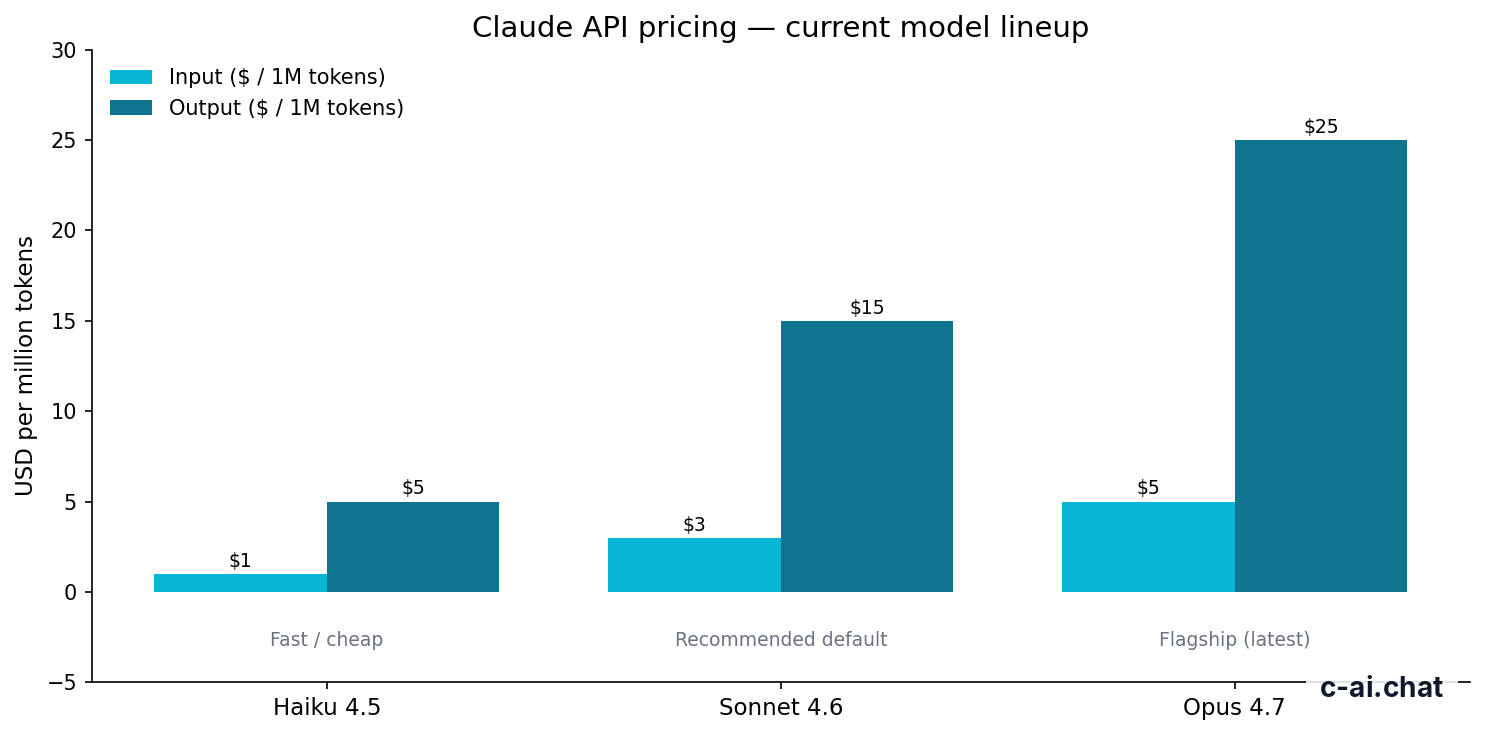
Model access also matters if you are using Claude beyond simple chat. Anthropic’s current lineup includes Claude Opus 4.7 at $5 per million input tokens and $25 per million output tokens, Claude Sonnet 4.6 at $3 and $15, and Claude Haiku 4.5 at $1 and $5 through the API. Most students on the consumer app do not need to think in token pricing day to day, but if you are building tools or automations for coursework, our API section explains when those costs become relevant.
90% off
cached input tokens with prompt caching
That token discount is mostly relevant to developers and advanced student builders. It is not a reason on its own for a typical student to subscribe to Pro. Likewise, Batch API pricing at 50% off both input and output is useful for bulk processing, but that is a separate API workflow rather than a normal student chat plan decision.
Is it worth it for you?

The best way to judge Claude for students is by fit, not hype. Think in terms of your class load, how often you hit limits, and whether Claude is replacing enough friction to earn its monthly cost.
Pick when
- You study with Claude most days, not just once in a while
- You work with long readings, repeated drafts, or project-based coursework
- You want separate Projects for different modules, papers, or thesis work
- You are a coding student who can use Claude Code regularly
- You lose time when free usage limits interrupt your workflow
Skip when
- You only need occasional explanations, summaries, or brainstorming
- Your budget is tight and the free plan already covers most sessions
- You rarely work on long assignments inside Claude
- You do not need Projects, Research, or Office integrations
- You want a shared class or club workspace rather than a solo account
The plan fits three student personas especially well.
- The heavy writer: essays, reports, citations to organise, multiple revision rounds, frequent outline-to-draft work.
- The technical student: programming assignments, debugging, code explanation, command-line help, and repeated testing prompts.
- The project organiser: someone managing several classes or a dissertation and wanting separate spaces for notes, files, and ongoing context.
It is a weaker fit for other students.
- The occasional user: asks a few questions each week and does not hit limits.
- The price-sensitive student: wants help, but not enough to justify another $20 monthly subscription.
- The collaboration-first user: actually needs a team workspace, admin settings, or shared controls rather than a solo account.
-
Track your real usage for two weeks
Use Claude Free normally for classes, revision, and writing. Note how often limits interrupt you.
-
List the tasks you repeat
If you regularly use Projects, long reading analysis, draft rewrites, or coding help, a paid plan may save time.
-
Put a dollar value on that saved time
If Pro saves several hours a month during term time,
$20/monthcan be reasonable. If not, stay on Free.
There is also a quality-of-life angle. AI tools are most useful in education when they reduce friction: explaining difficult material in simpler language, helping you compare ideas, testing your understanding, or turning messy notes into something usable. They are less useful when you pay for advanced capacity you rarely touch.
If you are comparing study workflows rather than just pricing, our Claude features page breaks down the tools that affect everyday use, and the Claude FAQ answers common setup and usage questions.
Cheaper / better alternatives
Sometimes the best answer is not “buy Pro.” The cheaper alternative is staying on Free. The better alternative for a small group project may be Team. The better alternative for a very heavy individual user may be Max. Students often save money by choosing the lower tier longer than they expected.
| Option | Price | Best for | When it beats Pro |
|---|---|---|---|
| Free | $0/month | Light or moderate student use | You do not hit daily limits often |
| Pro | $20/month or $17/month annual | Daily individual student use | Balanced choice for regular coursework |
| Max | From $100/month | Very heavy solo use | You need 5x or 20x Pro usage and higher output limits |
| Team Standard | $25/seat/month or $20/seat/month annual | Small groups needing shared workspace | You need admin controls and collaboration features |
Free is the obvious cheaper alternative. For many students, it is not a compromise so much as the correct tier. If your usage is bursty rather than constant, paying every month for extra capacity may not be rational.
Max is the next plan up, but it is only sensible for a narrow group: students doing unusually heavy daily work, often with long outputs, advanced workflows, or near-professional use. At starting prices from $100/month, it sits far outside normal student budgets.
Team Standard becomes more interesting if you are part of a research group, startup society, campus publication, or capstone team that actually needs shared workspace, SSO, or admin controls. As a solo student, it usually makes no sense to pay for team features you will never use.
Worked example
When paying for Pro does make sense
If Claude is part of your academic workflow every week, Pro can be a fair trade. If that time saving is not real, Free is the better value.
There is one more alternative that students sometimes miss: use Claude Free during lighter parts of term, then upgrade to Pro only during exam season, dissertation periods, or project crunches. That approach keeps costs aligned with actual need.
The honest take
Claude for students is easy to recommend, but not always as a paid subscription. The strongest default is still Claude Free at $0/month. It gives most students enough to test whether Claude genuinely improves note-making, concept explanation, writing, coding, and revision. If it becomes part of your routine and you keep hitting limits, Claude Pro at $20/month is the sensible upgrade.
The key is to pay for consistency, not curiosity. If you use Claude daily for serious coursework, Pro can be good value. If you use it occasionally, Free is the smarter choice. And if you need shared controls or very high capacity, you have moved beyond the normal student use case into Team or Max territory.
Independent guide. Not affiliated with Anthropic. For the official Claude product, visit claude.ai.
Last updated: 2026-05-12
This article is part of the Claude pricing & plans hub on c-ai.chat.