Claude API headers are the HTTP headers Anthropic requires or supports when you send requests to the Claude API, most importantly x-api-key, anthropic-version, and sometimes anthropic-beta; this independent guide explains which ones matter, how they work, what they affect, and where they fit in the wider Claude API guide.
- The short answer
- How it works
- What it costs
- Limits and gotchas
- Other questions readers ask
- The honest take
The short answer
The required Claude API headers are usually x-api-key for authentication, anthropic-version for the API version contract, and content-type: application/json for JSON requests. You only add anthropic-beta when Anthropic documents a beta feature that needs an opt-in header in the official developer docs at platform.claude.com or docs.claude.com.
If you are calling the Messages API, a minimal request looks like this:
curl https://api.anthropic.com/v1/messages
  --header "x-api-key: YOUR_API_KEY"
  --header "anthropic-version: 2023-06-01"
  --header "content-type: application/json"
  --data '{
    "model": "claude-sonnet-4-6",
    "max_tokens": 256,
    "messages": [
      {"role": "user", "content": "Hello, Claude"}
    ]
  }'
Worked example
Minimal Claude API header set
x-api-keyRequiredanthropic-versionRequiredcontent-typeapplication/jsonanthropic-betaOptionalIf your request is failing, missing or invalid headers are one of the first things to check.
For developers comparing endpoints, the header pattern is much simpler than many other AI APIs. The tradeoff is that versioning is explicit. You are expected to send the version header every time so the server knows which contract your client expects.
If you are still deciding between web app subscriptions and developer usage, our Claude pricing guide separates chat plans from API billing, because they are not the same product surface.
How it works
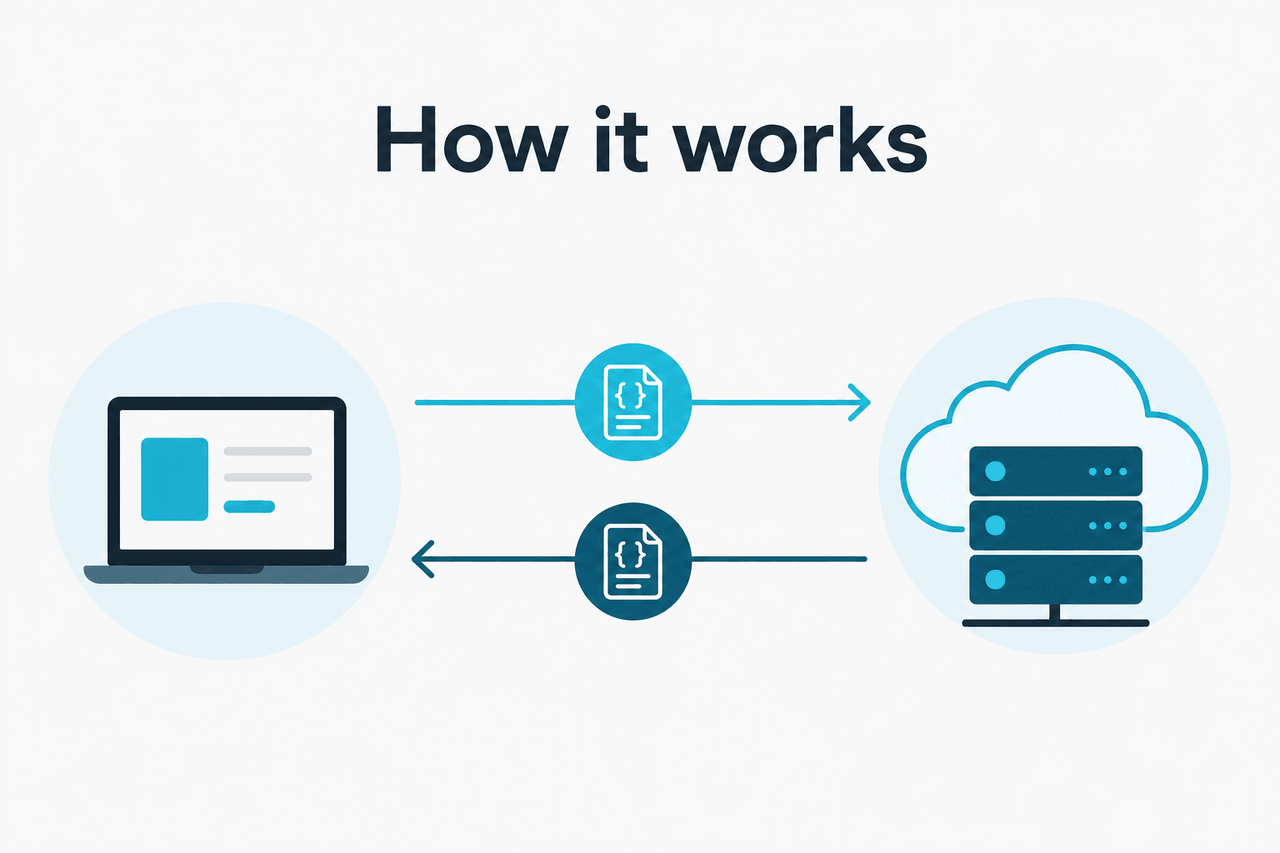
Claude API headers sit in the HTTP request metadata, not in the JSON body. Anthropic uses them for identity, API compatibility, and feature gating. In practical terms, your application sends the request body with the model, messages, and token limits, while the headers tell Anthropic who you are and which behavior contract to apply.
The most important header is x-api-key, which authenticates the request against your account in platform.claude.com. The next is anthropic-version, which stabilises the API surface for your integration. If Anthropic ships a beta capability, the docs may tell you to add anthropic-beta with one or more beta identifiers. That is opt-in, not a default requirement. For the current request format and model names, use the official references on platform.claude.com and docs.claude.com.
-
Create an API key
Generate a key in platform.claude.com and store it in an environment variable such as
ANTHROPIC_API_KEY. Do not hardcode it in frontend code. -
Set the required headers
Add
x-api-key,anthropic-version, andcontent-type: application/jsonto each server-side request. -
Add beta headers only when the docs say to
If a feature is flagged as beta, send
anthropic-betawith the exact value documented for that feature. Skip it otherwise. -
Send a valid model and body
Use a supported model such as
claude-opus-4-7,claude-sonnet-4-6, orclaude-haiku-4-5, plus fields likemessagesandmax_tokens. -
Check response headers and errors
If a request fails, inspect the HTTP status, error body, and any request ID returned by the API for debugging and support follow-up.
One common source of confusion is mixing Claude app features with Claude API mechanics. Features you may see in the app, such as workspace tools or user-facing integrations, do not automatically map to a request header. If you want the coding workflow side of the ecosystem, see our Claude Code guide. If you want product capabilities at a higher level, the Claude features overview is the better starting point.
Pick when
- You want explicit version control in your API integration
- You need a small, predictable header set
- You prefer documented beta opt-ins instead of silent behavior changes
Skip when
- You expect the web app subscription to include API access by default
- You plan to expose your API key in browser-side JavaScript
- You want to ignore versioning and hope requests keep working unchanged
What it costs
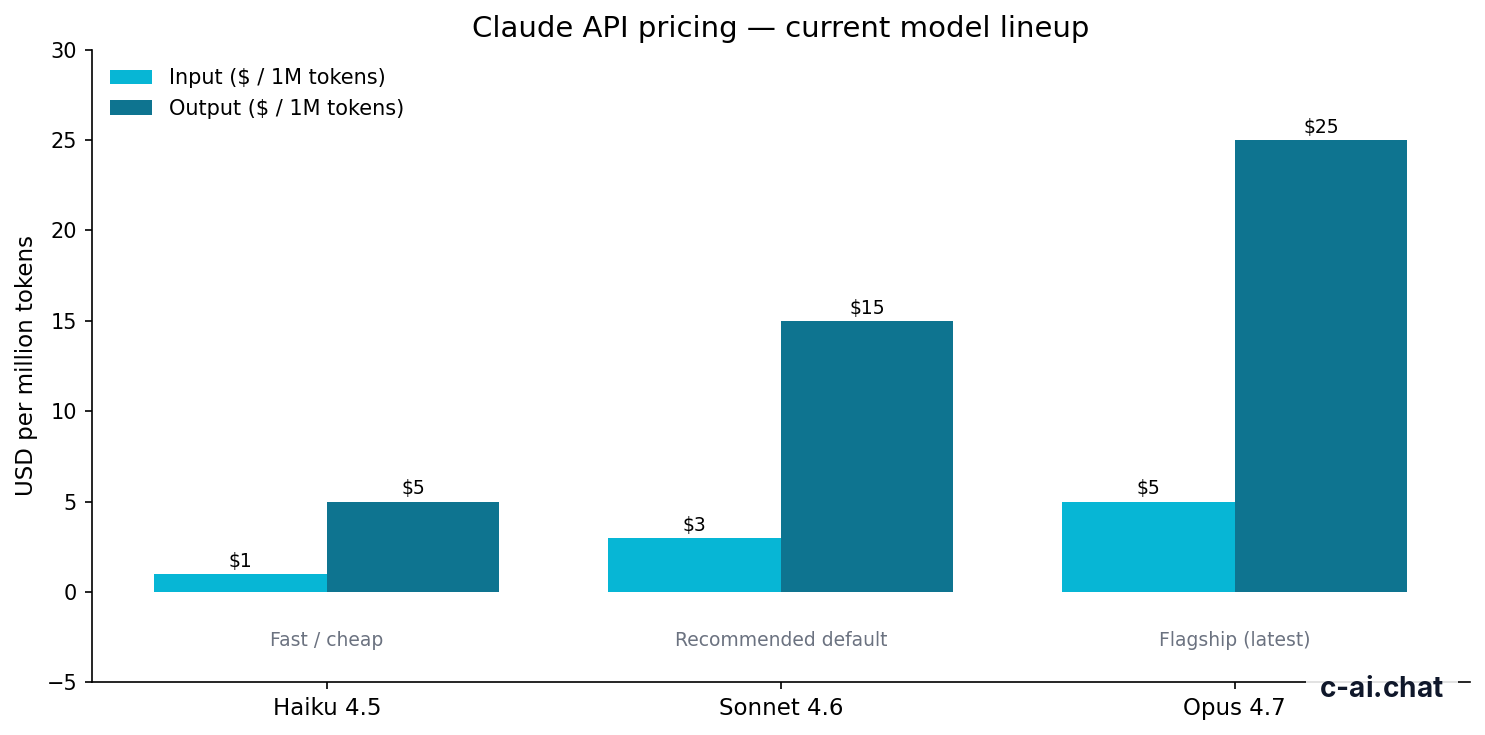
Headers themselves do not cost anything, but the requests they authenticate are billed per million tokens on the Claude API. At the current standard rates, Claude Opus 4.7 costs $5 per million input tokens and $25 per million output tokens, Claude Sonnet 4.6 costs $3 per million input tokens and $15 per million output tokens, and Claude Haiku 4.5 costs $1 per million input tokens and $5 per million output tokens.
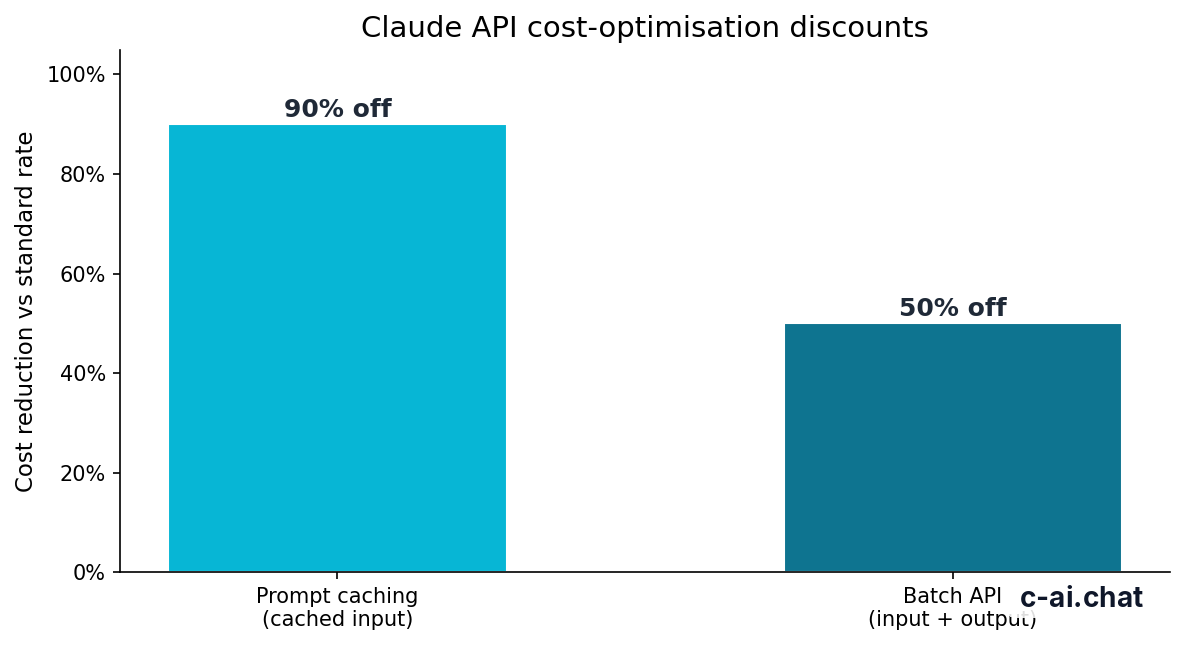
If you are designing an integration that sends repeated prompts, headers matter indirectly because they are part of the request path to pricing features. Anthropic offers prompt caching with 90% off cached input tokens, and the Batch API offers 50% off both input and output pricing where it fits your workload. Long context requests up to 1,000,000 tokens are available on Opus 4.7, Opus 4.6, and Sonnet 4.6 at standard rates. The official pricing reference is on claude.com/pricing and platform.claude.com.
- Free tier · no card
- API priced per million tokens
| Model | Input price | Output price | Typical fit |
|---|---|---|---|
| Claude Opus 4.7 | $5/M tokens | $25/M tokens | Highest capability, complex tasks, long-context work |
| Claude Sonnet 4.6 | $3/M tokens | $15/M tokens | Default recommendation for most production apps |
| Claude Haiku 4.5 | $1/M tokens | $5/M tokens | Fast, cheaper inference, lighter workloads |
90% off
cached input tokens with prompt caching
Do not confuse API token pricing with Claude app subscriptions. The Free, Pro, Max, Team, and Enterprise plans on claude.com govern access to Claude apps and workspace features, while API usage is billed separately through the developer platform. If you need the plan breakdown, our pricing page covers both sides clearly.
Limits and gotchas
Most header-related problems are not really “header syntax” problems. They are integration mismatches: wrong API key scope, unsupported model name, missing version header, account access differences, or undocumented assumptions about beta features.
- Missing
x-api-key: The request will fail authentication. Keep the key server-side and verify you are using the key from the correct Anthropic account or workspace. - Missing
anthropic-version: Claude API requests generally require an explicit version header. If you omit it, expect a request error rather than a silent default. - Wrong model identifier: A valid header set will not rescue an invalid body. Check the exact model names listed in the official models overview.
- Beta header misuse: Do not guess
anthropic-betavalues. Use only the exact beta strings documented by Anthropic for a live feature. - Rate limits: Throughput limits can vary by account, usage tier, and endpoint. If you see 429 errors, review your account limits in the platform and stagger or batch requests where possible.
- Model availability: Not every account has the same access at the same moment. Newer or higher-capability models may depend on account status or rollout stage.
- Region and compliance controls: Some enterprise features, regional data residency options, or trust requirements depend on contract level rather than a simple request header. See trust.anthropic.com for the official trust posture.
- Status issues: If headers look correct but requests fail unexpectedly, check status.claude.com before changing code.
- Frontend exposure: Never send Claude API requests directly from a public browser app with your real API key in headers. Put a server or secure proxy in front.
- Subscription confusion: A Claude Pro or Max subscription does not mean you can skip API authentication headers. API access still needs a platform key.
A practical debugging sequence is simple. First confirm the endpoint and JSON body. Then check the required headers. Then confirm the model name and account access. Only after that should you assume the problem is a transient service issue.
Other questions readers ask
The honest take
Claude API headers are straightforward. For most integrations, you need just three things: your API key, the Anthropic version header, and JSON content type. The only part that trips people up is expecting Claude to work like every other API. Anthropic chose explicit versioning and optional beta headers, which is slightly stricter up front but usually clearer over time.
If you want the safest default, build around x-api-key plus anthropic-version, keep requests server-side, and use a supported model such as Sonnet 4.6 unless you have a reason to move up or down the lineup. For broader developer context, start with our Claude API overview, then compare product capabilities on the c-ai.chat homepage.
Independent guide. Not affiliated with Anthropic. For the official Claude product, visit claude.ai.
Last updated: 2026-05-10
This article is part of the Claude API for developers hub on c-ai.chat.