To use the Claude API, create an Anthropic Console account, generate an API key, choose a Claude model, and send a Messages API request from your app; this independent guide links up to our broader Claude API documentation guide for setup, pricing, and deployment context.
c-ai.chat is not Anthropic and does not operate claude.ai. Anthropic makes Claude. We explain the developer path in plain terms: access, request format, model choice, costs, limits, common errors, and when the API is the right tool.
Table of contents
The short answer
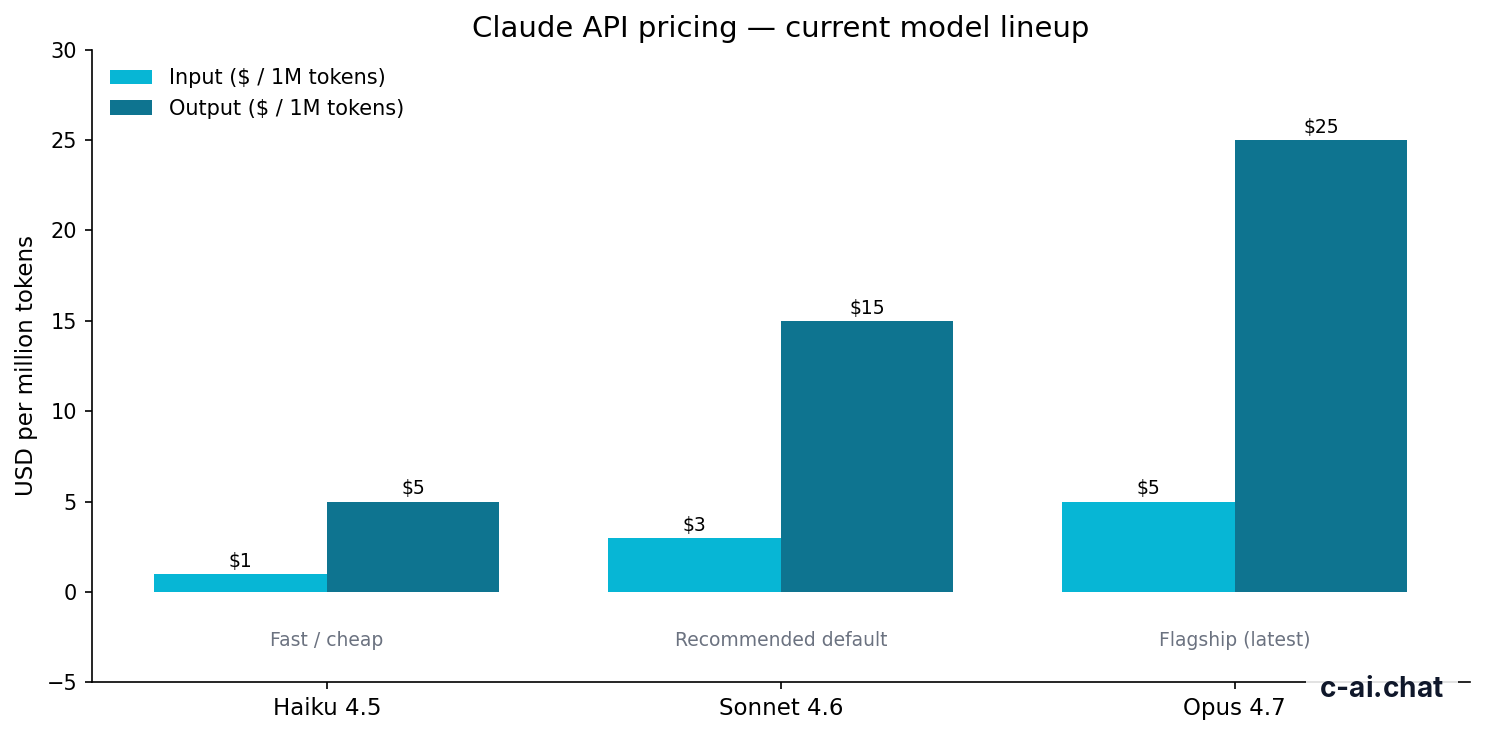
The fastest way to use the Claude API is to sign in to Anthropic Console, create an API key, install an official SDK, and call the Messages API with a supported model. Start with Sonnet 4.6 for most apps, Haiku 4.5 for low-cost speed, and Opus 4.7 for the strongest reasoning.
- Account required · create an API key in Anthropic Console
- Main format · use the Messages API for new Claude apps
- Billing · pay per million input and output tokens
- Default model · use Sonnet 4.6 unless the workload clearly needs another option
Opus 4.7
Use for complex reasoning, planning, and high-stakes long-context work.
$5/M input · $25/M output
Sonnet 4.6
Use as the default model for most production applications.
$3/M input · $15/M output
Haiku 4.5
Use for fast, lower-cost classification, extraction, routing, and simple chat.
$1/M input · $5/M output
Here is the minimal shape of a Claude API call using the official Python SDK. Set your API key as an environment variable first. Do not hard-code the key in source code or commit it to a repository.
Minimal example
Call Claude from Python
pip install anthropicANTHROPIC_API_KEYUse this pattern for a first test. Add streaming, tools, retries, logging, and validation before production.
import anthropic

client = anthropic.Anthropic()

message = client.messages.create(
    model="claude-sonnet-4-6",
    max_tokens=300,
    messages=[
        {
            "role": "user",
            "content": "Write a three-bullet project update for a product manager."
        }
    ],
)

print(message.content[0].text)
If you use JavaScript or TypeScript, the structure is similar: install the Anthropic SDK, create a client, pass the model name, set max_tokens, and provide a messages array. Anthropic’s official Claude docs are the canonical source for current SDK syntax, request parameters, and model identifiers.
How it works
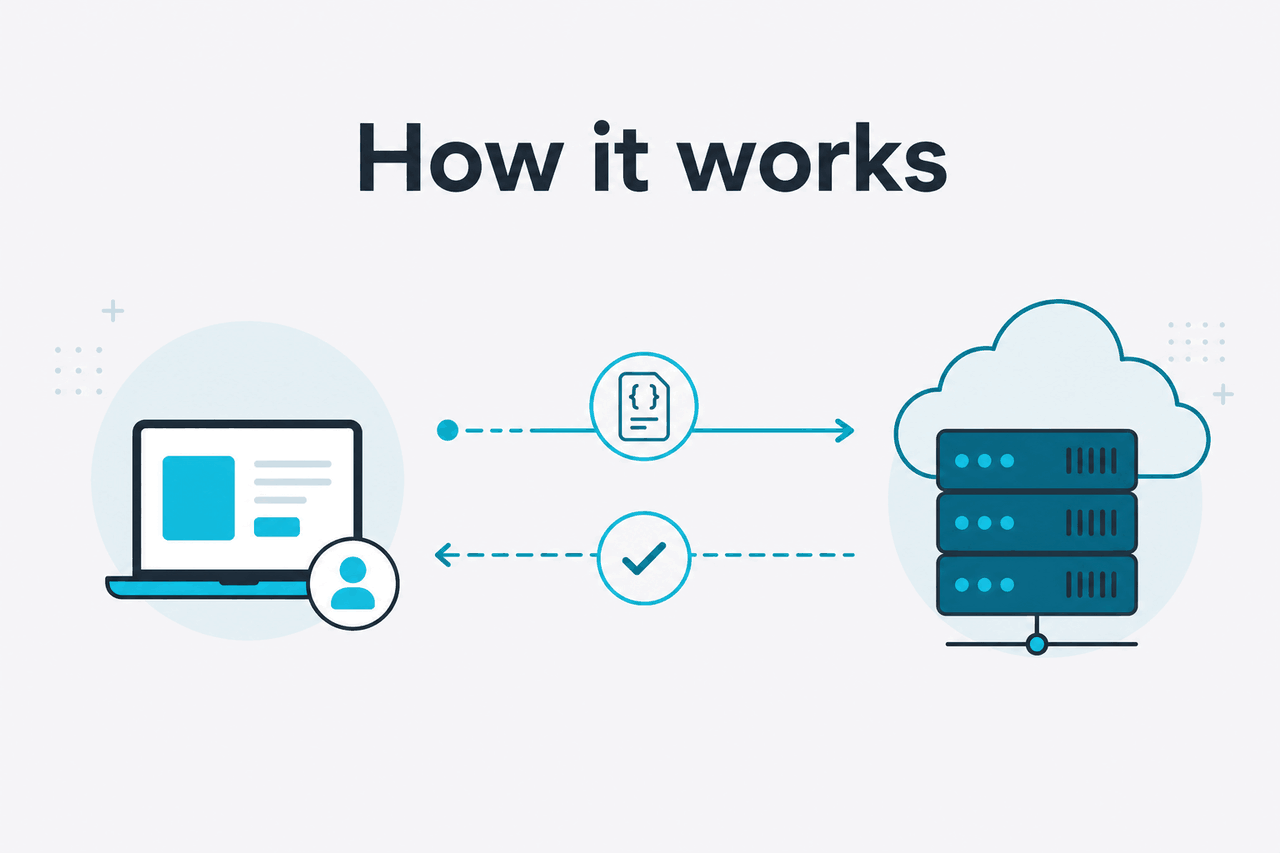
The Claude API accepts structured requests and returns generated text or tool-use instructions. In the standard Messages API flow, your application sends conversation turns, a target model, a maximum output length, and optional settings such as temperature, system instructions, tool definitions, and streaming.
Claude reads the input tokens and returns content blocks. Your app can display the text, store it, parse it, or route it into another workflow.
The API is not the same as using the Claude web app at claude.ai. The web app is an end-user product. The API is a programmable interface for building your own features, such as support assistants, code review bots, document analysis pipelines, internal search, data extraction, and agentic workflows. For model details, see Anthropic’s official model overview and our independent Claude models guide.
Create access
Open Anthropic Console, set up billing if required, and generate an API key. Store the key as an environment variable such as
ANTHROPIC_API_KEY.Choose a model
Start with Sonnet 4.6 for most production apps. Use Haiku 4.5 for high-volume, low-latency tasks. Use Opus 4.7 for complex reasoning and long-context work.
Send a Messages API request
Pass a
messagesarray with user and assistant turns. Add a system instruction when you need stable behaviour, such as tone, role, allowed actions, or output format.Handle the response
Read the returned content blocks. For simple chat, display the text. For tool use, execute the requested tool in your own code, then send the result back to Claude.
Add production controls
Log request IDs, set timeouts, retry safe failures, monitor token use, and protect secrets. For user-facing apps, add input validation and abuse controls.
A production request often includes more than a user message. You may add a system prompt, JSON-format instructions, retrieval results from your database, and tools Claude can request. Your app remains in control. Claude can suggest a tool call, but your code decides whether to run it, what data to pass, and how to handle failures.
For longer tasks, streaming improves perceived speed because the user sees output as Claude generates it. For repeated prompts with a stable prefix, prompt caching can lower costs. For offline jobs, the Batch API can reduce spend when you do not need immediate responses. For broader capability context, see our guide to Claude features.
What it costs
Claude API pricing is token-based. Anthropic charges separately for input tokens and output tokens. Input tokens are the text and data you send to Claude. Output tokens are the text Claude generates. Check Anthropic’s official API pricing page and our independent Claude pricing guide before estimating production cost.
| Model | Best fit | Input price | Output price | Notes |
|---|---|---|---|---|
| Claude Opus 4.7 | Highest-capability reasoning and complex work | $5/M tokens | $25/M tokens | Flagship model with a 1,000,000-token context window |
| Claude Sonnet 4.6 | Most production apps | $3/M tokens | $15/M tokens | Balanced default with a 1,000,000-token context window and 128,000-token max output |
| Claude Haiku 4.5 | Fast, lower-cost workloads | $1/M tokens | $5/M tokens | Good for classification, extraction, routing, and simple chat |
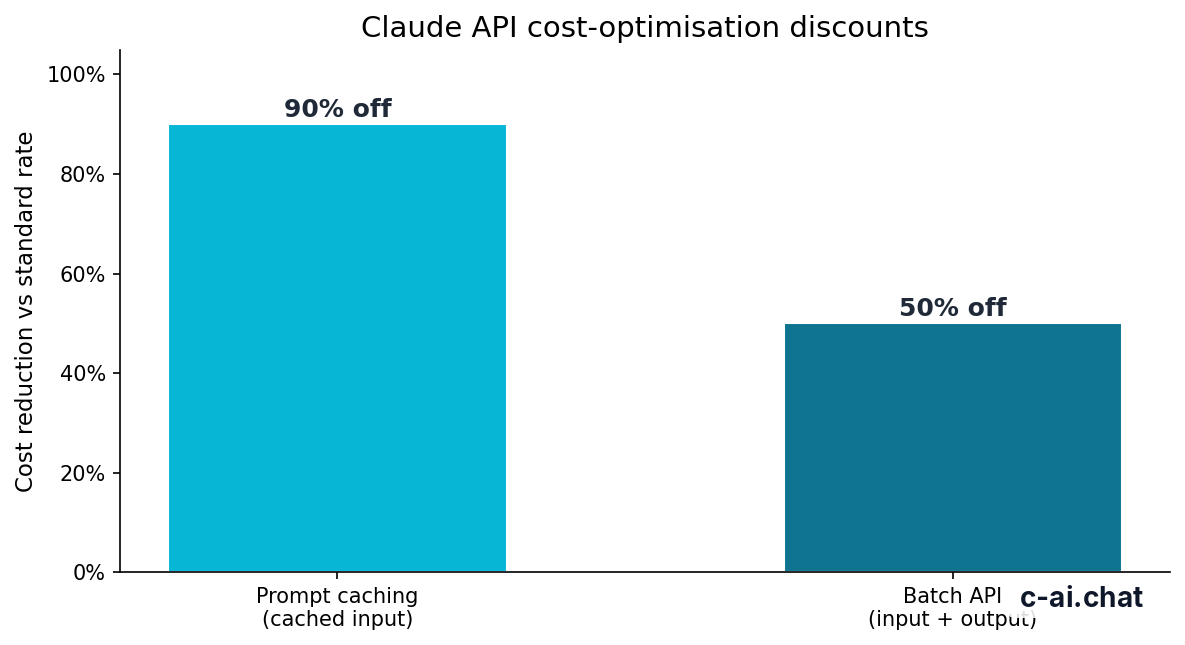
90% off
cached input tokens with prompt caching
Prompt caching matters when many requests share the same long prefix, such as a policy manual, tool instructions, or a stable system prompt. Cached input tokens receive a 90% discount. This helps most when the repeated part of the request is large and stable.
The Batch API gives a 50% discount in both directions for eligible asynchronous jobs. It is useful for classification, extraction, enrichment, and other workloads where the answer does not need to return instantly. It is not a fit for live chat, interactive agents, or user-facing flows that require low latency.
Worked example
Small Sonnet 4.6 request
Use estimates like this to reason about unit economics before traffic scales.
The practical cost lever is usually output length. Output tokens cost more than input tokens for the listed models. Set max_tokens, ask for concise answers when appropriate, and avoid sending context the model does not need.
Limits and gotchas
The API is straightforward to test, but several details surprise developers during launch. Treat these as design constraints.
What works well
- Fast prototypes with the Messages API
- Large-context document and knowledge workflows
- Structured support, extraction, coding, and analysis tasks
- Cost controls through caching and batching
What needs care
- Token costs on long outputs
- Rate limits and spend controls
- Secret handling and client-side exposure
- Validation for JSON, tools, and sensitive actions
- Rate limits vary by account and model. Your requests may be limited by requests per minute, input tokens per minute, output tokens per minute, or spend controls. Check Anthropic Console instead of assuming one universal ceiling.
- Model names must match the API. A friendly product name is not always the exact string your code should send. Use the identifiers in the official Anthropic model docs.
- Model availability can differ by workspace or access level. If a request returns a model-not-found or permission error, confirm that the model is enabled for your account and region.
- Regional and compliance requirements need planning. Enterprise features such as regional data residency, HIPAA-ready options, audit logs, and role-based controls are contract and configuration topics, not simple request flags. Anthropic publishes trust and security information at trust.anthropic.com.
- Context windows are large but not free. A 1,000,000-token context on supported models can handle large documents, but you still pay for tokens. Retrieval, chunking, and summarisation can be cheaper than sending everything.
- JSON output still needs validation. Claude can follow structured-output instructions, but your app should parse, validate, and reject malformed responses when correctness matters.
- Tool use is not execution. Claude can request a tool call. Your application executes the tool, checks permissions, and returns results. Never let a model perform sensitive actions without safeguards.
- Common errors often come from setup. Authentication failures usually mean a missing or invalid API key. Bad request errors often mean an incorrect model name, invalid message format, or
max_tokensvalue that does not fit the request. - Service incidents can happen. Check status.claude.com before debugging your own infrastructure during unexplained failures.
For production, build a small wrapper around the SDK instead of calling Claude directly from every part of your application. A wrapper gives you one place for retries, logging, model selection, prompt versioning, safety checks, and token accounting.
FAQ
The honest take
The Claude API is easy to test and serious enough for production. The hard part is system design. A useful integration needs clear prompts, controlled context, secure key handling, cost monitoring, retries, validation, and a plan for model changes.
Decision rule
Use the Claude API if you need Claude inside your own app, workflow, backend, or service.
Use claude.ai if you only need personal chat, document help, writing support, or coding assistance without building an integration.
Start small: one model, one task, one measurable output. Add streaming, tools, caching, batching, and routing only when the use case proves it needs them. That keeps cost predictable and makes failures easier to debug.
Independent guide. Not affiliated with Anthropic. For the official Claude product, visit claude.ai.
Last updated: 2026-05-12
This article is part of the Claude API for developers hub on c-ai.chat.