Claude tool use is Anthropic’s function-calling system: you define tools with JSON schemas, Claude requests a tool when needed, your code runs it, and you send the result back so Claude can continue. c-ai.chat is an independent guide, not Anthropic; for the broader developer setup, see our Claude API guide.
- The short answer
- How it works
- What it costs
- Limits and gotchas
- FAQ: other questions readers ask
- The honest take
- Sources
- Claude tool use lets Claude request functions you expose through the API.
- Your application executes the function. Claude does not run external code by itself.
- Tool definitions use JSON Schema for names, descriptions, and inputs.
- Token costs come from the selected model, tool definitions, messages, and results.
The short answer
Claude tool use connects Claude to software actions such as database lookups, calendar checks, search, ticket creation, code execution, or internal business logic. You describe each tool, Claude returns a structured request to use one, and your server decides whether and how to execute it.
Use tool use when Claude needs fresh data, private data, or deterministic actions. For example, Claude can ask your app to call get_order_status before answering a customer, instead of guessing from the prompt alone.
Minimal pattern
Define a tool, let Claude request it, return the result
{
  "tools": [
    {
      "name": "get_order_status",
      "description": "Look up the current status of a customer order.",
      "input_schema": {
        "type": "object",
        "properties": {
          "order_id": {
            "type": "string",
            "description": "The order identifier."
          }
        },
        "required": ["order_id"]
      }
    }
  ],
  "messages": [
    {
      "role": "user",
      "content": "Where is order A123?"
    }
  ]
}
Claude may respond with a tool-use request for get_order_status. Your application runs the lookup and sends the tool result back in the next API message.
The boundary is simple: Claude chooses and formats the tool request, but your system executes the tool. You control authentication, permissions, validation, side effects, retries, and logging.
How it works
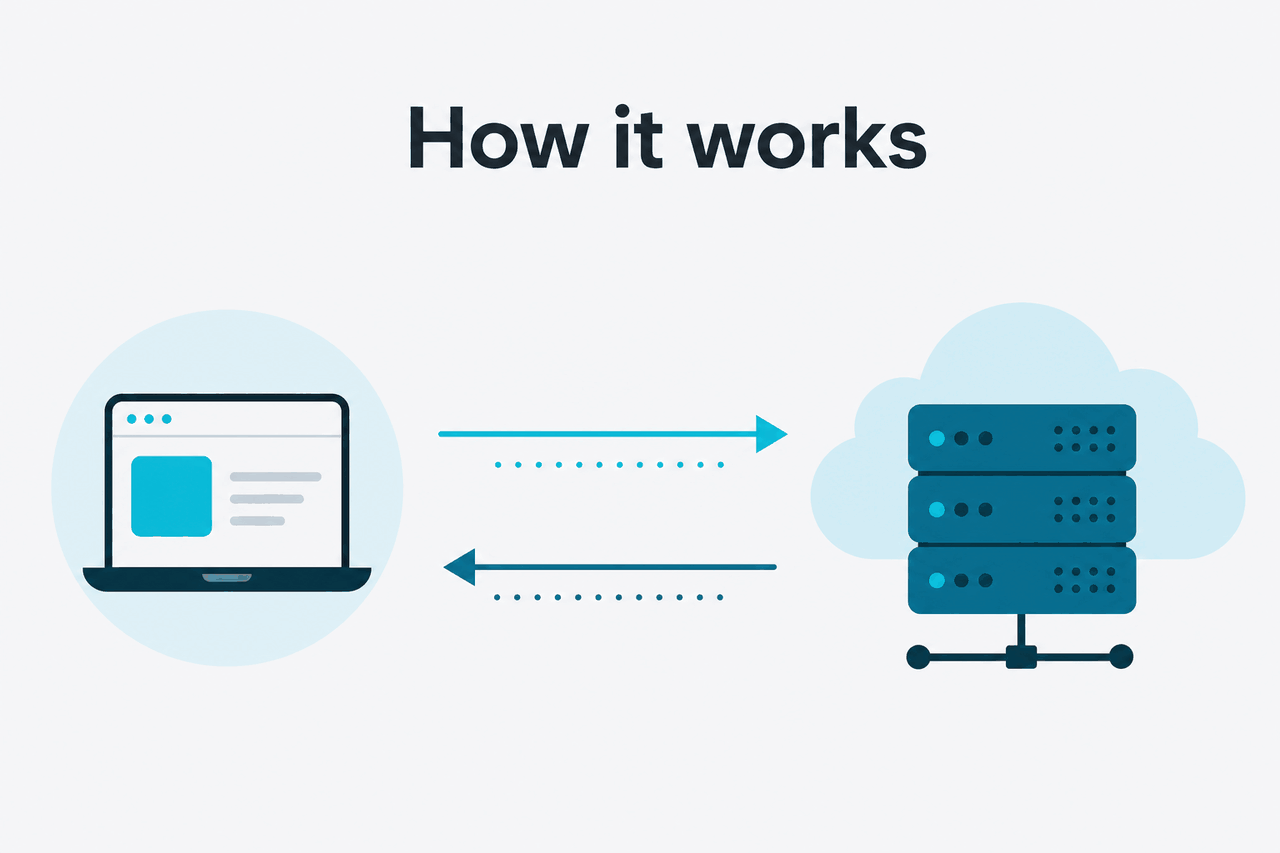
In the Messages API, you pass a tools array with the conversation. Each tool has a name, description, and input_schema. The description tells Claude when the tool is appropriate. The schema constrains the arguments Claude should produce. Anthropic documents this flow in the Claude tool use documentation.
When Claude decides a tool is needed, the model response includes a tool_use content block instead of a final answer. Your code reads the tool name and input, runs the matching function, and sends a tool_result block back to Claude. Claude can then answer the user, request another tool, or say it cannot complete the task.
Define the tool
Create a stable tool name, a precise description, and an
input_schemathat accepts only the fields your function needs.Send the user request
Call the Messages API with the conversation and your
toolsarray. Choose a model that fits your task, latency, and cost target.Inspect Claude’s response
If the response contains
tool_use, parse the tool name and JSON input. Do not assume the request is safe because it came from the model.Run your function
Validate the input, check permissions, execute the action, and capture a compact result. Keep secrets and internal-only data out of the model context unless they are required.
Return the tool result
Send the result back as
tool_result. Claude uses that result to continue the conversation or produce the final answer.
Vague tool descriptions cause avoidable errors. “Search data” is weak. “Search the company knowledge base for public support articles using a short query string” gives Claude a clearer boundary. The same applies to schemas: narrow enums, required fields, and clear descriptions usually produce more reliable calls.
Decision rule
Use tool use when Claude needs to act on your systems. Use the web product when the task is simple chat, document work, or a built-in Claude feature.
Tool use also works with agent-style loops. Your application can keep calling Claude until the model stops requesting tools, reaches a maximum step count, or hits a safety rule. For model selection, compare options in our Claude models guide.
What it costs
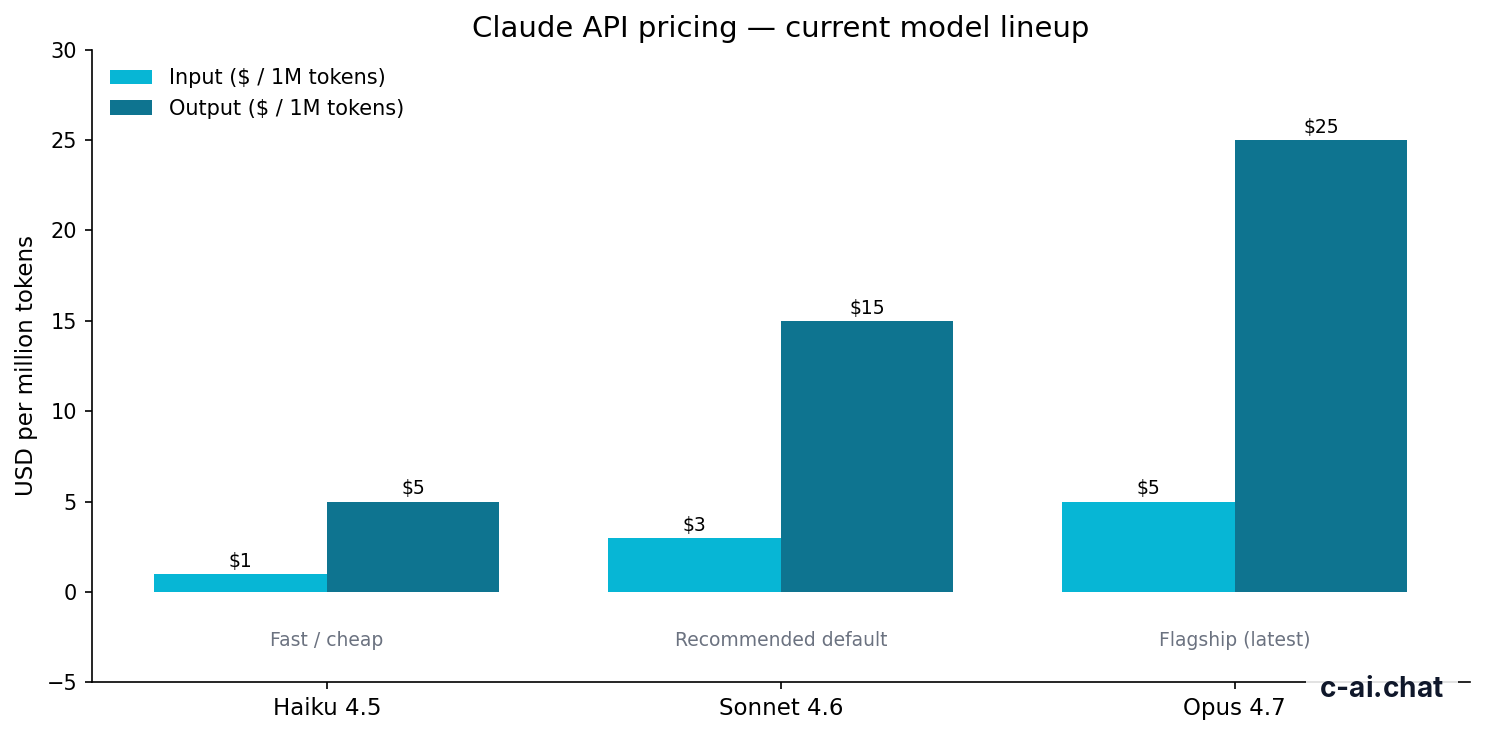
Claude tool use is priced by tokens through the selected API model. Tool definitions, user messages, assistant messages, tool requests, and tool results all count toward usage. Anthropic publishes API pricing in the Claude API pricing documentation, and product plan pricing at claude.com/pricing. For a plain-language cost overview, see our Claude pricing guide.
| Model | Typical role | Context and output | Input price | Output price |
|---|---|---|---|---|
| Claude Opus 4.7 | Flagship model for hard reasoning and high-value agent tasks | 1M context | $5/M tokens | $25/M tokens |
| Claude Sonnet 4.6 | Recommended default for most tool-use systems | 1M context; 128K max output | $3/M tokens | $15/M tokens |
| Claude Haiku 4.5 | Fast, lower-cost tool routing and simple workflows | Check official model docs for current limits | $1/M tokens | $5/M tokens |
Claude web plans
Free is $0. Pro is $20/month, or $17/month with annual billing. Max starts at $100/month.
Team plans
Team Standard is $25/seat, or $20/seat with annual billing. Team Premium is $125/seat, or $100/seat with annual billing.
Enterprise and API
Enterprise has a $20/seat base plus API rates. Custom tool use is mainly an API billing question, not a web-plan feature.
Tool use can increase context size because every tool definition is sent with the request, and tool results become part of the conversation. Keep schemas short, return only useful fields, and avoid dumping full database rows or long logs into the model unless the answer needs them.
90% off
cached input tokens with prompt caching
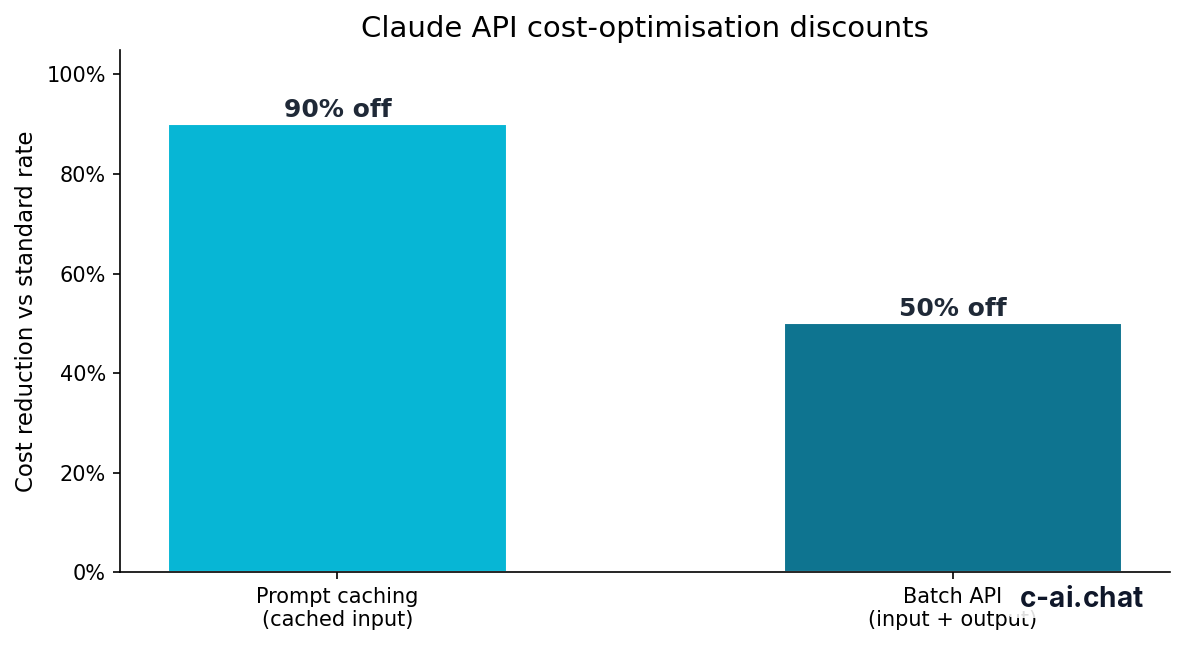
Prompt caching can reduce cost when the same tool definitions, system instructions, or reference context repeat across requests. Cached input tokens receive a 90% discount. This is especially useful for agents that send a large, stable set of tools on every turn.
The Batch API can reduce cost by 50% in both directions for asynchronous jobs. It is a poor fit for live chat because users expect immediate responses. It can help with offline tool-augmented tasks such as classifying tickets, enriching records, or running scheduled analyses.
Cost control example
A support agent with repeated tools
Most tool-use cost problems come from oversized inputs and verbose tool results, not from the function call mechanism itself.
Limits and gotchas
The tool-use API is flexible, but it needs guardrails. Validate inputs, check permissions, and control execution. These issues surprise developers most often.
- Rate limits still apply. Tool use does not bypass API rate limits or usage limits. Check your account limits and monitor production traffic.
- Model availability can vary by API access. Use the official Claude models overview before hard-coding model names into production systems.
- Region and compliance requirements matter. If you handle regulated data, review Anthropic’s trust and security materials at trust.anthropic.com and confirm your own legal requirements.
- Claude can request the wrong tool. Good descriptions reduce mistakes, but your application should still validate the selected tool and arguments.
- Tool inputs may be malformed. Schemas help, but you should handle missing fields, invalid enum values, unexpected types, and JSON parsing failures.
- Side effects need confirmation. For actions such as sending emails, deleting records, purchasing items, or changing permissions, add an approval step before execution.
- Long tool results can degrade answers. Return concise, structured results. If the tool finds many records, rank or filter them before sending the result back.
- Errors should be explicit. If a tool fails, send Claude a clear error result such as “order not found” or “permission denied,” rather than a stack trace.
- Status incidents affect production apps. If Claude responses slow down or fail, check status.claude.com before assuming your tool layer is broken.
Good fit when
- You need Claude to use private or live data.
- You can expose narrow, well-tested functions.
- You can validate requests before executing them.
- You need auditable actions in your own system.
Poor fit when
- You expect Claude to run arbitrary code safely without a sandbox.
- You cannot tolerate occasional tool-selection mistakes.
- Your workflow has destructive actions without human approval.
- Your tool results are huge and unfiltered.
For non-developers, tool use may be the wrong starting point. Claude’s built-in product features may cover the task without a custom API integration. See our Claude features overview if you are comparing product capabilities with developer tools.
FAQ: other questions readers ask
If you are deciding between the web app and a custom integration, start from the job you need done. The API gives you control and auditability. The web product is faster to adopt when built-in features are enough.
The honest take
Claude tool use is one of the main API features for building useful Claude applications. It turns Claude from a text-only assistant into a coordinator that can request specific actions from your software. The model still needs constraints. Your code must validate, authorize, execute, and log every tool call.
Use it when Claude needs live data, private systems, or controlled actions. Keep tools narrow, schemas strict, and results compact. If the task is simple chat or document work, the official Claude product may be enough. If you need a production workflow, the API tool-use pattern is the right place to start.
Independent guide. Not affiliated with Anthropic. For the official Claude product, visit claude.ai.
Last updated: 2026-05-12
This article is part of the Claude API for developers hub on c-ai.chat.