To cancel a Claude subscription, sign in to Claude, open your account or billing settings, choose your current paid plan, and cancel before your next renewal date; if you are trying to compare plans first, our Claude pricing guide covers the main differences, and this page explains what happens before, during, and after cancellation from an independent c-ai.chat perspective.

- The bottom line
- What’s actually included
- Is it worth it for you?
- Cheaper / better alternatives
- The honest take
The bottom line
You can cancel a Claude paid plan from your billing settings, and in most cases you keep access until the end of the current billing period rather than losing it immediately.
- Price · Free is $0, Pro is $20/month or $17/month annual, Max starts at $100/month
- Included · Paid plans add more usage, more features, and higher limits than Free
- Upgrade when · You regularly hit limits, need Claude Code, or want priority access
- Skip when · You only use Claude occasionally and Free covers your needs
If your goal is simply to stop future charges, cancellation is usually straightforward. The harder part is knowing what you lose. Pro includes Claude Code, Claude Cowork, unlimited Projects, Research access, additional models, and Office integrations for Excel, PowerPoint, and Word in beta. Max is aimed at heavier users who need 5x or 20x Pro usage, higher output limits, early feature access, and priority traffic.
If you are on Team or Enterprise, the process can be different because billing may be controlled by an admin rather than an individual user. In that case, check your workspace admin settings or ask the workspace owner before assuming you can cancel it yourself. If you are comparing personal plans with API spending, our guides to the Claude API and core Claude features can help you decide whether a downgrade makes more sense than a full cancellation.
What’s actually included
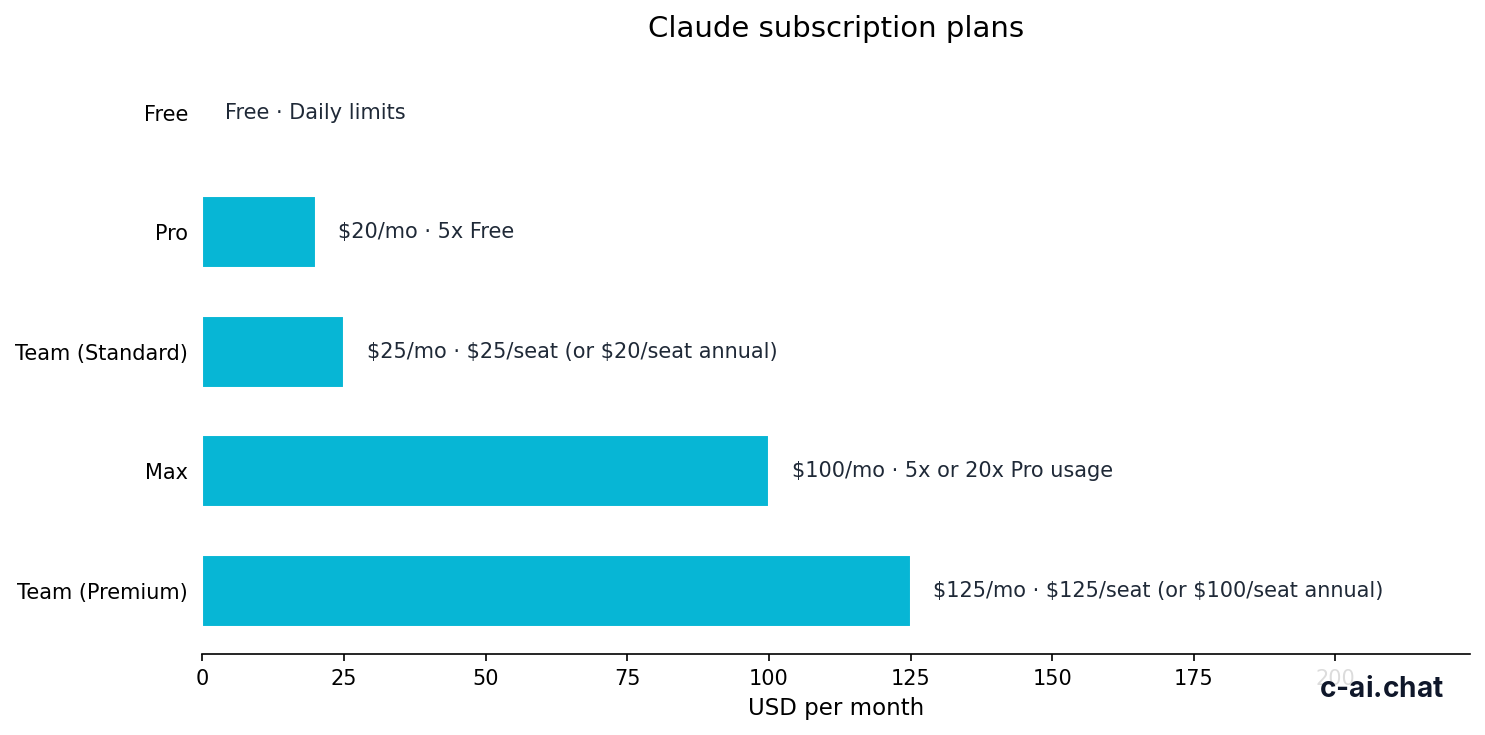
Before you cancel Claude, check what your current plan includes and what plan you will fall back to afterward. That prevents the common mistake of cancelling Pro or Max, then realising you depended on features not available on Free.
| Plan | Price | Who it is for | What you get | What to know before cancelling |
|---|---|---|---|---|
| Free | $0/month | Occasional personal use | Web, iOS, Android, and desktop access with daily usage limits | You keep basic access, but limits are lower |
| Pro | $20/month or $17/month annual | Individuals who use Claude regularly | Claude Code, Claude Cowork, unlimited Projects, Research access, additional models, Office integrations in beta | After cancellation, you lose paid-only extras at the end of the billing period |
| Max | From $100/month | Power users | 5x or 20x Pro usage, higher output limits, early feature access, priority traffic | If you mainly need higher limits, a downgrade may be better than a full cancellation |
| Team Standard | $25/seat/month or $20/seat/month annual | Small teams | SSO, admin controls, shared workspace | Seat billing and admin controls may affect when changes take effect |
| Team Premium | $125/seat/month or $100/seat/month annual | Higher-capacity teams | Priority traffic and expanded admin controls | Best handled by the workspace admin |
| Enterprise | $20/seat base + usage at API rates | Larger organisations | SCIM, audit logs, HIPAA-ready options, role-based access, spend controls, regional data residency | Contract terms may govern cancellation and renewal |
For most readers searching for “cancel Claude subscription,” the relevant plan is Pro. That is the main paid individual tier. If you cancel Pro, you are not deleting your Claude account by default. You are usually ending the recurring paid subscription and returning to Free when the current period ends.
That distinction matters. Cancelling billing is not the same as deleting data, leaving a team workspace, or closing your account entirely. If your concern is privacy, workspace membership, or data controls, you may need a different action than subscription cancellation. The official billing and support pages are the right place to confirm the exact behavior for your account type.
Free
$0/month
For occasional users
- Web, mobile, and desktop access
- Daily usage limits
Pro
$20/month
For regular individual use
- Claude Code and Claude Cowork
- Unlimited Projects, Research, extra models, Office integrations in beta
Max
From $100/month
For heavy users
- 5x or 20x Pro usage
- Higher output limits, early features, priority traffic
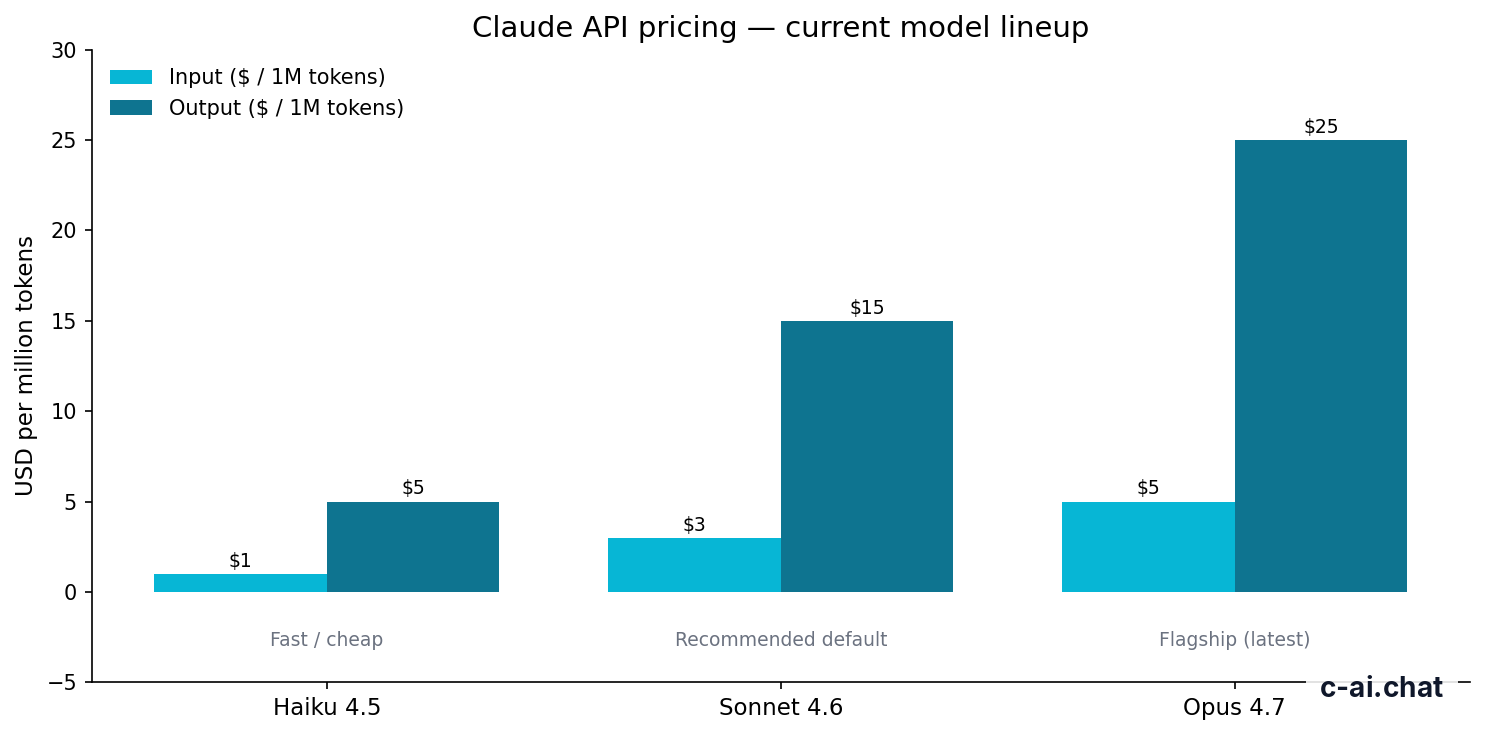
If you use Claude mainly through the API rather than the consumer app, subscription cancellation may not be the right concept at all. API access is priced by token usage instead of a flat personal subscription. Current flagship pricing is $5 per million input tokens and $25 per million output tokens for Claude Opus 4.7, with prompt caching offering 90% off cached input and Batch API offering 50% off both input and output. That is separate from cancelling a Pro or Max plan in the Claude app.
90% off
cached input tokens with prompt caching on the API side
If that sounds closer to your use case, compare app subscriptions with the API pricing model before you cancel. Some users realise they do not need a monthly app plan once they move specific workflows into API-based tools or team-managed environments.
Is it worth it for you?

Whether cancelling is the right move depends on how often you hit limits, which features you actually use, and whether you need individual access or a team setup.
Pick when
- You only use Claude occasionally and Free covers your daily needs
- You subscribed for one project and no longer need Claude Code, Research, or unlimited Projects
- You are reducing software spend and can accept lower limits
- You have moved to a Team or Enterprise workspace and no longer need a personal paid plan
Skip when
- You regularly hit Free limits and depend on Claude for work
- You use paid-only features such as Claude Code or Research every week
- You need priority traffic or higher output limits during busy periods
- You are cancelling in frustration over a temporary outage that may be visible on the status page
For light users, cancellation usually makes sense. If you open Claude a few times per week for drafting, brainstorming, or quick explanations, Free may be enough. In that case, paying $20 per month for Pro is hard to justify unless one paid feature matters to your workflow.
For regular solo professionals, the answer is less obvious. If you write code, create long documents, run repeat projects, or use Claude as a daily work assistant, Pro can still be reasonable. The cancellation question becomes less about headline price and more about whether Free interruptions will cost you more in lost time than the subscription saves.
For heavy users, full cancellation is often the wrong move. If you are on Max because you hit usage ceilings, downgrading to Pro may just recreate the problem. If you are on Team because you need admin controls or shared workspaces, dropping to an individual plan may remove features your group actually relies on. That is why it helps to compare plan fit, not just monthly cost. Our main pricing page and Claude FAQ cover the common edge cases.
One more practical point: if you are cancelling because Claude seems slow or unavailable, check Claude status first. A short-lived platform issue is a poor reason to make a billing change you may need to reverse later.
Cheaper / better alternatives
Sometimes the better move is not “cancel Claude subscription” but “downgrade,” “switch account type,” or “use the API only when needed.”
| Option | Cost | Best for | Main trade-off |
|---|---|---|---|
| Downgrade to Free | $0/month | Occasional personal use | Daily limits and fewer paid features |
| Keep Pro | $20/month or $17/month annual | Regular individual use | Recurring cost |
| Downgrade from Max to Pro | $20/month or $17/month annual | Users who need paid features but not maximum usage | Much lower limits than Max |
| Move to Team Standard | $25/seat/month or $20/seat/month annual | Small teams that need admin controls and shared workspace | Seat-based billing, not ideal for solo users |
| Use API instead of an app subscription | Usage-based | Developers and workflow builders | Requires setup and pay-per-token management |
The cheapest alternative is obvious: cancel and use Free. That works if your needs are small and predictable. The next best alternative for many power users is not Free, though. It is dropping from Max to Pro. If your issue is budget rather than dissatisfaction, that step can preserve most of the individual-user value while cutting cost sharply.
There is also a team-vs-personal question. If your company already pays for Team or Enterprise, your personal Pro subscription may be redundant. Team Standard starts at $25 per seat per month or $20 per seat per month annual and adds SSO, admin controls, and a shared workspace. Enterprise adds a $20 per seat base plus usage at API rates, with SCIM, audit logs, HIPAA-ready options, role-based access, spend controls, and regional data residency.
For developers, the API can be a better fit than a consumer plan if your usage is tied to products, scripts, or automations rather than direct chat sessions. Claude Sonnet 4.6 is priced at $3 per million input tokens and $15 per million output tokens, while Claude Haiku 4.5 is $1 per million input tokens and $5 per million output tokens. If your use is intermittent, that can be cheaper than keeping a monthly app plan you barely touch.
Check your renewal date
Open billing settings and confirm when the next charge happens. Cancel before that date if you want to avoid another billing cycle.
List the features you actually use
If you rely on Claude Code, Research, or unlimited Projects, moving to Free may feel restrictive fast.
Choose the real alternative
Pick
Free,Pro,Max,Team, orAPIbased on usage pattern, not guesswork.Cancel or downgrade in the official account area
Use Claude’s own billing interface. If support is needed, go through Anthropic’s official help channels.
If you need more background first, the homepage at c-ai.chat maps the Claude ecosystem, while our features guide is useful if you are unsure whether a paid-only capability is something you really depend on.
The honest take
If you searched for how to cancel a Claude subscription, the direct answer is simple: go to your official Claude account billing settings, cancel the paid plan, and expect access to continue until the current billing period ends in most standard cases. For casual users, that is often the right move. Free gives you a real fallback, so you are not locked out of Claude entirely.
But if you use Claude heavily for work, coding, research, or long-running projects, cancellation can be a false economy. Downgrading may be smarter than walking away, and team or API options may fit better than a solo paid plan. The right choice is the one that matches your usage pattern, not the one with the lowest visible price.
FAQ
Does cancelling Claude delete my account?
Usually no. Cancelling a subscription normally stops future paid renewals and returns you to a lower tier, often Free, rather than deleting the account itself. Account deletion is a separate action.
Do I lose access immediately after I cancel Claude Pro?
In most cases, no. You generally keep paid access until the end of the current billing period. Check the official billing screen in your account to confirm the exact end date.
Can I get a refund after cancelling?
Refund handling depends on Anthropic’s official billing terms and any app-store rules if you subscribed through mobile. Do not assume cancellation automatically creates a refund. Check the official support and billing pages for your case.
What happens to Projects after I cancel?
Your access may change based on the features available on the plan you move to. If unlimited Projects was part of your paid tier, review your workspace before cancelling so you know what changes when the billing period ends.
Is cancelling Pro the same as cancelling Max?
The billing action is similar, but the impact is different. Max users lose much higher usage allowances, higher output limits, early feature access, and priority traffic. For many Max users, downgrading to Pro is the more practical option.
Can a Team member cancel a Claude Team subscription?
Not always. Team billing is often controlled by an admin or workspace owner. If you are a member rather than the billing admin, you may need someone else to make the change.
Where do I check whether Claude is down before I cancel?
Use the official status page at status.claude.com. If a temporary outage or degraded performance is the issue, waiting may be better than cancelling in the moment.
Independent guide. Not affiliated with Anthropic. For the official Claude product, visit claude.ai.
Last updated: 2026-05-12
This article is part of the Claude pricing & plans hub on c-ai.chat.