Claude AI pricing splits into chat subscriptions for individuals and teams, plus separate API billing by million tokens; this independent guide explains the official prices, upgrade points, API costs, and cheaper alternatives. For the broader hub, see our Claude pricing guide.

- The bottom line
- What’s actually included
- Is it worth it for you?
- Cheaper / better alternatives
- The honest take
- FAQ
- Sources
The bottom line
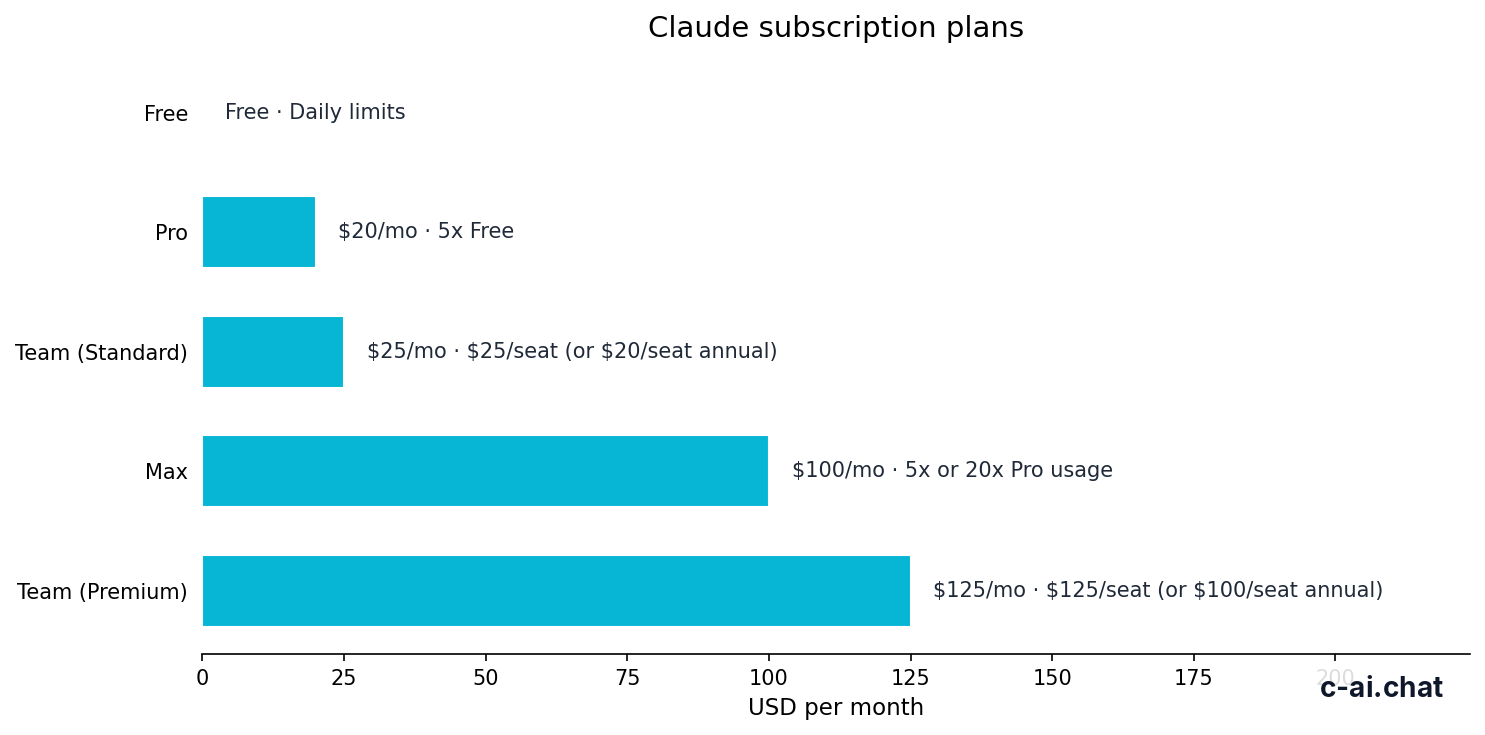
Free is enough for occasional Claude use. Pro is the first paid tier for individuals who use Claude most days. Max is for heavy individual users who hit Pro limits. Team is for managed business use. API access is billed separately by token usage.
- Free is $0/month with daily usage limits.
- Pro is $20/month, or $17/month annual.
- Max starts at $100/month.
- Team Standard is $25/seat/month, or $20/seat/month annual.
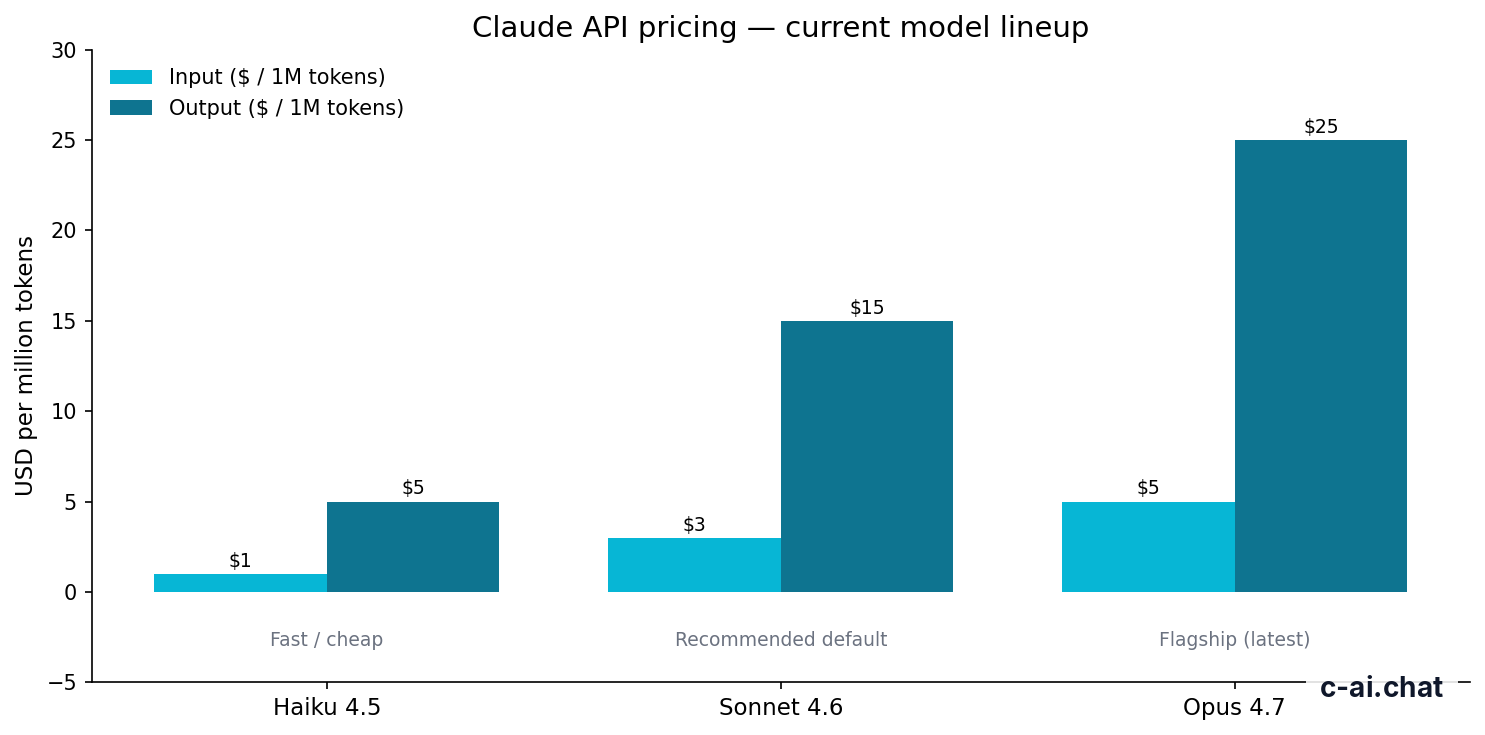
- API starts at $1/M input tokens and $5/M output tokens on Haiku 4.5.
Anthropic makes Claude and publishes the official plan details at claude.com/pricing. The official product is claude.ai. c-ai.chat is independent. We explain the pricing in practical terms: which plan fits, what the API costs, and when a cheaper option is enough.
The key distinction is subscription pricing versus API pricing. A Claude subscription gives you access through Claude’s apps, with plan-level limits and product features. API pricing is different. Developers pay for the tokens their application sends to and receives from Claude. If you are building with Claude, start with our Claude API guide and Anthropic’s official API pricing docs.
For most people, the choice is simple. Use Free if you ask a few questions a day. Choose Pro if Claude is part of your regular work. Choose Max only if Pro limits interrupt valuable work. Choose Team if you need admin controls and shared workspace features. Choose Enterprise if you need contract, compliance, and governance controls.
What’s actually included
Claude’s paid plans bundle access, usage allowance, and product features. They do not make the API free. If you call Claude through the API, token usage is billed under API pricing even if you also pay for a Claude subscription.
Free
$0/month
For occasional users testing Claude
- Web, iOS, Android, and desktop access
- Daily usage limits
- No card required
Pro
$20/month
For individuals using Claude for regular work
- $17/month annual option
- Claude Code
- Claude Cowork
- Unlimited Projects
- Research access
- Additional models
- Office integrations for Excel, PowerPoint, and Word beta
Max
From $100/month
For heavy individual users
- 5x or 20x Pro usage
- Higher output limits
- Early feature access
- Priority traffic
For individuals, the main jump is Free to Pro. Free can handle occasional questions, light rewriting, and basic research. Pro is better when you keep Claude open while you work. It adds Claude Code, Claude Cowork, unlimited Projects, Research access, additional models, and Office integrations for Excel, PowerPoint, and Word beta.
Max is a capacity plan. It raises the ceiling. If you generate long outputs, run many sessions, or rely on Claude for sustained work blocks, Max may be justified. If you only use Claude for short tasks, Max is likely more than you need.
| Plan | Price | Best fit | Key additions |
|---|---|---|---|
| Free | $0/month | Light personal use | Web, iOS, Android, and desktop access with daily usage limits |
| Pro | $20/month, or $17/month annual | Individuals using Claude most days | Claude Code, Claude Cowork, unlimited Projects, Research access, additional models, Office integrations |
| Max | From $100/month | Power users who hit Pro limits | 5x or 20x Pro usage, higher output limits, early feature access, priority traffic |
| Team Standard | $25/seat/month, or $20/seat/month annual | Small teams | SSO, admin controls, shared workspace |
| Team Premium | $125/seat/month, or $100/seat/month annual | Higher-capacity teams | Priority traffic, expanded admin controls |
| Enterprise | $20/seat base + API rates | Large organisations with governance needs | SCIM, audit logs, HIPAA-ready options, role-based access, spend controls, regional data residency |
Teams should look beyond the headline seat price. Team Standard adds the management features a business usually needs first: SSO, admin controls, and a shared workspace. Team Premium is a higher-capacity tier with priority traffic and expanded admin controls. Enterprise is for organisations that need custom controls, not just more messages.
Claude’s API uses separate model pricing. The model lineup includes Claude Opus 4.7, Claude Sonnet 4.6, and Claude Haiku 4.5. For a model-by-model overview, see our Claude models guide and Anthropic’s official models overview.
| API model | Positioning | Input price | Output price | Context and output |
|---|---|---|---|---|
| Claude Opus 4.7 | Flagship model | $5/M tokens | $25/M tokens | 1,000,000-token context |
| Claude Sonnet 4.6 | Best balance | $3/M tokens | $15/M tokens | 1,000,000-token context; 128K max output |
| Claude Haiku 4.5 | Fastest and cheapest | $1/M tokens | $5/M tokens | Best for high-volume lower-cost tasks |
Output tokens often matter more than expected. A short prompt that asks for a long report can cost more on output than input. For chat subscriptions, you think in terms of usage limits. For the API, estimate both directions.
90% off
cached input tokens with prompt caching
Prompt caching can reduce repeated input costs when your application sends the same long context many times. Batch API can reduce costs by 50% in both directions when the workload can wait and does not need immediate responses. These are developer features. They matter most for API users, not ordinary Claude chat subscribers.
Worked example
A simple API cost comparison
Use Haiku 4.5 for cheaper high-volume tasks when quality is sufficient. Use Sonnet 4.6 when better reasoning or writing quality is worth the higher token rate.
If you want feature-level context before choosing a subscription, see our Claude features guide. Pricing only makes sense after you know whether you need Projects, Research, Office integrations, coding help, or team controls.
Is it worth it for you?

Claude is worth paying for when it saves regular work time, improves work quality, or replaces a slower workflow. It is not worth paying for just because a paid tier exists. The right test is whether you hit a real limit or need a specific paid feature.
Pick when
- You use Claude most workdays and Free limits interrupt you.
- You want Projects, Research access, Claude Code, or Office integrations.
- You manage a team and need SSO, admin controls, or a shared workspace.
- You are building with the API and can estimate token volume.
Skip when
- You only ask a few short questions each week.
- You do not need the paid features included in Pro.
- You are considering Max before proving that Pro limits are a problem.
- Your API workload is unclear and you have not measured input and output tokens.
For writers, marketers, students, founders, analysts, and operators, Pro is the obvious paid starting point. It can justify its cost if Claude helps with drafts, research, synthesis, spreadsheets, presentations, or recurring work. The important question is not whether Claude can answer a prompt. It is whether you use the answers often enough.
For developers, the answer splits. If you use Claude through the product interface for coding help, Pro may be enough. If you use Claude Code heavily, run longer sessions, or regularly hit output limits, Max may be easier to justify. If you are embedding Claude in an app, focus on API pricing and model selection instead of subscription tiers.
For small teams, Team Standard is the practical entry point because it adds SSO, admin controls, and a shared workspace. Those features reduce operational risk. A team can standardise access, manage users, and avoid scattered individual accounts. Team Premium is a better fit when capacity and expanded administration matter more than the lowest seat cost.
For enterprises, the public price line is not the whole story. Enterprise uses a $20/seat base + API rates, with custom contracts. The reason to choose Enterprise is governance: SCIM, audit logs, HIPAA-ready options, role-based access, spend controls, and regional data residency. If those terms are unfamiliar or unnecessary, Team may be the better place to start.
The cleanest way to decide is to treat pricing as a usage ladder. Start Free. Move to Pro when you get repeatable value. Move to Max when Pro limits block valuable work. Move to Team when management and shared work matter. Move to Enterprise when compliance, controls, and custom contracting matter.
Step 1: Identify the interface
If you use Claude in a browser or app, compare subscriptions. If software calls Claude from code, compare API models and token usage.
Step 2: Measure the bottleneck
Upgrade only when you hit usage limits, need a listed feature, or require admin controls.
Step 3: Choose the smallest plan that solves it
Free to Pro is the common jump. Pro to Max should be based on sustained usage, not curiosity.
Step 4: Recheck after real use
For API projects, review input and output tokens. For teams, review seats, admin needs, and security requirements.
Cheaper / better alternatives
The cheaper alternative is often the plan below, not a different product. The better alternative is the plan above only when it removes a real constraint. Here is the practical comparison inside the Claude ecosystem.
| If you are considering | Cheaper option | Higher option | Decision rule |
|---|---|---|---|
| Pro | Free at $0/month | Max from $100/month | Choose Pro when Free limits or missing paid features affect regular work. |
| Max | Pro at $20/month, or $17/month annual | No higher individual tier listed here | Choose Max only when 5x or 20x Pro usage, higher output limits, early feature access, or priority traffic matter. |
| Team Standard | Individual Pro accounts at $20/month each, or $17/month annual | Team Premium at $125/seat/month, or $100/seat/month annual | Choose Team Standard when shared workspace, SSO, and admin controls are needed. |
| Team Premium | Team Standard at $25/seat/month, or $20/seat/month annual | Enterprise at $20/seat base + API rates | Choose Team Premium for higher-capacity team use with priority traffic and expanded admin controls. |
| Opus 4.7 API | Sonnet 4.6 at $3/M input and $15/M output, or Haiku 4.5 at $1/M input and $5/M output | No higher listed model here | Use Opus 4.7 when flagship capability justifies $5/M input and $25/M output. |
Free is the right alternative to Pro if you are still testing Claude. Do not pay before you have a task pattern. Examples include summarising articles, rewriting emails, asking for study help, or testing prompts. If Free covers that without disruption, keep using it.
Pro is the cheaper alternative to Max. The gap is large: Pro is $20/month, or $17/month annual, while Max starts at $100/month. If Pro limits rarely interrupt you, Max is not a clean financial choice. If Pro limits interrupt paid work several times a week, Max may be rational.
For teams, individual Pro accounts can look cheaper on paper. They may be fine for a very small, informal group. The trade-off is management. Team Standard adds SSO, admin controls, and a shared workspace. If you need those, the Team plan is not just a higher price. It solves a different problem.
For API users, the alternative is often a different Claude model. Haiku 4.5 is the cheapest listed model at $1/M input and $5/M output. Sonnet 4.6 offers the best balance at $3/M input and $15/M output. Opus 4.7 is the flagship at $5/M input and $25/M output, with a 1,000,000-token context. The best model is the cheapest one that meets your quality and latency requirements.
Cost optimisation can change the answer. If your application repeatedly sends the same long instructions, documents, or system context, prompt caching can reduce cached input tokens by 90%. If your workload can run asynchronously, Batch API can reduce costs by 50% in both directions. Both require implementation discipline. They are not automatic savings for every workload.
There are also non-price alternatives. You can reduce spend by shortening prompts, limiting output length, routing simple tasks to cheaper models, caching repeated context, batching non-urgent work, and monitoring failures. For product teams, these engineering choices often matter more than the headline model price.
If you are comparing Claude with other assistants, keep the comparison task-specific. A plan that is cheaper can still be worse for long-document work, coding workflows, or team controls. A plan that is more expensive can still be unnecessary if your work is simple. The right benchmark is your workload, not a feature checklist.
The honest take
Claude’s pricing is straightforward once you separate subscriptions from API usage. Free is for light use. Pro is the sensible default for individuals who use Claude regularly. Max is for heavy users who already know Pro is too restrictive. Team Standard is for small teams that need shared controls. Team Premium and Enterprise are for higher-capacity or governed environments.
The API is a separate decision. Haiku 4.5 is the low-cost model, Sonnet 4.6 is the default balance, and Opus 4.7 is the flagship. Use prompt caching, Batch API, and model routing if you care about cost at scale. If you are unsure, start smaller, measure actual usage, then upgrade only when the limit is real.
FAQ
Is Claude Free really free?
Yes. Free is $0/month and includes web, iOS, Android, and desktop access with daily usage limits.
How much is Claude Pro?
Claude Pro is $20/month, or $17/month annual. It is designed for individuals who use Claude regularly.
Does Claude Pro include API usage?
No. Claude chat subscriptions and API usage are separate. API calls are billed per million input and output tokens through Anthropic’s platform.
Which Claude API model is cheapest?
Claude Haiku 4.5 is the cheapest listed model at $1/M input tokens and $5/M output tokens.
Which Claude API model should most developers start with?
Claude Sonnet 4.6 is the best default for many developers at $3/M input tokens and $15/M output tokens because it balances quality and cost.
When is Claude Max worth it?
Claude Max is worth considering when Pro limits interrupt valuable work and you need 5x or 20x Pro usage, higher output limits, early feature access, or priority traffic.
Where can I check official security and trust information?
Anthropic publishes trust information at trust.anthropic.com. For general support, use support.anthropic.com.
For more quick answers, see our Claude FAQ or return to the c-ai.chat homepage.
Independent guide. Not affiliated with Anthropic. For the official Claude product, visit claude.ai.
Last updated: 2026-05-12
This article is part of the Claude pricing & plans hub on c-ai.chat.