Claude Pro is worth it for individuals who use Claude most days for writing, coding, research, spreadsheets, or document work; c-ai.chat is an independent guide, not Anthropic, and this review compares Pro against the official Claude pricing, Free, Max, Team, Enterprise, and API options.
- The bottom line
- What’s actually included
- Is it worth it for you?
- Cheaper and better alternatives
- The honest take
- FAQ
- Sources
The bottom line
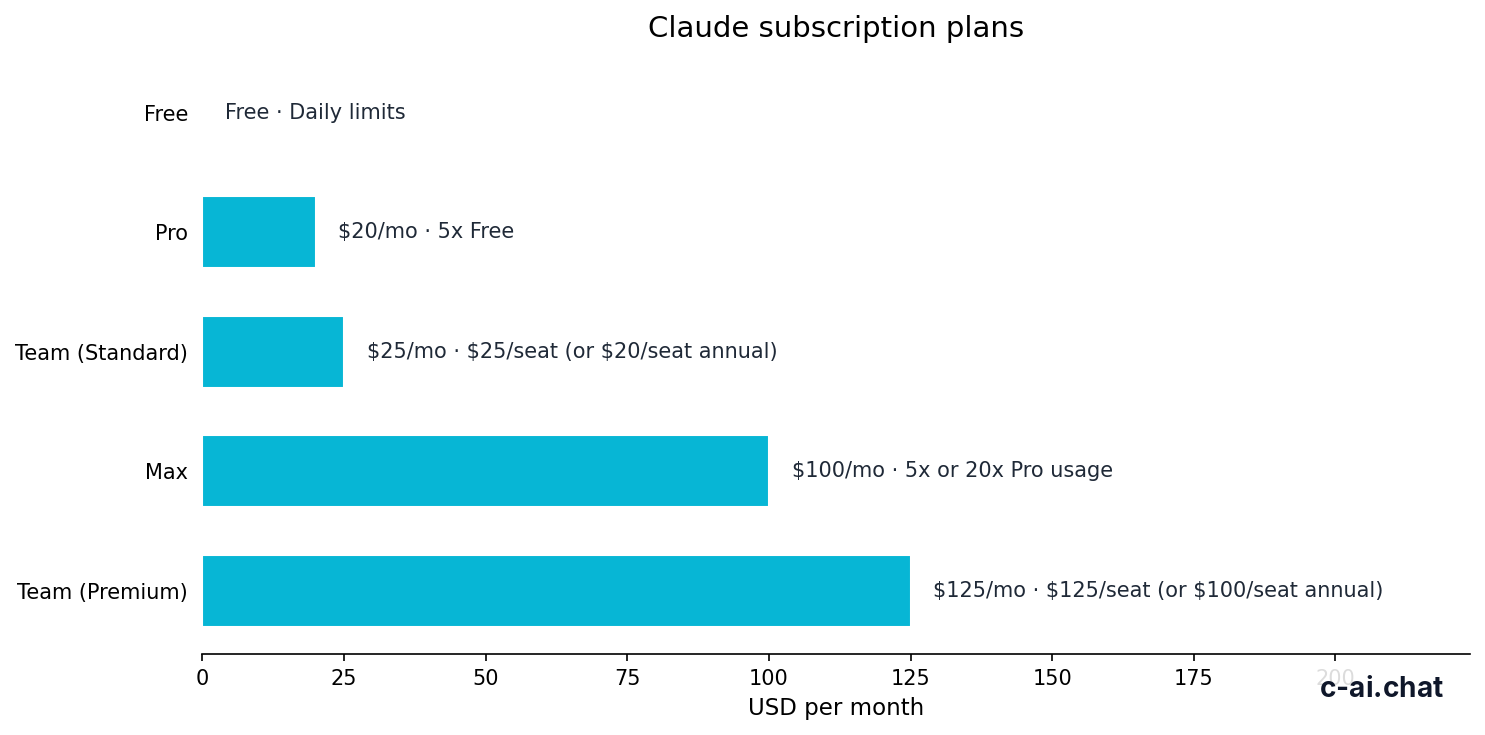
Claude Pro costs $20/month, or $17/month on an annual plan, and is the right upgrade when Free plan limits interrupt regular work.
It is not automatically worth it. If you ask Claude a few casual questions each week, stay on Free. If you need admin controls, shared workspaces, or higher team capacity, compare Team or Enterprise. If you build apps with Claude, use API pricing instead of a Pro subscription.
- $20/month · or $17/month annual
- Includes Claude Code, Claude Cowork, Projects, Research, Claude models, and Office beta
- Upgrade when Free limits interrupt real work
- Skip when you need Team controls, Enterprise governance, or API billing
The official product is claude.ai. Anthropic publishes current plan details at claude.com/pricing. This page explains those options from a buyer’s point of view.
What’s actually included
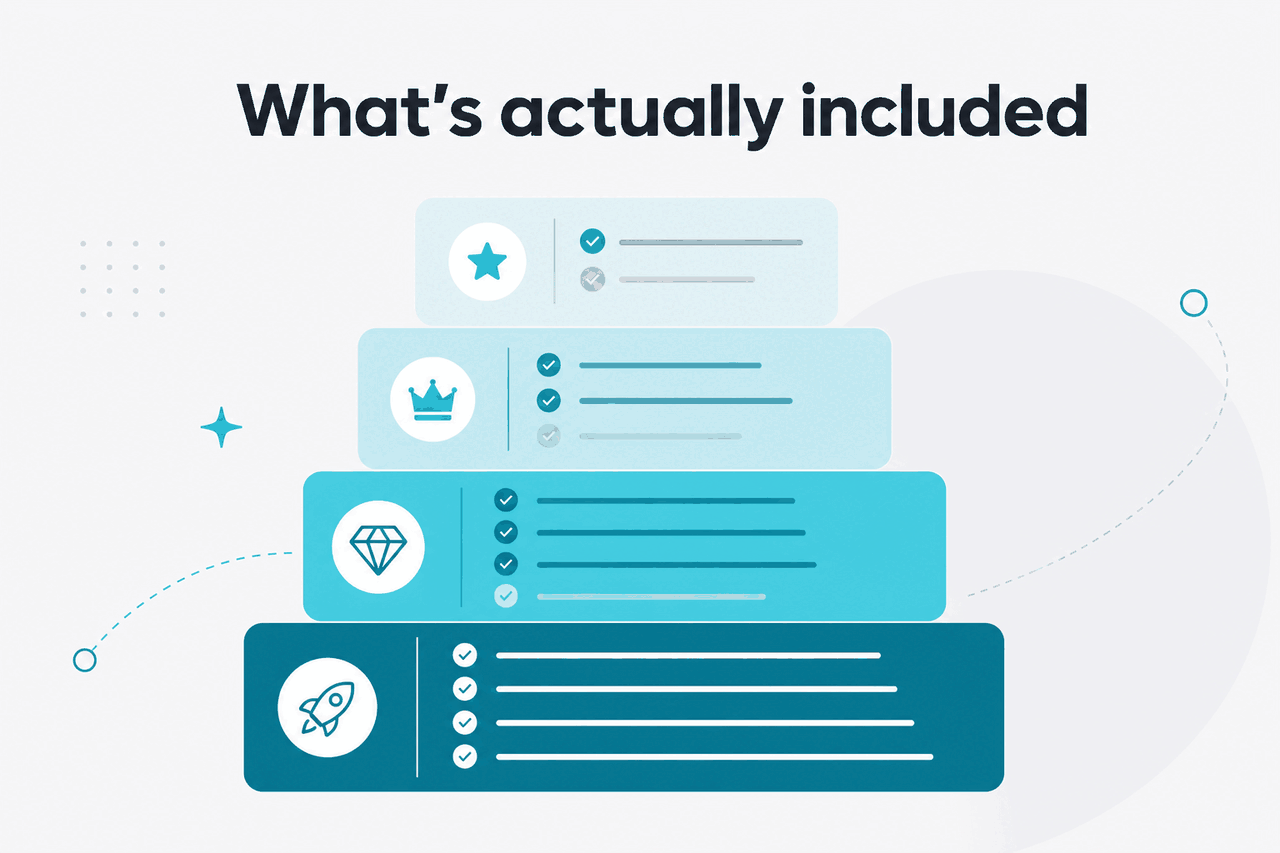
Claude Pro sits between Free and Max. It gives one individual more capability inside Claude’s official apps, but it does not create a managed team workspace or remove all usage limits.
Free
$0/month
For occasional use and testing Claude
- Web, iOS, Android, and desktop access
- Daily usage limits
- No subscription required
Pro
$20/month
For individuals who use Claude for regular work
- $17/month annual option
- Claude Code and Claude Cowork
- Projects
- Research access
- Claude models available on Pro
- Office beta for Excel, PowerPoint, and Word
Max
From $100/month
For power users who hit Pro limits
- Higher personal usage than Pro
- More room for intensive work sessions
- Useful after Pro becomes the bottleneck
The main Pro benefit is not one feature. It is the combination of higher practical access and work-focused tools. If Claude is part of your normal workday, Pro can save time because you are less likely to stop mid-task and switch tools.
For writers, marketers, consultants, and students, the value usually comes from Projects and Research. Projects help you organise ongoing work instead of starting from a blank chat every time. Research helps with structured investigation, but you should still check important claims against primary sources.
For developers, Claude Code is the main reason to look at Pro. It is useful when you want Claude involved in coding workflows rather than only answering programming questions in a chat window. If your main interest is models, context windows, token pricing, and developer access, see our Claude API guide.
For office-heavy users, Office beta can matter. Treat the beta label seriously. Beta features can change and may not cover every workflow in a large organisation. If you need rollout controls, permissions, auditability, or procurement review, look beyond Pro.
| Plan | Official price | Best fit | Main limitation |
|---|---|---|---|
| Free | $0/month | Trying Claude or using it occasionally | Daily usage limits |
| Pro | $20/month or $17/month annual | Individuals doing regular work in Claude | No team admin layer |
| Max | From $100/month | Power users who outgrow Pro | Higher personal cost |
| Team Standard | $25/seat/month or $20/seat/month annual | Teams that need a managed workspace | Per-seat billing |
| Team Premium | $125/seat/month or $100/seat/month annual | Teams that need a higher-capacity plan | Much higher per-seat cost |
| Enterprise | $20/seat base + API rates | Organisations needing custom controls | Custom contract and usage billing |
The plan names can sound similar, but they solve different problems. Pro is for one person. Team is for management and collaboration. Enterprise is for procurement, governance, and scale. API access is for building software that calls Claude programmatically.
Is it worth it for you?

Use this decision rule: Claude Pro is worth it if the monthly cost is lower than the time you lose from Free plan limits, repeated setup, or switching tools.
Pick Pro when
- You use Claude for work several times per week.
- You regularly write, edit, analyse, code, or research with Claude.
- You want Projects for recurring clients, classes, products, or documents.
- You want Claude Code as part of a personal development workflow.
- You can justify $20/month from time saved or better work quality.
Skip Pro when
- You only use Claude for light personal questions.
- You need a managed team workspace.
- You are building an app and need API billing.
- You already hit heavy limits and need Max.
- Your employer requires a managed AI plan before work use.
Pro fits three common users.
- The individual professional: You use Claude to draft emails, shape proposals, analyse documents, prepare slides, and turn rough notes into usable work. Pro makes sense if those tasks happen often enough that limits interrupt you.
- The developer or technical operator: You use Claude for code review, debugging, refactoring, tests, scripts, documentation, or automation planning. Pro is especially relevant if Claude Code is part of the workflow.
- The researcher, student, or analyst: You use Claude to compare sources, organise notes, explain dense material, and create structured outlines. Pro is useful when Projects and Research reduce repeat setup.
Example
If Claude saves you one hour a month on billable, academic, or operational work, Pro is usually easy to justify. If you only use it for occasional brainstorming, Free is still the cleaner choice.
Pro does not fit every serious user. If you are choosing Claude for a company, start with team and enterprise requirements first. A company may need admin controls, role-based access, compliance review, or procurement approval. Those are not individual Pro buying criteria.
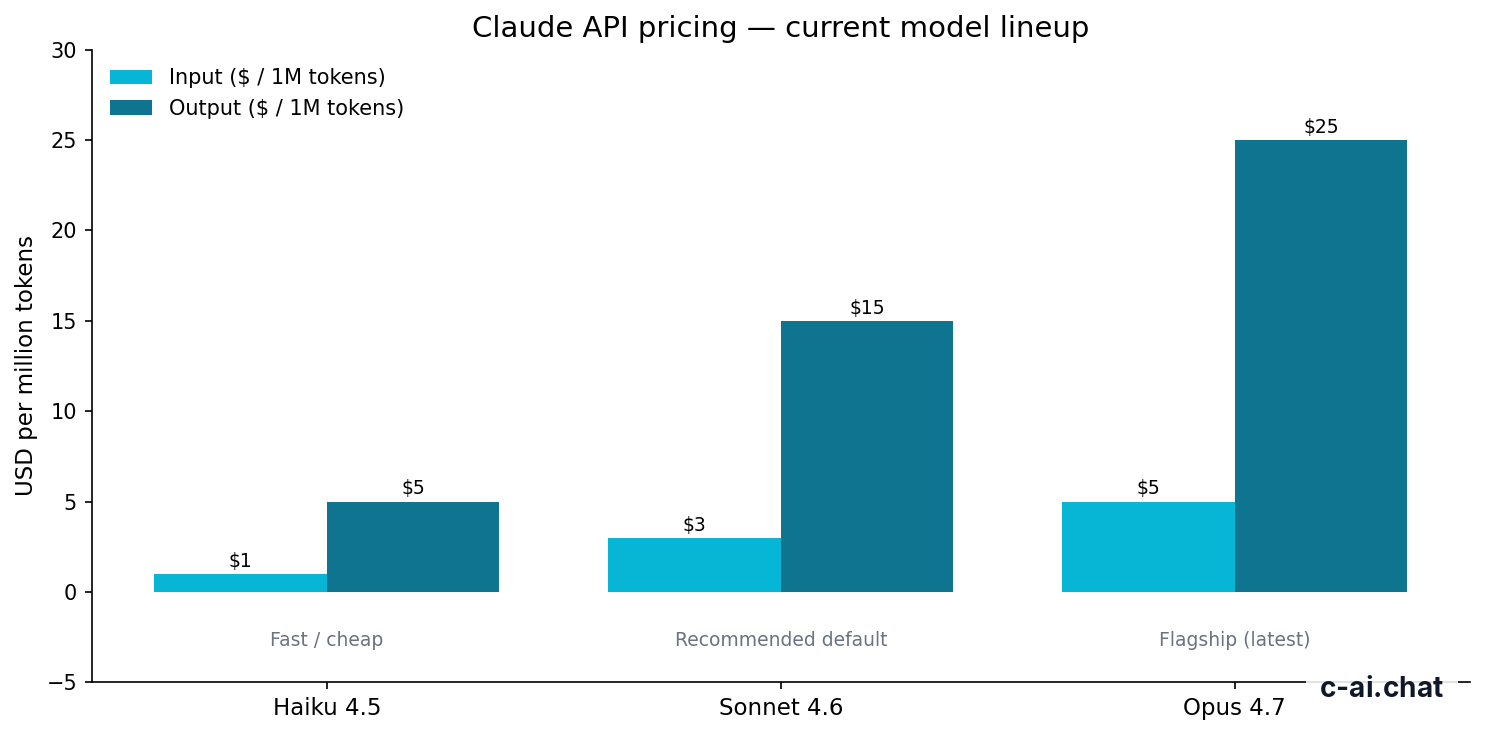
It also does not fit API-first users. If your goal is to call Claude from your own product, internal tool, workflow automation, or backend service, subscription pricing is the wrong calculator. Anthropic’s API uses token pricing. Current examples include Opus 4.7 at $5/M input tokens and $25/M output tokens with a 1M context window, Sonnet 4.6 at $3/M input tokens and $15/M output tokens with a 1M context window and 128K max output, and Haiku 4.5 at $1/M input tokens and $5/M output tokens.
API discounts
Prompt caching gives 90% off cached input. Batch API gives 50% off both input and output.
Those discounts matter only for API usage. They do not change whether a personal Pro subscription is worth it. Developers should compare subscription access against Anthropic’s API pricing at platform.claude.com.
If you mainly care about what Claude can do before you pay, review our guide to Claude features. A feature can be useful and still not justify a subscription if you only need it once a month.
Cheaper and better alternatives
The cheaper alternative is Free. The higher-capacity alternative is Max. The organisational alternative is Team or Enterprise. The developer alternative is the API.
| Alternative | Price | Choose it instead of Pro when | Trade-off |
|---|---|---|---|
| Claude Free | $0/month | You only need occasional Claude access. | Daily usage limits can stop longer work sessions. |
| Claude Max | From $100/month | You already use Pro heavily and need more personal capacity. | It costs much more than Pro. |
| Team Standard | $25/seat/month or $20/seat/month annual | You need a managed workspace for multiple people. | It is priced per seat and built for teams. |
| Team Premium | $125/seat/month or $100/seat/month annual | You need a higher-capacity team plan. | It is not a casual solo upgrade. |
| Enterprise | $20/seat base + API rates | You need custom governance, procurement, or compliance controls. | It uses custom contracts and usage billing. |
| Claude API | Usage at API rates | You are building software or automations with Claude. | You manage tokens, prompts, rate limits, and billing separately. |
Free is right if you are still testing Claude. It gives access to the official apps without a subscription. It is also right if your usage is unpredictable and you do not mind waiting when limits apply.
Max is right if Pro becomes the bottleneck. Do not start with Max because it sounds more capable. Start with the lowest plan that solves your actual usage problem. Upgrade only when the limit is visible in your work.
Team Standard is better when more than one person needs a managed workspace. Team Premium is for higher-capacity team use, not for a solo user who wants a little more room.
Enterprise is a different buying process. It is for organisations that need governance, compliance, procurement review, and custom controls. Anthropic’s trust materials are available at trust.anthropic.com.
The API is also a separate decision. It can be cheaper or more expensive than Pro depending on token volume, caching, batch processing, model choice, and how many users your application serves. Anthropic’s model overview is published at platform.claude.com. For a practical overview, see our Claude models guide.
The honest take
Claude Pro is worth $20/month for regular individual users. The clearest signal is frustration with Free limits. If you keep reaching limits while doing real work, Pro is a practical upgrade. If you rarely notice the limits, keep your money.
The plan is strongest for people who use Claude as a work assistant: drafting, editing, coding, analysing documents, organising projects, and researching topics. It is weaker for teams, API builders, and compliance-heavy organisations. Those users should compare Team, Enterprise, or API pricing before paying for Pro.
FAQ
Is Claude Pro worth it for casual users?
Usually no. If you use Claude only for occasional questions, Free is the better starting point. Upgrade only when limits regularly interrupt tasks you care about.
Is Claude Pro worth it for coding?
Yes, if you code often and want Claude involved in debugging, refactoring, documentation, tests, or Claude Code workflows. If you are building an application that calls Claude directly, use the Claude API guide and Anthropic’s API pricing instead.
Does Claude Pro include the API?
No. Claude Pro is a subscription for Claude’s user-facing apps. API usage is billed separately through Anthropic’s platform using token-based pricing.
What is the main difference between Free and Pro?
Free gives access to Claude with daily usage limits. Pro adds paid individual access with Claude Code, Claude Cowork, Projects, Research, Claude models available on Pro, and Office beta.
Should I choose Pro or Max?
Choose Pro first unless you already know you need much more capacity. Max starts from $100/month and is aimed at power users who need higher personal usage than Pro.
Should a small business buy Pro or Team?
Choose Team if multiple people need a managed workspace. Team Standard costs $25/seat/month or $20/seat/month annual. Pro is better for one individual user.
Where can I check current Claude availability?
Use Anthropic’s official status page at status.claude.com. For general account and billing questions, use support.anthropic.com.
Independent guide. Not affiliated with Anthropic. For the official Claude product, visit claude.ai.
Last updated: 2026-05-12
This article is part of the Claude pricing & plans hub on c-ai.chat.