Claude plans range from Free for light personal use to Pro, Max, Team, and Enterprise for heavier work, while API usage is billed separately; our full Claude pricing guide explains the cost model in more detail.
- The bottom line
- What’s actually included
- Is it worth it for you?
- Cheaper or higher-capacity alternatives
- The honest take
- FAQ
- Sources
The bottom line
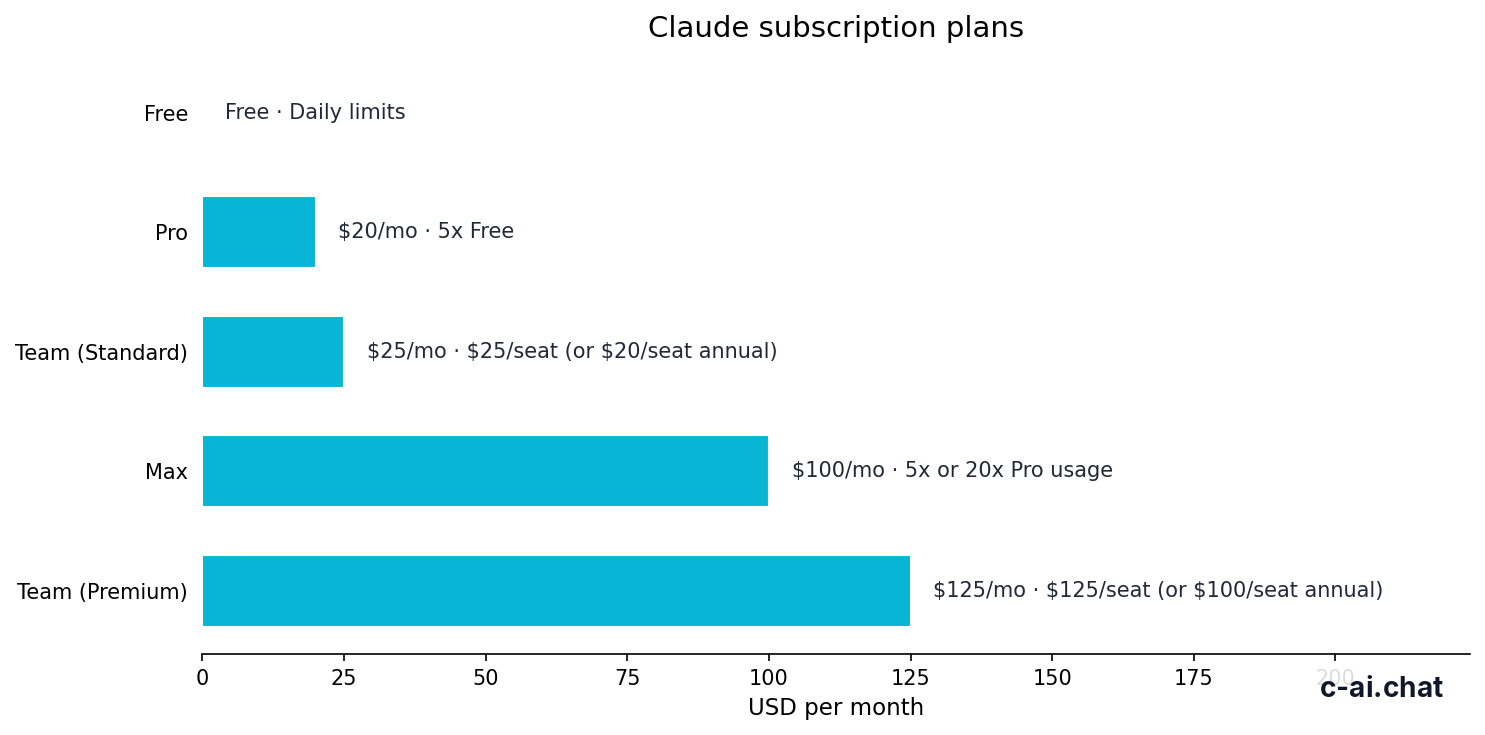
Start with Free if you use Claude occasionally. Choose Pro at $20/month, or $17/month annually, if Claude is part of your regular work. Move to Max from $100/month only when Pro limits block you. Teams should compare Team Standard at $25/seat/month, or $20/seat/month annually, against Team Premium at $125/seat/month, or $100/seat/month annually. Enterprise is $20/seat base plus usage at API rates.
- Price · Free to Enterprise
- Main split · subscriptions for chat, token billing for API use
- Upgrade · when limits, features, or controls block real work
- Skip paid plans · for casual testing
Anthropic makes Claude and runs the official product at claude.ai. c-ai.chat is independent. This page compares the public Claude plans, explains who each plan fits, and separates subscription pricing from developer pricing for the Claude API.
The key question is not only price. It is how often you use Claude, whether you need admin controls, and whether your workload belongs in chat or the API.
What’s actually included
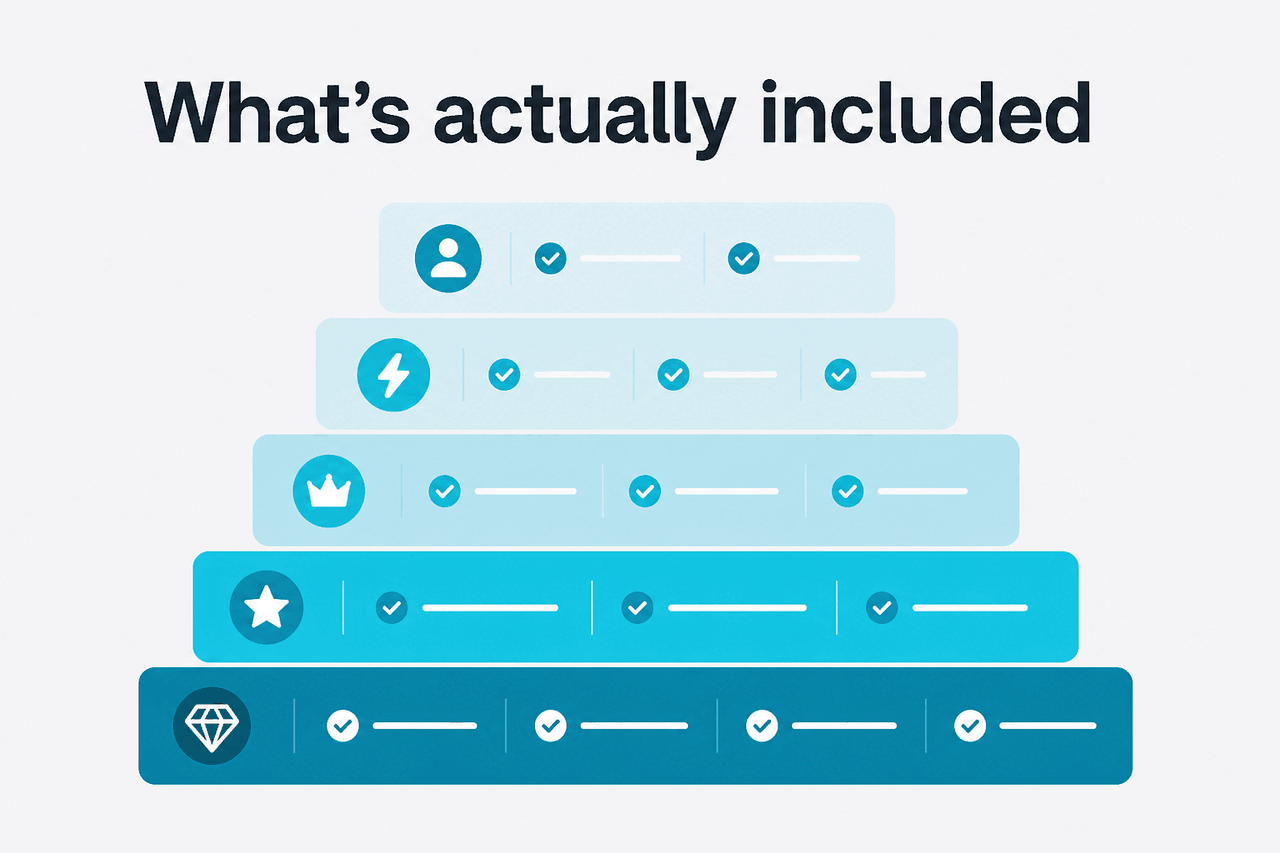
Claude plans differ by usage limits, feature access, team administration, and enterprise controls. The table below follows Anthropic’s public Claude pricing page.
Free
$0/month
For testing Claude or occasional personal use
- Web, iOS, Android, and desktop access
- Daily usage limits
- No paid commitment
Pro
$20/month
For individuals who use Claude regularly
- $17/month annual option
- Higher usage than Free
- Projects for ongoing work
- Access to more Claude features, subject to availability
Max
From $100/month
For power users who need more capacity
- 5x or 20x Pro usage
- Higher output limits
- Early feature access
- Priority traffic
Team Standard
$25/seat/month
For small teams that need shared administration
- $20/seat/month annual option
- SSO
- Admin controls
- Shared workspace
Team Premium
$125/seat/month
For teams that need higher capacity and stronger controls
- $100/seat/month annual option
- Priority traffic
- Expanded admin controls
- Higher-capacity team tier
Enterprise
$20/seat base + API rates
For organisations with security, compliance, and governance needs
- Custom contracts
- SCIM
- Audit logs
- HIPAA-ready options
- Role-based access
- Spend controls
- Regional data residency
Free is the right place to test Claude’s style, file handling, coding help, and reasoning quality. It is not designed for predictable daily throughput. If you use Claude for client work, research sessions, recurring writing, or coding, Free limits can interrupt the workflow.
Pro is the main paid individual plan. It suits people who work inside Claude rather than ask occasional questions. Projects can keep context organised by client, subject, or workflow.
Max is not the default upgrade. It is for people who already use Claude heavily enough that Pro limits are the bottleneck. That can include developers, analysts, founders, researchers, and operators who run long sessions and need higher output limits.
Team Standard and Team Premium are about administration as much as usage. If a business needs SSO, admin controls, and a shared workspace, individual Pro accounts are usually the wrong structure. Enterprise adds contractual, security, compliance, and governance controls for larger organisations.
| Plan | Price | Best fit | Main reason to choose it |
|---|---|---|---|
| Free | $0/month | Casual users and evaluators | Test Claude without paying |
| Pro | $20/month or $17/month annual | Regular individual users | More features and practical daily capacity |
| Max | From $100/month | Heavy individual users | 5x or 20x Pro usage, higher output limits, and priority traffic |
| Team Standard | $25/seat/month or $20/seat/month annual | Small teams | SSO, admin controls, and shared workspace |
| Team Premium | $125/seat/month or $100/seat/month annual | High-capacity teams | Priority traffic and expanded admin controls |
| Enterprise | $20/seat base + usage at API rates | Larger organisations | SCIM, audit logs, HIPAA-ready options, spend controls, and data residency |
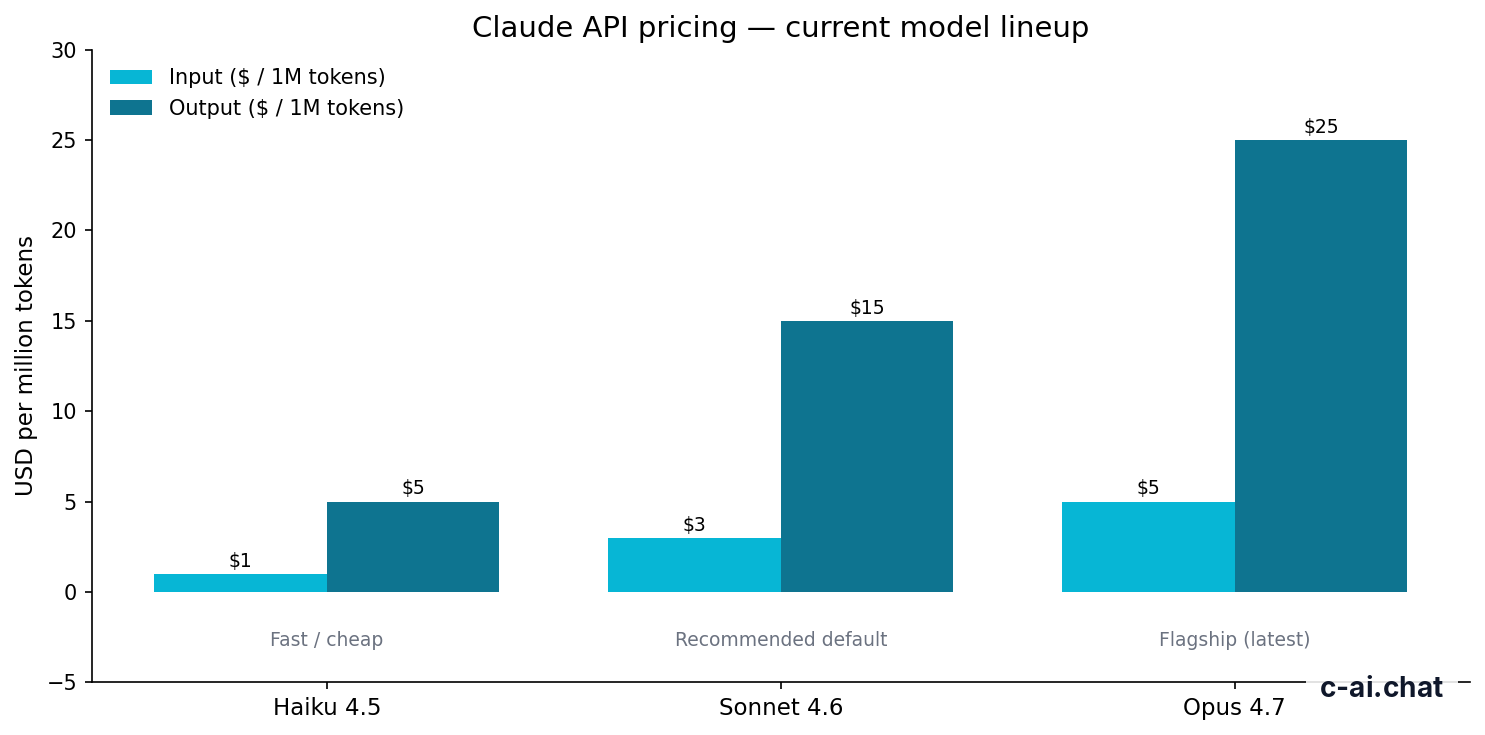
Subscription plans are separate from normal API usage. The developer platform charges by token, not by seat. Anthropic lists Claude Opus 4.7 at $5/M input tokens and $25/M output tokens, Claude Sonnet 4.6 at $3/M input tokens and $15/M output tokens, and Claude Haiku 4.5 at $1/M input tokens and $5/M output tokens. Opus 4.7 and Sonnet 4.6 support a 1M context window. Sonnet 4.6 supports up to 128K max output.
90% off
cached input tokens with prompt caching
For API users, cost optimisation can matter more than plan choice. Prompt caching gives 90% off cached input. The Batch API gives 50% off both directions. Long context is a model and API capability question, not a reason to buy a consumer subscription by itself.
For a wider feature-level view, see our guide to Claude features. For model differences, see Claude models. For common billing and access questions, see the Claude FAQ.
Is it worth it for you?

Claude is worth paying for when it saves enough time, improves enough work, or gives your team enough control to justify the plan. It is not worth paying for if you only ask occasional questions or if your real need is API automation.
Pick a paid plan when
- You use Claude most workdays for writing, analysis, coding, research, or planning.
- You need Projects to organise ongoing work by client, course, role, or product.
- You hit Free or Pro limits during normal work.
- Your company needs SSO, admin controls, shared workspace, audit logs, or data residency.
- You need more predictable access during busy periods and can justify priority traffic.
Stay lower or skip when
- You are still testing Claude against other assistants.
- You only need a few prompts a week.
- Your workload belongs in the API rather than the chat product.
- You need guaranteed feature access that Anthropic has not documented.
- Your team has no need for central billing, SSO, admin controls, or governance.
For students, casual researchers, and light personal users, Free is often enough. Use it to learn how Claude responds, how it handles files, and whether its tone fits your work. Upgrade only when limits stop a real task.
For independent professionals, Pro is the plan to evaluate first. Writers can keep client context in Projects. Consultants and analysts can use Claude for research and document-heavy workflows. The price is easier to justify when Claude supports paid work or saves repeated manual effort.
For heavy individual users, Max makes sense only after Pro is clearly not enough. The reason to choose Max is capacity: 5x or 20x Pro usage, higher output limits, priority traffic, and early feature access. If you do not hit limits, Max is probably unnecessary.
For teams, the decision changes. A company should not choose a plan only by asking how many prompts people send. It should ask who manages access, who owns shared workspaces, whether SSO is required, and whether compliance obligations apply. Team Standard is the first team plan. Team Premium and Enterprise are for organisations that need more capacity, stronger controls, or custom terms.
Start with your usage pattern
If Claude is occasional, stay on Free. If it is part of your weekly or daily workflow, compare Pro against the time saved.
Check whether limits are the real problem
Upgrade to Max only if plan limits interrupt normal work. Do not upgrade just because a larger plan exists.
Separate chat from API
If you are building an app, agent, workflow, or backend process, review API pricing instead of buying more chat seats.
Use team controls when people and data matter
If your organisation needs SSO, admin controls, shared workspace, audit logs, or regional data residency, individual accounts are usually not the right answer.
If your organisation has strict procurement rules, review Anthropic’s Trust Center and support material before assuming a public plan will meet internal requirements. If uptime matters to your workflow, keep the Claude status page available.
Cheaper or higher-capacity alternatives
The right option depends on what you are trying to do. Sometimes it is the next Claude plan down. Sometimes it is the next plan up. Sometimes it is the API rather than a subscription.
| If you are considering | Cheaper alternative | Higher-capacity alternative | Choose it when |
|---|---|---|---|
| Pro | Free at $0/month | Max from $100/month | Free limits interrupt regular individual work. |
| Max | Pro at $20/month or $17/month annual | Team Premium at $125/seat/month or $100/seat/month annual | You are one heavy user, not a managed team. |
| Team Standard | Pro at $20/month or $17/month annual | Team Premium at $125/seat/month or $100/seat/month annual | SSO, admin controls, and shared workspace matter. |
| Team Premium | Team Standard at $25/seat/month or $20/seat/month annual | Enterprise at $20/seat base + usage at API rates | Team capacity and priority traffic justify the higher seat price. |
| Enterprise | Team Premium at $125/seat/month or $100/seat/month annual | API usage billed by token | Contracts, SCIM, audit logs, HIPAA-ready options, role-based access, spend controls, or regional data residency are required. |
Free is the cheaper alternative to Pro. It is best when you are still learning Claude or comparing it with other tools. The trade-off is daily usage limits and fewer paid-plan features.
Pro is the cheaper alternative to Max. If you do not hit Pro limits, the higher Max price is hard to justify. Max is better when your work is blocked by capacity, output limits, or traffic priority.
Team Standard is the cheaper alternative to Team Premium. It covers basic organisational needs: SSO, admin controls, and shared workspace. Team Premium is better when a team needs higher capacity, priority traffic, and expanded admin controls.
Enterprise is not just a larger team plan. It fits organisations that need custom contracts, SCIM, audit logs, HIPAA-ready options, role-based access, spend controls, and regional data residency. If those requirements do not apply, a Team plan may be simpler.
The API is the better alternative when Claude is part of software rather than a person using chat. If you are routing customer messages, analysing documents at scale, running background jobs, or embedding Claude in a product, use the official API pricing documentation and model overview.
Worked example
Choosing between Pro and Max
This avoids paying for Max before you know whether Pro is enough.
If you are comparing Claude against other AI assistants, keep the test practical. Use the same tasks: a document analysis, a spreadsheet explanation, a coding task, a writing revision, and a research question. The plan with the highest limit is not automatically the plan that produces the best result for your workflow.
The honest take
The right Claude plan is usually clear once you identify the constraint. Free is for trying Claude. Pro is for regular individual use. Max is for heavy individual use. Team Standard is for small teams that need administration. Team Premium is for higher-capacity teams. Enterprise is for organisations with compliance, governance, and procurement needs.
Do not upgrade for vague reasons. Upgrade when a specific limit, feature, or control blocks work that matters. If you are building with Claude rather than chatting with it, review API pricing and model choices before buying more subscription capacity.
FAQ
Is Claude Free enough?
Yes, if you only use Claude occasionally. Free is best for testing Claude, asking light questions, and comparing its responses with other assistants. Upgrade when limits interrupt work you actually need to finish.
Is Claude Pro worth $20/month?
Claude Pro is worth it if you use Claude regularly for writing, analysis, coding, research, planning, or document work. If you only send a few prompts a week, Free is usually the better fit.
Who should choose Claude Max?
Choose Max if you are a heavy individual user and Pro limits block normal work. Max is about more capacity, higher output limits, priority traffic, and early feature access. It is not the first paid plan most people should buy.
Should a business use Pro accounts or a Team plan?
Use a Team plan when the business needs SSO, admin controls, shared workspace, central billing, or stronger account management. Individual Pro accounts can be simpler for solo use, but they are usually weak for managed company access.
Does a Claude subscription include API usage?
No. Claude subscriptions are for the chat product. API usage is billed by tokens through the developer platform. Enterprise pricing includes a $20/seat base plus usage at API rates.
How much does the Claude API cost?
Claude Opus 4.7 costs $5/M input tokens and $25/M output tokens. Claude Sonnet 4.6 costs $3/M input tokens and $15/M output tokens. Claude Haiku 4.5 costs $1/M input tokens and $5/M output tokens. Prompt caching gives 90% off cached input. The Batch API gives 50% off both directions.
Where can I check Claude outages?
Use the official Claude status page. If Claude is part of paid work or production workflows, check status before assuming an issue is local.
Independent guide. Not affiliated with Anthropic. For the official Claude product, visit claude.ai.
Last updated: 2026-05-12
This article is part of the Claude pricing & plans hub on c-ai.chat.