The claude ai free plan is Claude’s $0/month tier: you can use Claude on web, iOS, Android, and desktop with daily usage limits, and you only need to pay if you want higher limits or advanced features; this guide from c-ai.chat explains what the free tier includes, where it falls short, and when moving to Claude pricing plans makes sense.

- The bottom line
- What’s actually included
- Is it worth it for you?
- Cheaper / better alternatives
- The honest take
- FAQ
The bottom line
The free Claude plan costs $0/month and gives you access to Claude apps with daily limits, but it is best for light, occasional use rather than heavy work, long sessions, or team collaboration.
- $0/month · web, iOS, Android, desktop
- Includes basic Claude access with daily usage limits
- Upgrade when you hit limits or need Pro features
- Skip if you need team admin, API scale, or high-volume use
If you arrived looking for a simple answer to “is there a Claude AI free plan?”, the answer is yes. Anthropic offers a free tier through claude.ai and its apps. You do not need a credit card to start. The trade-off is that access is capped by daily usage limits, so the free tier works better for testing, occasional writing, or asking a few questions each day than for sustained professional use.
That matters because Claude has several ways to pay. There is the consumer app plan stack, which includes Free, Pro, Max, Team, and Enterprise, and there is also API usage billed separately through the Claude API. People often mix these up. The free plan in this article means the app-level free tier, not free API credits.
What’s actually included
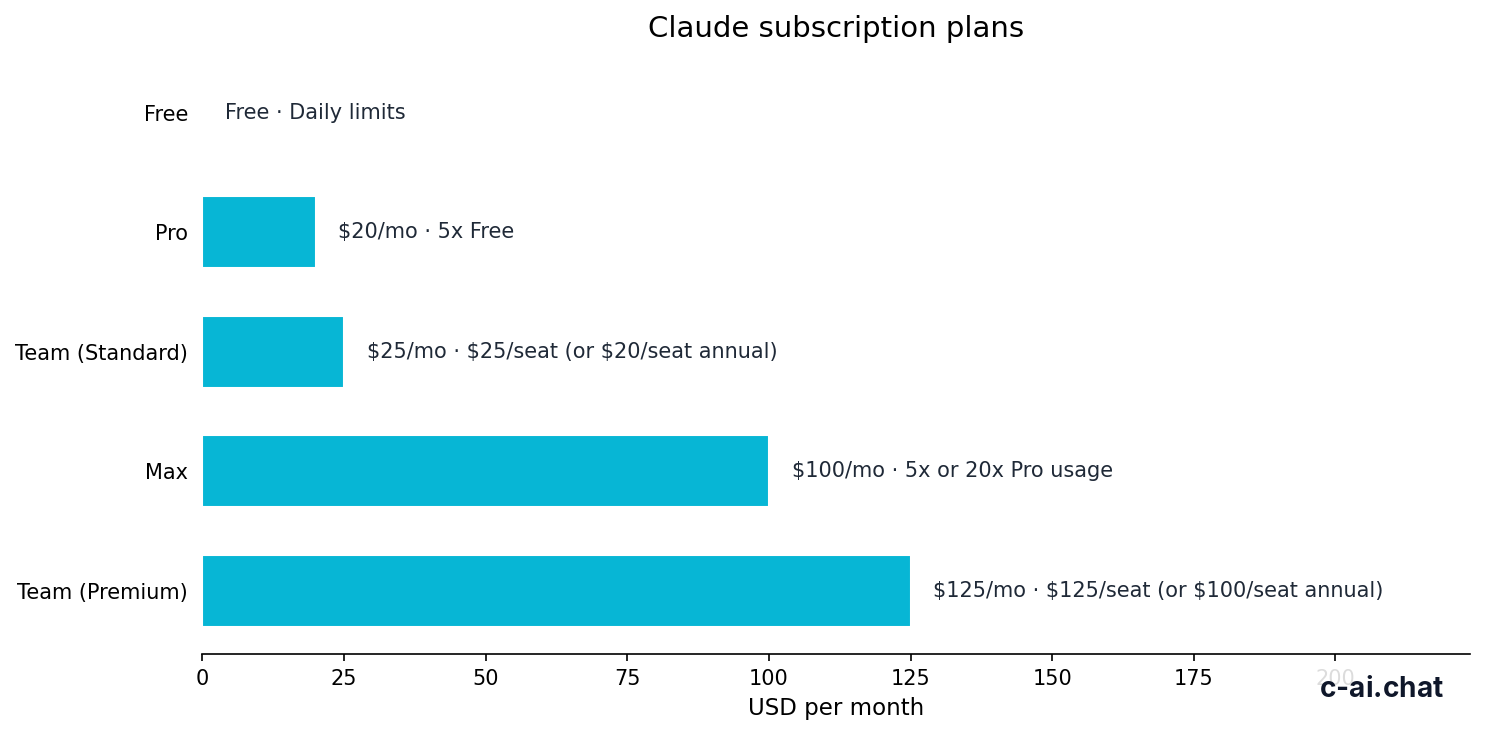
The free tier gives you the core Claude experience, but with tighter limits than paid plans. The key distinction is simple: Free is enough to try Claude and handle light personal work, while paid plans are designed for people who use Claude regularly, need more capacity, or want specific extras.
Free
$0/month
For first-time users and light personal use
- Claude on web, iOS, Android, and desktop
- Daily usage limits
- No card required to start
Pro
$20/month
For individuals who use Claude often
- Higher usage than Free
- Claude Code and Claude Cowork
- Unlimited Projects, Research, extra models, Office integrations beta
Max
From $100/month
For power users who hit Pro limits
- 5x or 20x Pro usage
- Higher output limits
- Early feature access and priority traffic
| Plan | Price | What you get | Main limit |
|---|---|---|---|
| Free | $0/month | Claude apps on web, mobile, and desktop | Daily usage limits |
| Pro | $20/month or $17/month annual | Higher usage, Claude Code, Claude Cowork, unlimited Projects, Research, more models, Office integrations beta | Still individual-focused, not a team admin plan |
| Max | From $100/month | 5x or 20x Pro usage, higher output limits, early access, priority traffic | Expensive if you only use Claude occasionally |
| Team Standard | $25/seat/month or $20/seat/month annual | Shared workspace, SSO, admin controls | Requires multiple users |
| Team Premium | $125/seat/month or $100/seat/month annual | Higher-capacity team tier, priority traffic, expanded admin controls | Overkill for individuals |
| Enterprise | $20/seat base + usage at API rates | SCIM, audit logs, HIPAA-ready options, role-based access, spend controls, regional data residency | Custom contract, aimed at larger organisations |
For most searchers, the important part is the first row. Free means you can open Claude and use it without paying. It does not mean unlimited access. Anthropic describes this as a daily-usage-limited tier, and in practice that means your available messages or workload can vary based on demand, model use, and session intensity.
What the free plan does not include is just as important. It is not the right option if you want dependable heavy usage, the broader Pro feature set, or admin features for a team. It also is not an API plan. If you want to build against Claude programmatically, pricing is token-based through the platform, not through the app subscription stack. You can compare those routes on our Claude features guide and Claude FAQ.
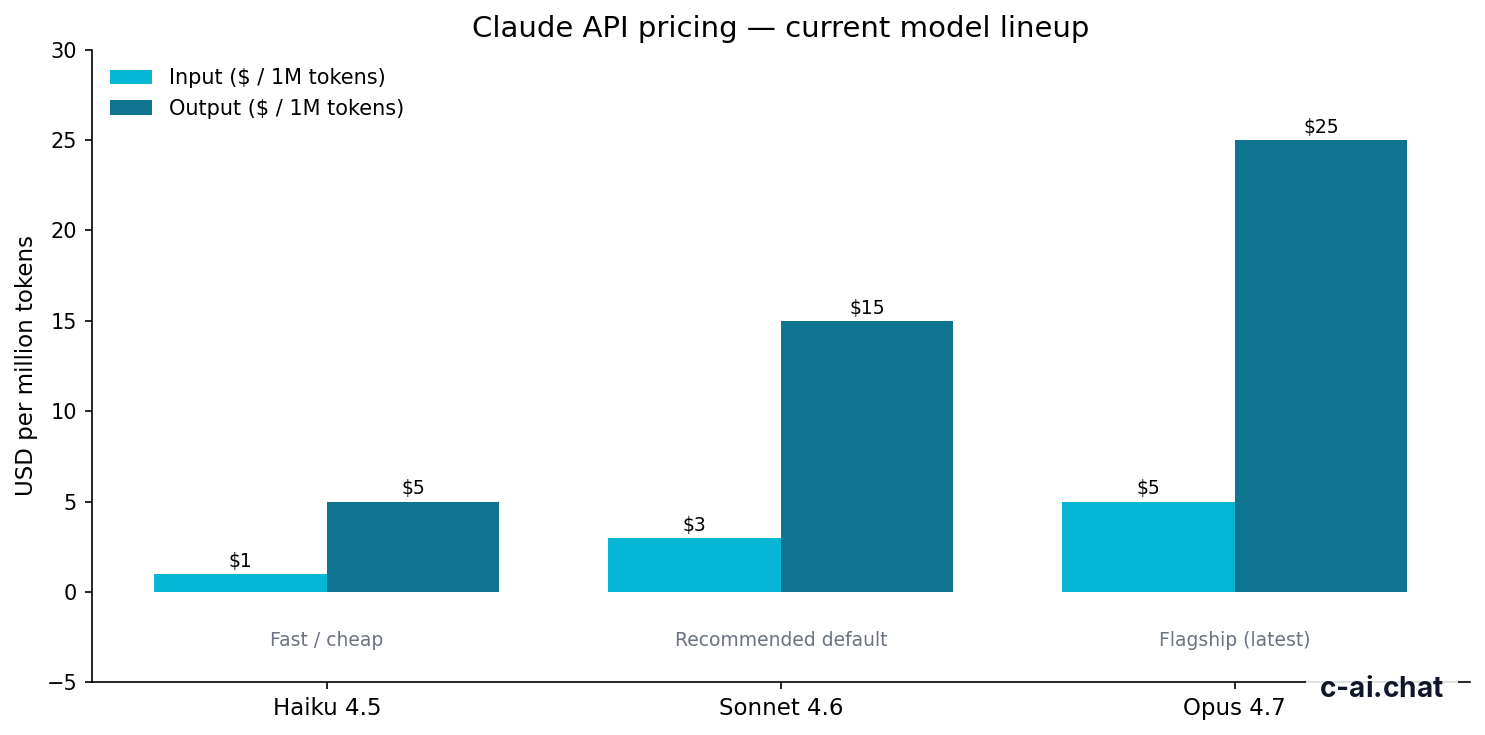
For developers, Claude’s API pricing starts at $1 per million input tokens and $5 per million output tokens for Claude Haiku 4.5, $3/$15 for Claude Sonnet 4.6, and $5/$25 for Claude Opus 4.7. That is separate from the free app tier. If you only want to chat in the app, those API numbers do not affect your bill. If you want to ship a product, they matter a lot.
90% off
cached input tokens with prompt caching on the API side
There are also API cost controls that have nothing to do with the free consumer plan, including prompt caching at 90% off cached input tokens and Batch API pricing at 50% off both input and output. Those are valuable if you build with Claude, but they should not be confused with “free Claude access” in the app.
Is it worth it for you?

The free plan is worth it if you want to try Claude before paying, or if your usage is light enough that daily caps rarely get in the way. It is not worth forcing yourself to stay on Free once limits start slowing down real work.
Pick when
- You are new to Claude and want to test the app at $0
- You use AI a few times per day for writing, summaries, or quick questions
- You are comparing Claude with other assistants before choosing a paid tool
- You do not need team admin, advanced collaboration, or API billing
Skip when
- You hit usage limits several times per week
- You need Claude Code, Research, unlimited Projects, or Office integrations beta
- You run a team and need SSO, shared workspace, or admin controls
- You need predictable high-volume output for work
Three groups usually get good value from Free.
- Curious first-time users. If you have heard of Claude and want to see how it writes, reasons, or summarises, the free tier is enough.
- Students and casual users. If your usage is short bursts rather than long daily sessions, Free can be plenty.
- Professionals evaluating tools. Marketers, founders, analysts, and developers often start on Free just to compare tone, speed, and output quality before paying.
Three groups usually outgrow it fast.
- Heavy solo users. If Claude is part of your daily workflow, usage caps become friction. Pro is usually the practical step up.
- Power users. If you regularly produce long outputs, run many chats, or depend on fast access during busy periods, Max is the better fit.
- Teams and IT-led organisations. Shared workspaces, SSO, admin policies, SCIM, and audit controls sit in Team and Enterprise, not Free.
A useful rule of thumb is this: if you think about Claude as an app you open now and then, Free is probably enough. If you think about Claude as part of your workflow, Free is usually only a trial stage. That is especially true if you need repeatable output, long context work, or reliable access during busy periods.
Cheaper / better alternatives
Sometimes the right answer is not “stay on Free.” Sometimes it is “upgrade one level,” and sometimes it is “use the API instead of the app.” The best alternative depends on why Free is not working for you.
| Option | Price | Better than Free for | Not ideal for |
|---|---|---|---|
| Claude Free | $0/month | Testing Claude, light everyday use | Heavy usage or advanced features |
| Claude Pro | $20/month or $17/month annual | Individuals who need more usage and Pro-only features | People who only use Claude occasionally |
| Claude Max | From $100/month | Power users needing 5x or 20x Pro usage | Budget-conscious solo users |
| Claude API | Usage-based | Builders who need programmatic access and cost control | Users who just want the chat app |
The nearest alternative to the free plan is clearly Claude Pro. At $20/month, or $17/month on annual billing, it is the plan for individuals who use Claude often enough that higher limits and extra features have real value. Pro adds Claude Code, Claude Cowork, unlimited Projects, Research access, additional models, and Office integrations in beta for Excel, PowerPoint, and Word.
The other direction is not another app plan below Free, because there is no cheaper paid tier than $0. The real “next plan down” alternative is simply staying on Free and changing expectations. If your usage is light, the extra $20 may buy very little. Paying for Pro only makes sense when the added capacity or features solve a real problem.
There is also a different branch entirely: the Claude API. If your goal is to put Claude inside a product, automate a workflow, or control costs at the token level, app subscriptions are not the right lens. You would look at model pricing instead. For example, Claude Haiku 4.5 is the low-cost API option at $1/M input and $5/M output, while Claude Sonnet 4.6 is the balanced default at $3/M and $15/M. Claude Opus 4.7 is the flagship at $5/M and $25/M.
Worked example
When Pro is cheaper than wasted time
Free saves money only while the limits do not create friction that matters.
If you are choosing between app plans, use this simple ladder:
Start on Free
Use Claude in normal conditions for a few days. Do not judge it from one short prompt.
Watch for friction
If daily limits, missing Pro features, or output caps slow down real work, note exactly what is blocking you.
Upgrade only one step
Move from
FreetoProfirst. Jump toMaxonly if Pro still is not enough.
That same logic applies to teams. If multiple people need Claude inside one managed environment, skip trying to stretch Free accounts and look at the paid workspace tiers instead. Team Standard starts at $25 per seat per month, or $20 per seat per month annually, while Team Premium is $125 per seat per month, or $100 per seat per month annually.
The honest take
Claude’s free plan is good. It is one of the easier ways to try a leading AI assistant without paying upfront, and for many people that is enough. You can use the official apps, get a real sense of Claude’s style, and decide whether it fits your work before spending anything.
But “free” does not mean “complete.” The plan is intentionally limited. If you rely on Claude often, need Pro-only features, or want team controls, staying on Free too long usually becomes false economy. For casual use, keep it. For regular work, Pro is the logical next step. For managed organisations or builders, look at Team, Enterprise, or the API instead.
FAQ
Is Claude AI free to use?
Yes. Claude has a Free plan at $0/month. You can use it on web, iOS, Android, and desktop, subject to daily usage limits.
Do I need a credit card for the Claude free plan?
No card is required to start on the free tier. You only need to pay if you choose a paid plan or use paid API services.
What is the difference between Claude Free and Claude Pro?
Claude Free costs $0/month and comes with daily usage limits. Claude Pro costs $20/month, or $17/month on annual billing, and adds higher usage plus features including Claude Code, Claude Cowork, unlimited Projects, Research access, additional models, and Office integrations in beta.
Is the Claude API included in the free plan?
No. The app-level free plan and the Claude API are different products. API use is billed separately at token-based rates through Anthropic’s platform.
When should I upgrade from Claude Free?
Upgrade when daily limits interrupt real work, when you need Pro-only features, or when Claude becomes part of your daily workflow rather than an occasional tool.
Is Claude Free enough for students or casual users?
Usually, yes. If your usage is light and spread across the day, the free tier can be a good fit. It is less suitable for long, frequent, high-volume sessions.
Can teams use the free plan?
Teams can try Claude individually on Free, but the free tier does not include shared workspace features, SSO, or admin controls. Those start with Team plans.
Where can I check official Claude pricing?
You can verify current app plans at claude.com/pricing and model pricing at platform.claude.com. For a broader overview, see our Claude pricing guide.
Independent guide. Not affiliated with Anthropic. For the official Claude product, visit claude.ai.
Last updated: 2026-05-10
This article is part of the Claude pricing & plans hub on c-ai.chat.