Yes. Claude has a free version at claude.ai, with web, iOS, Android, and desktop access plus daily usage limits; if you need the bigger picture, our independent Claude pricing guide maps the paid plans, API costs, and when upgrading makes sense.

- The bottom line
- What’s actually included
- Is it worth it for you?
- Cheaper / better alternatives
- The honest take
- FAQ
The bottom line
Claude does have a free version, and for many people it is enough to try Claude seriously before paying anything.
The free plan costs $0/month and gives you access to Claude across the main apps, but usage is capped by daily limits. That makes it a good fit for casual chat, occasional writing help, and testing core features. It is not the right plan if you rely on Claude every day for long sessions, higher usage, or team controls. If your use case is developer-heavy, our Claude API guide is the better next step than a consumer subscription page.
- $0/month · free access with daily limits
- Includes web, iOS, Android, and desktop access
- Upgrade when you hit limits or need advanced features
- Skip if you need team admin controls or predictable heavy usage
What’s actually included
The free version is real, usable, and easy to start because it does not require a paid subscription. What matters is not just that it exists, but what you can actually do before hitting the limits.
On the free plan, Claude is available through the consumer apps: web, iOS, Android, and desktop. Anthropic describes the free tier as access with daily usage limits, not unlimited use. Those limits can matter if you upload files often, run long back-and-forth conversations, or use Claude as a work tool throughout the day. If you want a broader overview of the product itself, see our Claude features guide.
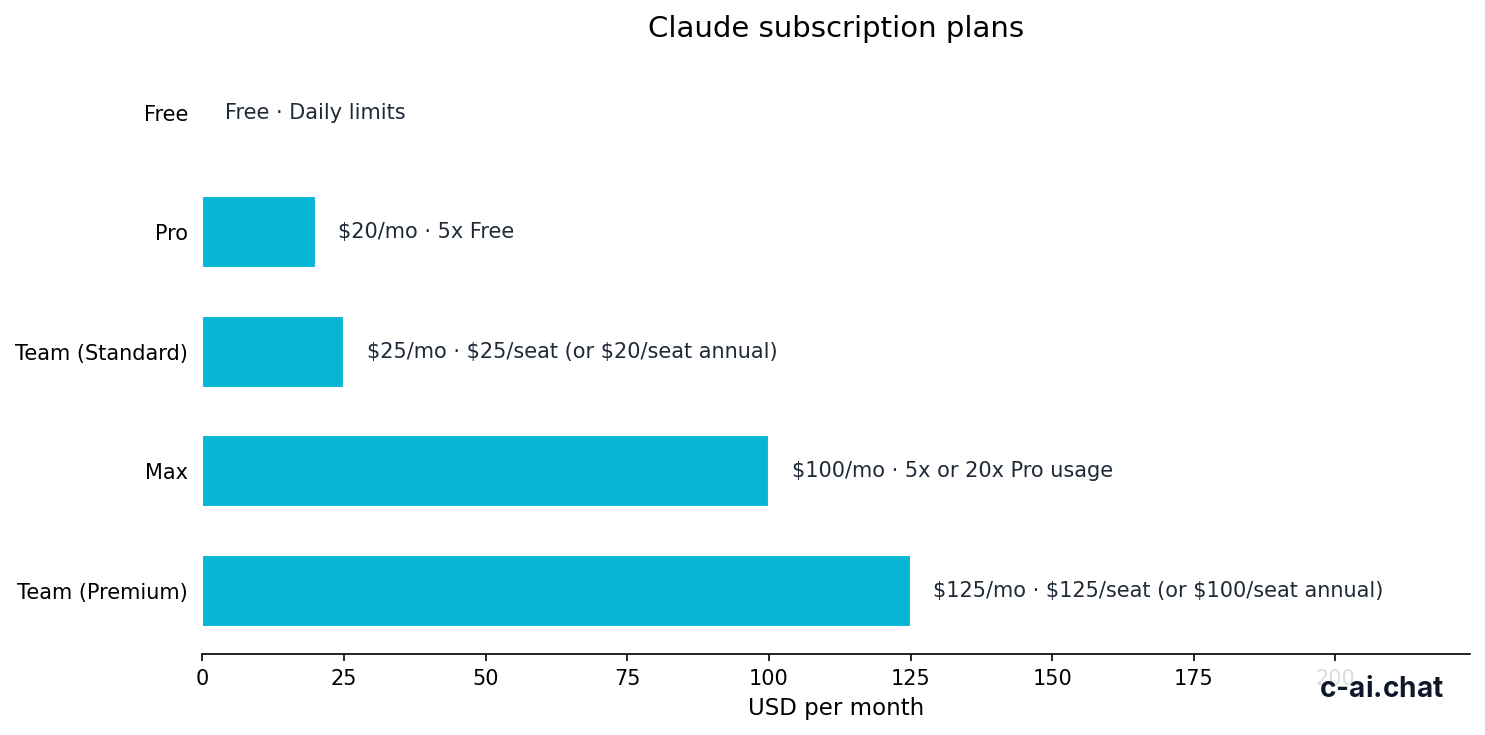
Free
$0/month
For first-time users and light personal use
- Web, iOS, Android, and desktop access
- Daily usage limits
- No paid subscription required
Pro
$20/month
For individuals who use Claude regularly
- $17/month if billed annually
- Claude Code and Claude Cowork
- Unlimited Projects, Research access, extra models, Office integrations
Max
From $100/month
For power users who hit Pro limits
- 5x or 20x Pro usage
- Higher output limits
- Early feature access and priority traffic
| Plan | Price | Main access | Best for | Main limitation |
|---|---|---|---|---|
| Free | $0/month | Web, iOS, Android, desktop | Trying Claude, light use | Daily usage limits |
| Pro | $20/month or $17/month annual | Consumer apps plus added features | Individuals who use Claude often | Still not a team admin plan |
| Max | From $100/month | Higher-capacity consumer use | Heavy individual usage | Costs much more than Pro |
| Team Standard | $25/seat/month or $20/seat/month annual | Shared workspace | Small teams | Per-seat pricing |
| Team Premium | $125/seat/month or $100/seat/month annual | Higher-capacity team tier | Teams needing priority traffic and more admin controls | Much higher seat cost |
| Enterprise | $20/seat base + usage at API rates | Custom deployment and controls | Large organisations | Requires contract-style evaluation |
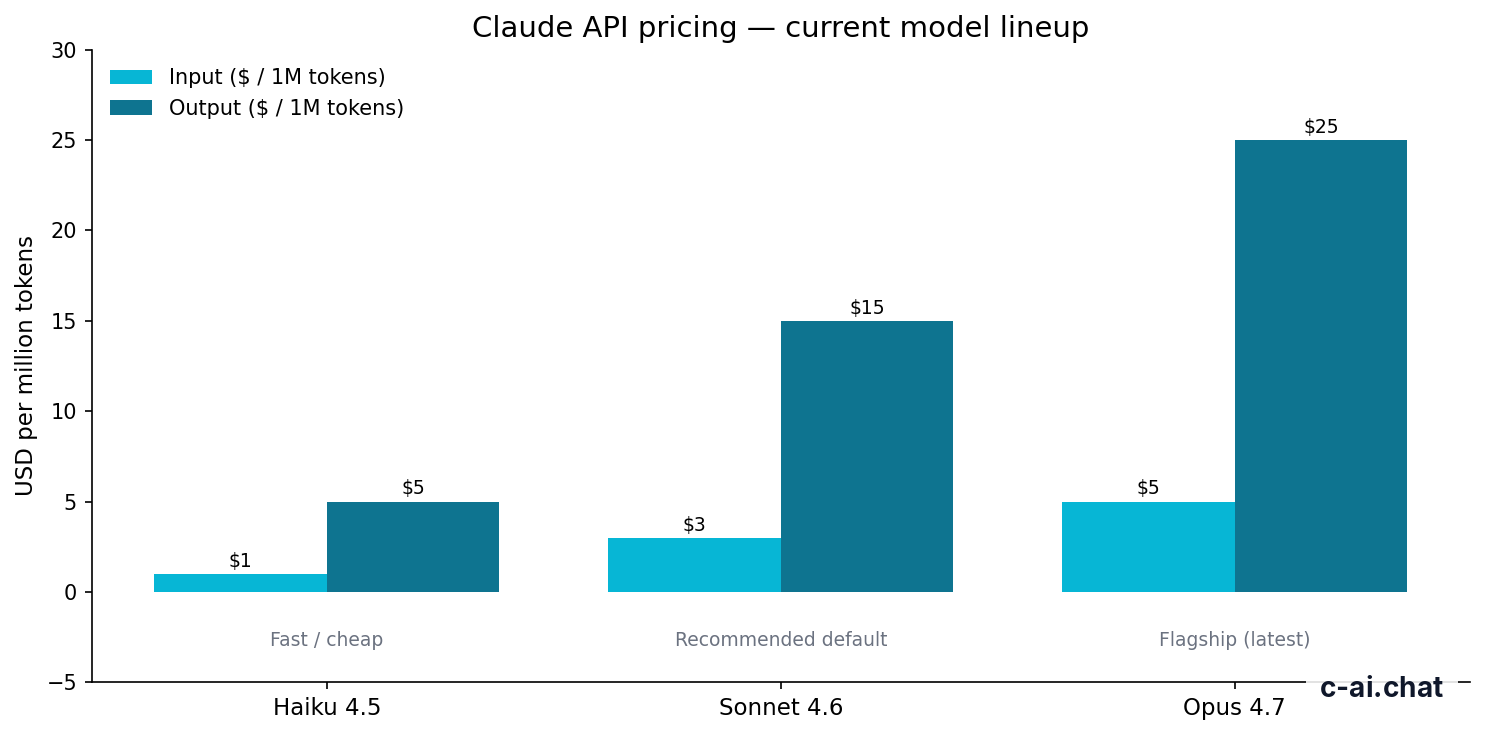
A common point of confusion: the free Claude plan is different from the API. The API is priced separately by token usage, not by consumer subscription. Current public API pricing starts at $1 per million input tokens and $5 per million output tokens for Claude Haiku 4.5, $3/$15 for Claude Sonnet 4.6, and $5/$25 for Claude Opus 4.7. That matters if you are building software rather than just using the app yourself. Our pricing overview explains how subscription and API billing fit together.
90% off
cached input tokens with prompt caching on the API side
That API discount does not change the consumer free plan, but it is useful context if you are comparing “free Claude” with “cheap Claude.” For builders, the cheapest sensible path may be API usage on Haiku 4.5 rather than a higher-end consumer subscription. Anthropic also offers the Batch API at 50% off input and output token pricing for work that does not need immediate responses.
Is it worth it for you?

The free version is worth using if you want to test Claude in a real workflow without paying first. Whether it is enough depends on how often you use it, how long your chats are, and whether you need premium features.
Pick when
- You are new to Claude and want to see how it writes, explains, or summarises
- You use AI a few times a day rather than all day
- You want app access on web, phone, and desktop without paying upfront
- You are comparing Claude with other assistants before choosing a paid plan
Skip when
- You routinely hit message or daily usage limits
- You need Claude Code, Claude Cowork, unlimited Projects, or Research access
- You need shared workspace, SSO, admin controls, or compliance features
- You need predictable heavy usage for work every day
Three personas fit the free plan well.
- AI-curious professionals: You want to test writing, brainstorming, summarising, or question answering before committing to a paid tool.
- Students and learners: You need occasional explanation help, drafting support, or study assistance, but not constant heavy usage.
- Existing AI users comparing tools: You already use another chatbot and want to compare Claude’s style, speed, and output quality with no upfront cost.
And three personas usually outgrow it quickly.
- Daily professional users: If Claude is part of your normal workday, the free limits may feel restrictive fast.
- Developers building products: The API is the relevant path, not the free app plan. Start with our API explainer if that is your use case.
- Teams and operations leads: Free access does not replace team governance, SSO, admin controls, or shared workspace features.
The main value of the free plan is low-friction access. You can assess how Claude handles your own prompts, documents, and writing tasks with no subscription fee. That is more useful than a feature list alone. On the other hand, once an AI tool becomes part of your routine, “free” can become expensive in time if you keep running into caps and restarting work elsewhere.
Cheaper / better alternatives
Sometimes the right answer is not the free Claude plan. Sometimes it is Pro, and sometimes it is the API instead.
| Option | Price | Better than Free when | Worse than Free when |
|---|---|---|---|
| Claude Free | $0/month | You want no-cost app access | You need more consistent usage or premium features |
| Claude Pro | $20/month or $17/month annual | You use Claude often and want Claude Code, Claude Cowork, unlimited Projects, Research access, additional models, and Office integrations | You only use Claude occasionally |
| Claude Max | From $100/month | You are a heavy solo user hitting Pro limits | You do not need 5x or 20x Pro usage |
| Claude API with Haiku 4.5 | $1/M input, $5/M output tokens | You are building a workflow or app and want usage-based cost control | You just want the normal Claude app experience |
The next plan up from Free is Pro. For many people, Pro is the real “working plan” because it shifts Claude from trial use into daily use. If you use Claude enough that daily limits break your flow, Pro is the obvious upgrade. The extra features also matter: Claude Code, Claude Cowork, unlimited Projects, Research access, additional models, and Office integrations for Excel, PowerPoint, and Word in beta.
The next path down in cost is not another subscription plan. It is simply staying on Free. That is why the question is less “Does Claude have a free version?” and more “At what point does free stop being practical?” If your total usage is light, Free may remain the best option indefinitely.
Worked example
When Free beats Pro
If you mainly want occasional chat, writing help, or comparison testing, the free version is the better deal.
Worked example
When Pro is cheaper in practice
If Claude is part of your normal workflow, paying for Pro can be simpler than working around limits.
For teams, neither Free nor Pro is the right endpoint. Team Standard starts at $25 per seat per month, or $20 per seat per month on annual billing, and adds shared workspace, SSO, and admin controls. Team Premium costs $125 per seat per month, or $100 per seat per month annually, for higher-capacity access, priority traffic, and expanded admin controls. Enterprise starts from a $20 per seat base plus usage at API rates for organisations that need SCIM, audit logs, role-based access, spend controls, regional data residency, or HIPAA-ready options. If those requirements sound familiar, the consumer free plan is the wrong category rather than the wrong price.
The honest take
Yes, Claude has a free version, and it is good enough for real evaluation and light ongoing use. You do not need to pay to find out whether Claude suits your writing, research, or everyday question-answering workflow. That makes it one of the easier AI tools to test properly.
But the free plan is not a substitute for higher-capacity access. If you use Claude heavily, need advanced features, or need team controls, you will outgrow it. The simplest rule is this: start free, stay free if the limits never bother you, and upgrade only when your work repeatedly hits the ceiling. For a broader plan breakdown, see our Claude pricing guide or the official app at claude.ai.
FAQ
Is Claude free forever?
Claude has a free plan priced at $0/month, but Anthropic can set usage limits and plan terms. “Free” does not mean unlimited. The official current details are listed at claude.com/pricing.
Do you need a credit card to use Claude free?
The free plan is described as a $0/month consumer plan. If Anthropic requires any sign-up verification in your region or app flow, the official sign-up process at claude.ai will show it. The pricing page does not describe the free plan as a paid trial.
What is the limit on Claude’s free plan?
Anthropic describes the free plan as having daily usage limits. Public pricing language does not reduce that to one single universal message cap in all contexts, so the safest answer is that the limit depends on current product rules and your usage pattern.
Can you use Claude free on mobile and desktop?
Yes. The free plan includes access on web, iOS, Android, and desktop.
What do you get if you pay for Claude Pro?
Claude Pro costs $20/month, or $17/month on annual billing. It adds Claude Code, Claude Cowork, unlimited Projects, Research access, additional models, and Office integrations for Excel, PowerPoint, and Word in beta.
Is Claude free different from Claude API pricing?
Yes. The consumer free plan is separate from API billing. API usage is charged by tokens. Public API rates are $5/M input and $25/M output for Claude Opus 4.7, $3/M input and $15/M output for Claude Sonnet 4.6, and $1/M input and $5/M output for Claude Haiku 4.5. See our API guide if you are building with Claude rather than just using the app.
Is the Claude free plan enough for students or casual users?
Usually, yes. If your use is occasional and you do not need premium features, the free plan is often enough. If you use Claude every day for coursework, writing, or analysis, you may run into the daily limits and decide Pro is worth paying for.
Where should you check if Claude is down?
The official status page is status.claude.com. That is the right place to check service incidents before assuming a free-plan issue is account-specific. For more common user questions, see our Claude FAQ.
Independent guide. Not affiliated with Anthropic. For the official Claude product, visit claude.ai.
Last updated: 2026-05-10
This article is part of the Claude pricing & plans hub on c-ai.chat.