Claude Max 20x is the highest-capacity consumer Claude subscription tier: it starts from $100/month, gives you either 5x or 20x Pro usage depending on the Max option you choose, and is built for people who hit Pro limits regularly; this is c-ai.chat’s independent guide, and below we cover what Max 20x includes, who should buy it, and what to choose instead if it is overkill.

If you need the wider Claude pricing context first, see our Claude pricing guide. If you are comparing product plans with API billing, our Claude API guide explains the difference.
- The bottom line
- What’s actually included
- Is it worth it for you?
- Cheaper / better alternatives
- The honest take
The bottom line

Claude Max 20x is the heavy-use paid plan for individuals who need far more capacity than Claude Pro. Max starts at $100/month, and the headline promise is 5x or 20x Pro usage, higher output limits, early feature access, and priority traffic. If Pro already covers your daily work, Max 20x is usually too expensive. If Pro caps are slowing down paid work, Max can make sense.
- Price · from $100/month
- Includes · 5x or 20x Pro usage, priority traffic, early access
- Upgrade when · you hit Pro limits often
- Skip if · Free or Pro already fits your workload
The key point is simple: Max 20x is not a different Claude model. It is a higher-capacity access plan for the Claude product at claude.ai. Model quality still depends on the model you use inside Claude, such as Opus 4.7, Sonnet 4.6, or Haiku 4.5, not on the Max label itself. If you are mainly trying to lower per-request costs in software, this is usually the wrong tool; use the API instead.
That distinction matters because many searchers looking for “claude max 20x” are really asking one of three questions: how much it costs, whether it removes limits, and whether it is better than Pro. The short answers are: it starts at $100/month, it raises limits substantially but does not mean infinite usage, and it is only better than Pro if your workload is heavy enough to justify the jump.
What’s actually included
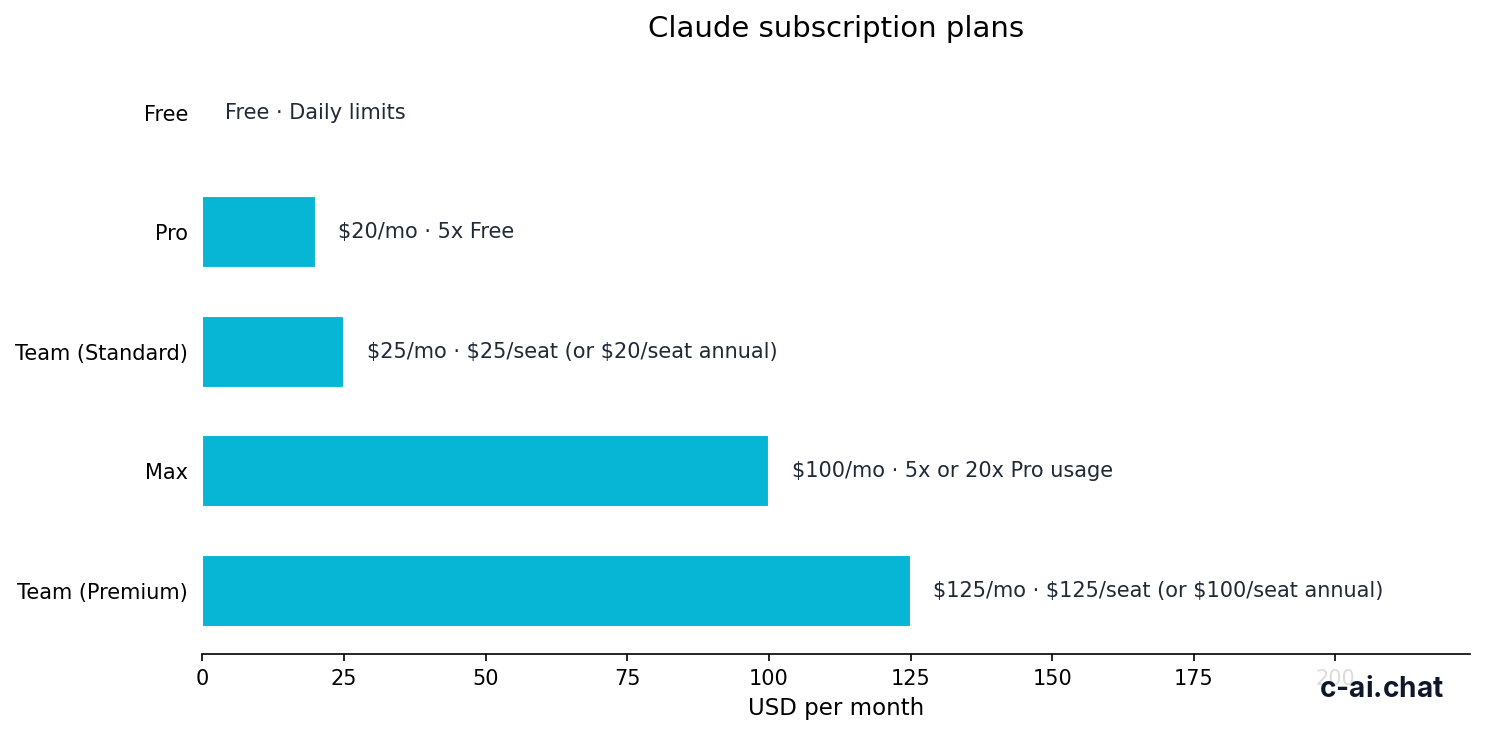
Claude Max is designed for people who use Claude as a serious daily tool, not occasional chat. The official plan details place it above Pro and below team or enterprise offerings. What you are paying for is more capacity, faster access under load, and earlier access to new features.
Claude Pro
$20/month
For individuals with regular but moderate usage
- Claude web, iOS, Android, and desktop access
- Claude Code and Claude Cowork
- Unlimited Projects
- Research access
- Additional models
- Office integrations for Excel, PowerPoint, and Word beta
Claude Max
From $100/month
For power users who regularly hit Pro limits
- 5x or 20x Pro usage depending on Max option
- Higher output limits
- Early feature access
- Priority traffic
- Individual plan, not a team admin workspace
The phrase “Claude Max 20x” usually refers to the higher-capacity Max option that gives 20 times the usage allowance of Pro. Claude’s public pricing page groups Max as a plan family that starts at $100/month, with the usage multiplier as the main differentiator. In practice, that means Max is for users running long chats, repeated document analysis, large project workspaces, or many sessions across a day.
| Plan | Price | Who it is for | Main extras | Main limitation |
|---|---|---|---|---|
| Free | $0/month | Light use | Claude on web, mobile, and desktop with daily limits | Usage limits arrive quickly for heavy work |
| Pro | $20/month or $17/month annual | Individuals | Claude Code, Claude Cowork, unlimited Projects, Research, additional models, Office integrations beta | Can still feel tight for all-day use |
| Max | From $100/month | Power users | 5x or 20x Pro usage, higher output limits, early feature access, priority traffic | High monthly cost |
| Team Standard | $25/seat/month or $20/seat/month annual | Small teams | SSO, admin controls, shared workspace | Built for teams, not solo heavy personal use |
| Team Premium | $125/seat/month or $100/seat/month annual | Higher-capacity teams | Priority traffic, expanded admin controls | Per-seat team spend adds up fast |
| Enterprise | $20/seat base + usage at API rates | Large organisations | SCIM, audit logs, HIPAA-ready options, role-based access, spend controls, regional data residency | Custom contract and operational overhead |
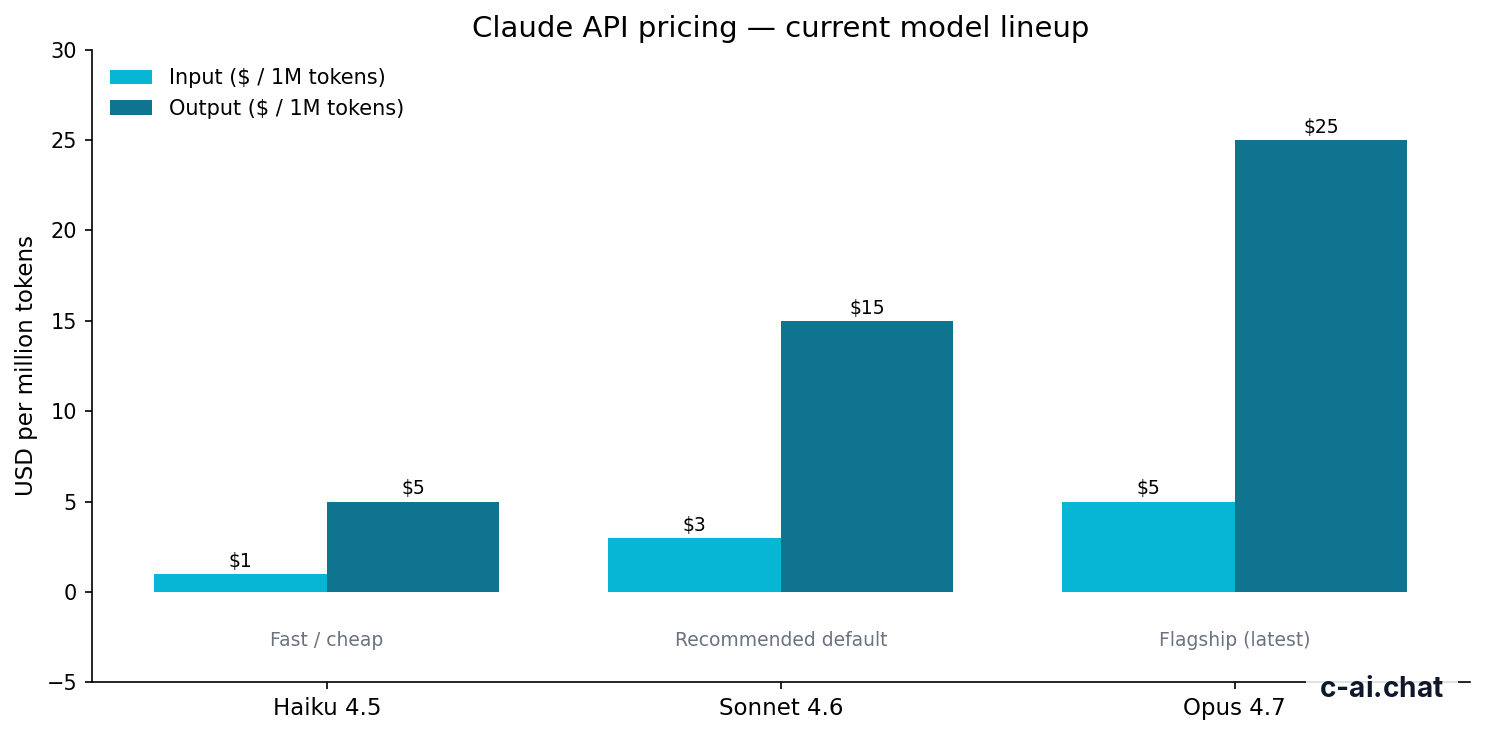
For most buyers, the confusing part is that Max does not replace API pricing. If your real need is predictable application cost, API pricing remains separate: Opus 4.7 is $5 per million input tokens and $25 per million output tokens; Sonnet 4.6 is $3 and $15; Haiku 4.5 is $1 and $5. On the API side, Anthropic also offers prompt caching with 90% off cached input tokens and Batch API with 50% off both input and output. None of that is included automatically just because you buy Max.
20x
the Pro usage allowance on the higher Max tier
What Max does buy you is convenience inside the Claude product. You stay in the same interface, keep the same personal workflow, and get more headroom before limits interrupt you. For users who spend hours each day in Claude, that can matter more than raw token economics.
If you are still deciding between Claude plans, our homepage independent Claude guide and our overview of Claude features can help you map usage needs to the right subscription.
Is it worth it for you?

The right way to judge Claude Max 20x is not “can I afford $100?” but “what is the cost of running into Pro limits?” If hitting the ceiling wastes billable time, interrupts research, or forces tool-switching during the day, Max may pay for itself. If you are mostly chatting, drafting a few documents, or doing light coding, it probably will not.
Pick when
- You use Claude for hours every workday and regularly hit Pro limits.
- You run long sessions with large files, long conversations, or repeated analysis.
- You are a solo consultant, researcher, writer, analyst, or developer whose output depends on uninterrupted access.
- You value priority traffic and early feature access enough to pay a premium.
Skip when
- You only use Claude a few times per day.
- Pro already gets you through a normal week without friction.
- Your main goal is lower cost per token for software or automation.
- You need shared admin controls, SSO, or workspace governance for a team.
Three personas fit Max 20x especially well.
- Independent professionals with high daily volume. Think lawyers reviewing long documents, consultants building client deliverables, growth operators generating and refining assets all day, or founders using Claude as a full-time thinking partner.
- Developers who live in Claude’s product workflow. If you rely on Claude Code and broad context across many sessions, more usage headroom can be more useful than micromanaging API calls.
- Researchers and power readers. Users who upload, compare, and synthesise large amounts of material can burn through Pro allowances quickly.
And several personas usually should not buy it.
- Students and casual users. Free or Pro is normally enough.
- Budget-conscious solo users. If the value is not obvious within a week, $100/month is hard to justify.
- Teams needing controls. Team Standard, Team Premium, or Enterprise are better fits because Max does not solve workspace governance.
- API-first builders. If usage happens inside your own app, API pricing is the cleaner path.
A useful self-test is to track one week of actual usage. Count how often you hit limits, how often you delay work because Claude is unavailable, and whether you have to switch to another tool mid-task. If that happens rarely, Max will feel expensive. If it happens repeatedly, Max becomes easier to defend.
Cheaper / better alternatives
Sometimes “claude max 20x” is the wrong answer. The cheaper alternative is usually Claude Pro. The better alternative, if you need admin and collaboration, is usually Team Standard or Team Premium. If you need software-level control over cost, the best alternative is often the Claude API, not another subscription.
| Option | Price | Better than Max when | Worse than Max when |
|---|---|---|---|
| Pro | $20/month or $17/month annual | You want the lowest-cost serious individual plan | You hit limits often |
| Max | From $100/month | You need 5x or 20x Pro usage as an individual | You need team admin or cheaper token-level automation |
| Team Standard | $25/seat/month or $20/seat/month annual | You need shared workspace, SSO, and admin controls | You are a solo user who only needs more personal capacity |
| Team Premium | $125/seat/month or $100/seat/month annual | You need higher-capacity team access plus stronger controls | You do not need team features |
| Enterprise | $20/seat base + usage at API rates | You need SCIM, audit logs, HIPAA-ready options, residency, and spend controls | You just want a better solo subscription |
If you are deciding between Pro and Max, the trade-off is simple: Pro is dramatically cheaper, while Max buys breathing room. If you are deciding between Max and Team Standard, the trade-off is different: Max is about individual capacity, while Team is about shared administration and collaboration. Many buyers confuse those two.
-
Choose Pro first if you are unsure
At $20/month, Pro is the safer test. Move up only after you hit clear limits.
-
Choose Max if capacity is the real pain point
Go to Max when the issue is frequency, volume, and output headroom rather than missing admin features.
-
Choose Team or Enterprise if governance matters
If you need SSO, shared workspace controls, or compliance features, skip Max and move to the business tiers.
There is also the API route. For builders, agencies, or operations teams running repeatable workflows, API pricing can be more rational than a premium app subscription. For example, Sonnet 4.6 costs $3 per million input tokens and $15 per million output tokens, with prompt caching and batch discounts available. That structure is often better for automation than paying for the highest individual plan.
Worked example
When Max beats Pro in practice
If Pro limits are blocking paid work, the upgrade can be easy to justify. If they are only mildly annoying, it is not.
For broader plan questions, our Claude FAQ covers common billing and usage issues. If your question is really about feature access rather than price, check our Claude feature guide.
The honest take
Claude Max 20x is a sensible plan for a narrow group of users: individuals who already know Claude Pro is too small for their workload. It is not the “best” plan in general. For most people, Pro is the better default because the jump from $20 to a plan that starts at $100 is large, and the value only appears when you are pushing Claude hard every day.
If you are a heavy solo user and lost time from limits costs more than the upgrade, Max 20x is easy to defend. If you are still estimating your usage, start lower. If you need organisational controls, skip Max and look at team or enterprise plans instead. That is the clearest way to think about it.
Independent guide. Not affiliated with Anthropic. For the official Claude product, visit claude.ai.
Last updated: 2026-05-10
This article is part of the Claude pricing & plans hub on c-ai.chat.