Claude Code Teams usually means getting Claude Code through Claude’s team plans rather than the individual Pro plan: Team Standard starts at $25 per seat/month or $20 per seat/month billed annually, and it adds shared workspace, SSO, and admin controls on top of Claude’s collaboration features; this is an independent guide from c-ai.chat, and if you need the broader pricing context first, see our Claude pricing guide.

- The bottom line
- What’s actually included
- Is it worth it for you?
- Cheaper / better alternatives
- The honest take
The bottom line
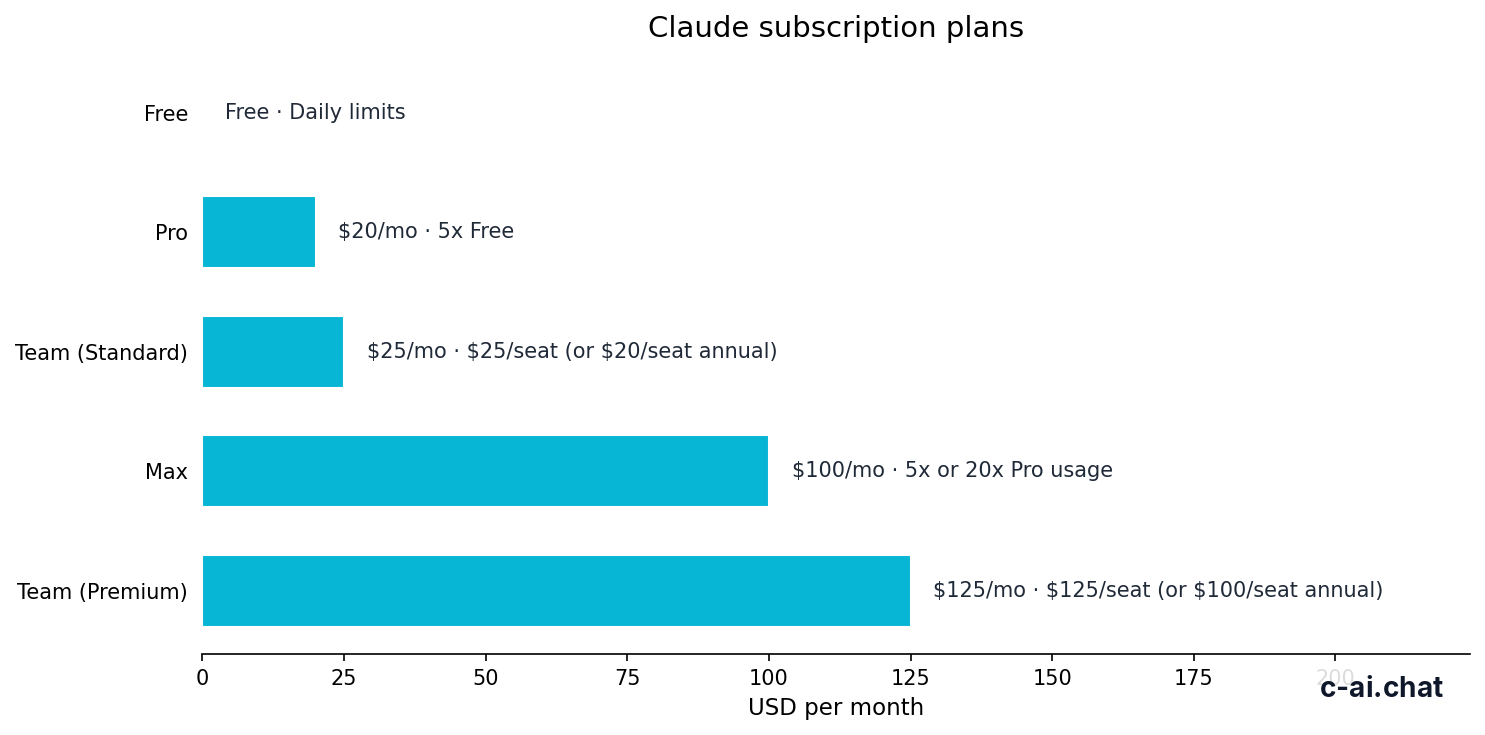
If you want Claude Code for a shared team setup, the practical starting point is Claude Team Standard at $25 per seat/month or $20 per seat/month annually; individual users can get Claude Code more cheaply through Pro at $20/month, while larger organisations that need tighter controls usually look at Enterprise.
- $25/seat monthly · or $20/seat annual
- Includes Claude Code, shared workspace, SSO, admin controls
- Upgrade to Premium or Enterprise for higher capacity and governance
- Skip if one person can use Pro at $20/month
The key thing to understand is that Claude Code is not a separate standalone “Teams plan” with its own public price page line item. It sits inside Claude subscription tiers. For a solo developer, the lower-cost route is usually Claude Pro and Claude features. For a company that needs multiple seats, shared access, and admin controls, Team is the first tier that makes sense.
That matters because many searches for “claude code teams” are really asking three different questions at once: how much it costs, what a team gets that Pro does not, and when Team is worth paying for instead of letting each user subscribe individually. Those are the questions this page answers.
What’s actually included
For teams, the public choices are Team Standard, Team Premium, and Enterprise. If your main question is “which Claude plan gives my developers Claude Code plus team controls?”, Team Standard is the usual entry point.
Pro
$20/month
For individual developers and solo power users
- Claude Code
- Claude Cowork
- Unlimited Projects
- Research access
- Additional models
- Office integrations
Team Standard
$25/seat/month
For small teams that need shared access and admin controls
- Shared workspace
- SSO
- Admin controls
- Multi-seat team setup
- Claude access for each user
- Annual option at $20/seat/month
Team Premium
$125/seat/month
For teams that need more capacity and priority handling
- Higher-capacity team tier
- Priority traffic
- Expanded admin controls
- Multi-seat management
- Annual option at $100/seat/month
If you are also using the API, keep the two billing systems separate in your head. Claude subscriptions cover the Claude app experience for users. API usage is billed separately through the Claude API at token-based rates. Team does not replace API billing, and API access does not automatically give you Team workspace features.
| Plan | Price | Best for | Main additions | What to watch |
|---|---|---|---|---|
| Free | $0/month | Light personal use | Web, iOS, Android, desktop access with daily usage limits | Not a team plan; limited usage |
| Pro | $20/month or $17/month annual | One heavy user | Claude Code, Claude Cowork, unlimited Projects, Research, additional models, Office integrations | No shared team workspace, SSO, or team admin layer |
| Team Standard | $25/seat/month or $20/seat/month annual | Small teams | SSO, admin controls, shared workspace | Per-seat cost is higher than solo Pro if you do not need team controls |
| Team Premium | $125/seat/month or $100/seat/month annual | High-usage teams | Priority traffic, higher capacity, expanded admin controls | Big jump in seat cost |
| Enterprise | $20/seat base + usage at API rates | Larger organisations | SCIM, audit logs, HIPAA-ready options, role-based access, spend controls, regional data residency | Custom contract; cost depends on setup and usage |
What Team Standard clearly adds over Pro is operational structure. You get a shared workspace instead of isolated personal accounts, plus SSO and admin controls that matter once more than a few people are involved. For many companies, that is the real reason to buy “claude code teams” access. The coding features matter, but governance matters more once you are onboarding staff.
What Team Standard does not do is turn Claude into an all-in-one engineering platform with unlimited backend usage. If your developers are building product features on top of Claude models, you may also need API spend planning, model selection, and possibly caching or batch processing. Our Claude FAQ covers common account and usage questions, while the official model lineup and rates are on Anthropic’s platform pages.
90% off
cached input tokens with prompt caching on API workloads
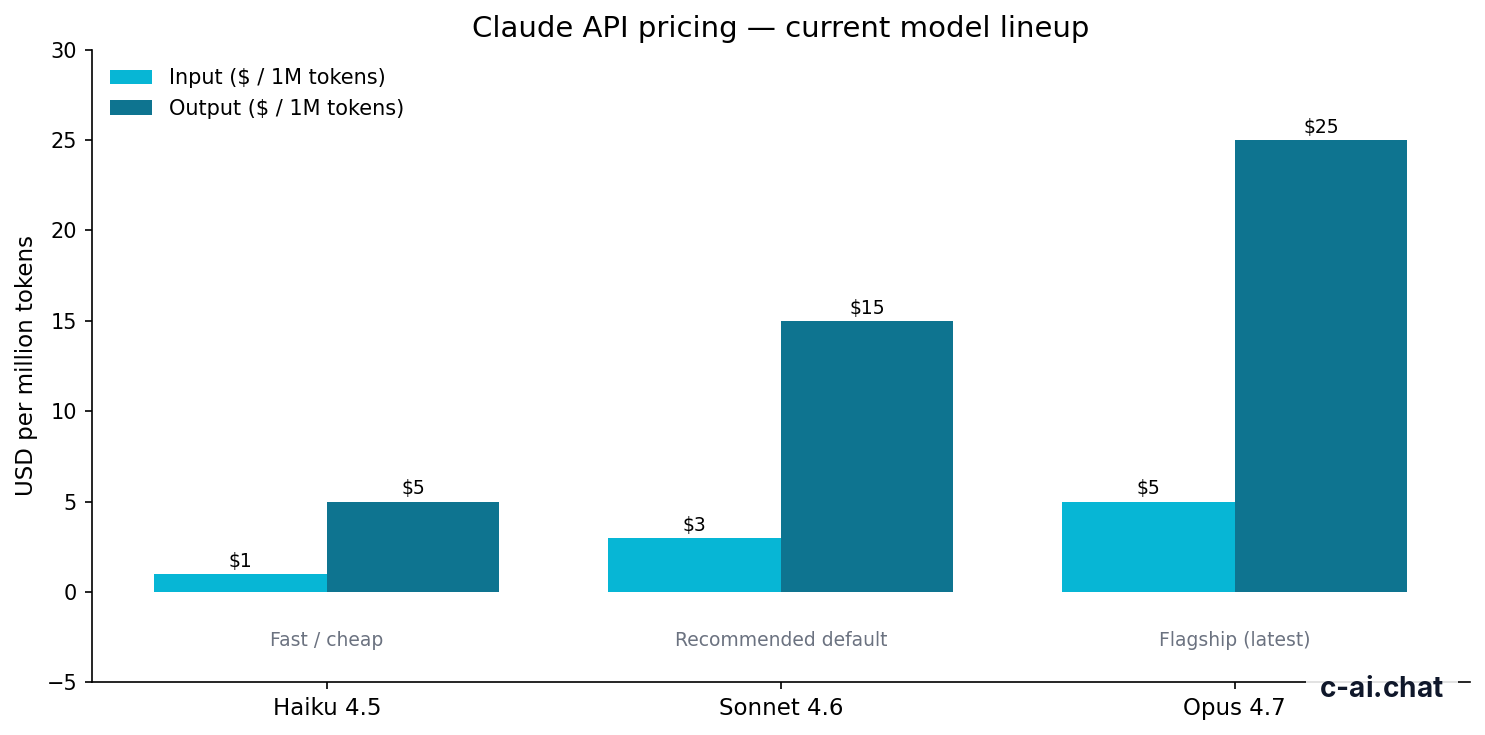
That API optimisation is relevant because teams often discover a split setup: employees use the Claude app and Claude Code through Team, while product or automation workloads run through the API. If that is your setup, pricing conversations should cover both subscriptions and token spend. The official API pricing lists Claude Opus 4.7 at $5/M input and $25/M output, Sonnet 4.6 at $3/M input and $15/M output, and Haiku 4.5 at $1/M input and $5/M output.
Is it worth it for you?

It depends less on raw model quality and more on whether you need shared administration. Team Standard is usually worth it when you are buying Claude for a group, not when you are just trying to get the lowest-cost way to access Claude Code.
Pick when
- You have 3–50 users who need Claude under one team setup
- You need SSO instead of unmanaged personal logins
- You want a shared workspace and admin controls
- You are standardising tooling across engineering, product, or ops
- You want Claude Code access without moving straight to Enterprise
Skip when
- Only one person needs advanced Claude access
- You do not need shared workspace, SSO, or admin oversight
- Your real need is API access for an app, not user seats
- You need SCIM, audit logs, or regional data residency from day one
- Your budget cannot justify a per-seat subscription
There are three clear personas that fit Team Standard well.
- Small engineering teams: a startup or internal dev team that wants everyone using the same Claude environment, with shared controls and a cleaner onboarding process than reimbursing individual Pro plans.
- Cross-functional knowledge teams: product, research, marketing, and operations groups that collaborate in Claude and need a common workspace rather than isolated accounts.
- IT-managed SMBs: organisations that need SSO and central oversight but are not yet at Enterprise complexity.
And there are two main groups it does not fit well.
- Solo users: if one person wants Claude Code, Pro is cheaper and simpler.
- Compliance-heavy enterprises: if procurement, security, or legal teams need SCIM, audit logs, role-based access, spend controls, HIPAA-ready options, or regional data residency, Team may be only a stopgap before Enterprise.
A useful test is to ask what breaks if everyone just buys Pro. If the answer is “nothing,” then Team is probably unnecessary. If the answer is “we cannot manage access properly, we need shared administration, and security wants SSO,” then Team is doing real work for you.
Count actual users
Do not buy team seats for occasional users who only need light chat access.
Separate app use from API use
Subscriptions cover user access; API costs are billed separately at token rates.
List governance needs
If you need
SSO, admin controls, or shared workspace, Team starts to justify itself.Check whether Enterprise features are mandatory
If you need
SCIM, audit logs, or regional data residency, go straight to Enterprise discussions.
Cheaper / better alternatives
Sometimes the best answer to “claude code teams” is not Team Standard. The cheaper alternative is usually Pro for each heavy individual user. The better-but-more-expensive alternative is Team Premium or Enterprise if your real problem is capacity or governance.
| Option | Price | Why choose it | Why not |
|---|---|---|---|
| Pro | $20/month per user or $17/month annual | Cheapest path to Claude Code for one person; strong individual feature set | No team workspace, SSO, or team admin controls |
| Team Standard | $25/seat/month or $20/seat/month annual | Best starting point for small teams that need shared controls | Costs more than Pro if you do not need the team layer |
| Team Premium | $125/seat/month or $100/seat/month annual | Higher-capacity team use with priority traffic and expanded admin controls | Very large jump in price |
| Enterprise | $20/seat base + usage at API rates | Best for advanced governance, compliance, and large rollouts | Custom sales process; more complex buying decision |
If you want a rough budgeting shortcut, compare the seat cost against the value of central management. For a five-person team, Team Standard at monthly billing is $125/month total. Five separate Pro subscriptions would be $100/month total. That means you are effectively paying $25/month extra for shared workspace, SSO, and admin structure across that team.
Worked example
5-person dev team deciding between Pro and Team Standard
If that extra $25 buys cleaner access control and fewer admin headaches, Team is reasonable. If not, use Pro.
For annual billing, the gap can disappear on paper: Pro is $17/month annual and Team Standard is $20/seat/month annual, so the difference becomes $3 per user/month. In practice, that makes Team much easier to justify when a company is already committed to Claude as a standard tool.
If your usage is intense enough that people regularly hit limits or need better performance handling, Team Premium is the next obvious step. If your blockers are identity management, auditability, procurement, or regional control, skip Premium and talk to Anthropic about Enterprise instead. Our Claude AI guide homepage and pricing hub can help you compare those routes.
The honest take
Claude Code Teams is worth it when you are buying Claude for a real team rather than a collection of individuals. Team Standard at $25 per seat/month is the practical entry tier because it adds the pieces companies usually care about first: shared workspace, SSO, and admin controls. That is the difference between “everyone has a good AI tool” and “the company actually has a managed rollout.”
If you only need Claude Code for yourself, buy Pro at $20/month instead. If you need stronger governance, compliance, or larger-scale control, Team Standard is probably too small and Enterprise is the better conversation. So the honest answer is simple: Team is a sensible middle tier, but only if the team layer solves a real problem.
Independent guide. Not affiliated with Anthropic. For the official Claude product, visit claude.ai.
Last updated: 2026-05-10
Related Reading
This article is part of the Claude pricing & plans hub on c-ai.chat.